Why do your Amazon advertising campaigns show available budget but generate zero clicks or impressions? This guide explains what causes Amazon ads not to spend, the seven most common reasons preventing ad delivery, proven methods to diagnose and fix spending issues, and optimization strategies that ensure your campaigns consume budget effectively and drive consistent sales.
Quick Summary
- Amazon ads not spending occurs when campaigns fail to consume the daily budget due to low bids, insufficient keyword volume, poor listing quality, or a missing Buy Box preventing ad delivery.
- Common reasons for low ad spend: Seven factors prevent spending – low bids in competitive auctions, keywords with minimal search volume, lack of Buy Box, suppressed listings, restrictive daily budgets, excessive negative keywords, and new account restrictions.
- How to prevent ads from not spending: Verify Buy Box eligibility through incognito mode checks and ensure campaign status shows “Enabled” without policy violations by reviewing Campaign Manager for warnings.
- Best practices to maximize delivery: Launch automatic campaigns to discover high-performing keywords, implement dynamic bidding strategies that adjust based on conversion likelihood, and monitor performance weekly to optimize budgets and eliminate underperformers.
What Does Amazon Ads Not Spending Mean?
Amazon ads not spending means your campaigns are not generating enough clicks to meet the daily budget, indicating your ads aren’t appearing or aren’t relevant enough to consumers. Common causes include bids that are too low to win auctions, low keyword search volume, poor listing quality, or a lack of the Buy Box.
7 Common Reasons that Cause Low Ad Spend
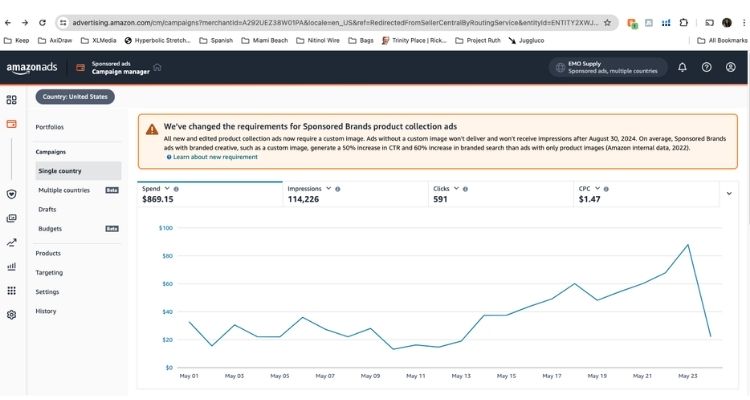
Amazon ads fail to spend the budget for multiple reasons, ranging from technical issues to competitive factors. Understanding these seven common causes helps you quickly diagnose why your campaigns aren’t delivering and take targeted action to restore ad spend.
Low Bids & High Competition
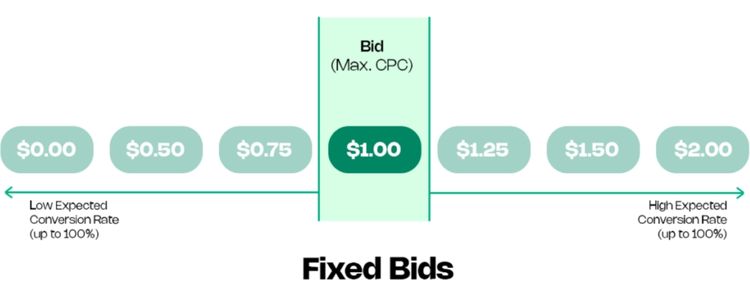
Amazon’s ad auction operates on a competitive bidding system where higher bids win premium placement positions. When your bid amount falls below the minimum threshold required to compete against other advertisers targeting the same keywords or products, your ads cannot enter the auction and remain unserved regardless of available budget.
Increase your bids incrementally by 10-20% and monitor impression share in Campaign Manager for 3-5 days. Additionally, check Amazon’s suggested bid range for your keywords and adjust to at least the low end of the recommended range to enter competitive auctions and start generating impressions.
Low Keyword Volume/Relevance
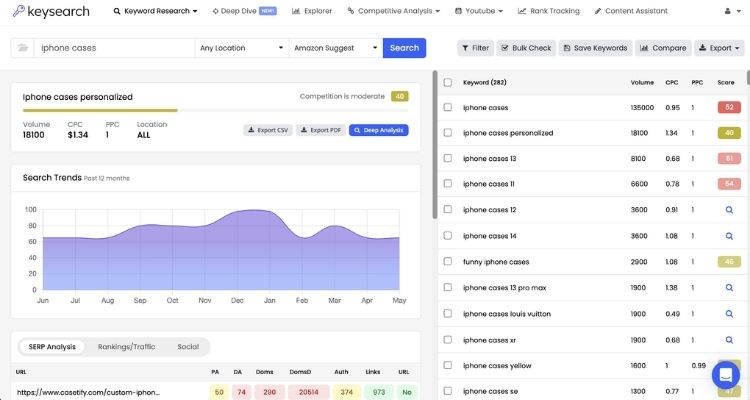
Keywords with extremely low search volume provide insufficient opportunities for your ads to display, resulting in minimal or zero spend. Additionally, when your selected keywords don’t align with your product listing’s title or backend search terms, Amazon’s relevancy algorithm prevents your ads from showing to maintain search quality and user experience.
Expanding your targeting to phrase match or broad match keywords captures more search volume, while automatic campaigns help discover high-volume keywords customers actually use. Furthermore, ensure your primary ad keywords appear naturally in your product title and first three bullet points to improve relevancy scores.
No Buy Box
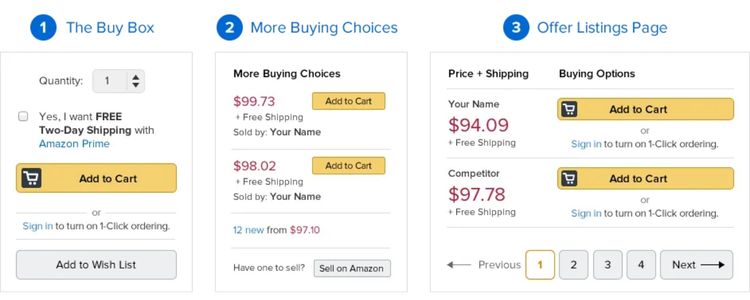
Amazon only displays sponsored ads for products that currently hold the Buy Box, as this ensures customers can immediately purchase when clicking your ad. Without Buy Box ownership, your advertising campaigns automatically pause regardless of bid amounts or budget availability, preventing any ad spend until you regain competitive pricing and fulfillment metrics.
Check your Buy Box status in incognito mode and lower your price to match or beat the lowest FBA competitor. Additionally, switching from FBM to FBA fulfillment improves competitive positioning, while maintaining Order Defect Rate below 1% and at least 30 days of inventory helps regain Buy Box eligibility.
Suppressed Listing
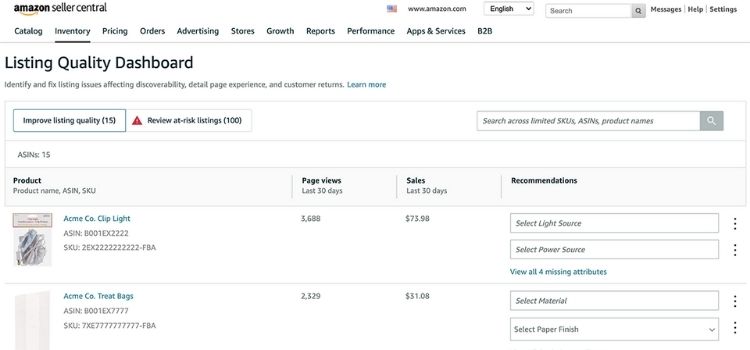
Active listing status is a fundamental requirement for running Amazon ads, and suppressed listings cannot generate ad impressions. When your product becomes inactive due to policy violations, restricted content flags, or inventory stockouts, Amazon immediately halts all advertising activity for that ASIN until the underlying issues are resolved and the listing is restored.
Navigate to Inventory > Fix Stranded Inventory in Seller Central to identify suppression reasons, then correct policy violations, remove restricted content, or replenish out-of-stock inventory. Once you resubmit your listing for review, ads will resume automatically after Amazon restores active status.
Low Daily Budget
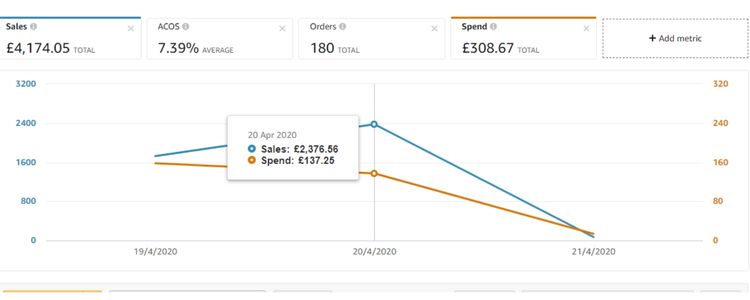
Daily budget caps that are too restrictive cause campaigns to exhaust funds within the first few hours of the day. Once your budget limit is reached, Amazon pauses ad delivery for the remainder of the day, leaving 12-18 hours without any impressions and significantly reducing total daily spend compared to your intended investment level.
You should increase your daily budget by 50-100% to ensure campaigns run throughout the entire day, or implement dayparting strategies that concentrate budget during peak shopping hours. Furthermore, monitor your budget utilization in Campaign Manager and adjust upward if campaigns consistently hit the cap before 6 PM.
Excessive Negative Keywords
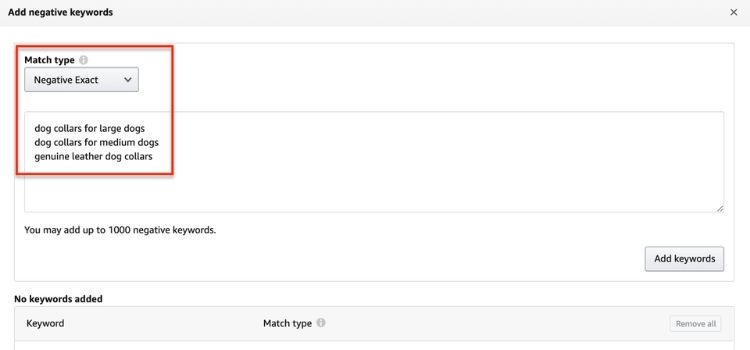
Negative keywords help filter irrelevant traffic, but adding too many negative terms severely restricts your campaign’s reach. When your negative keyword list becomes overly aggressive, it blocks legitimate search queries that could have resulted in conversions, shrinking your eligible audience below the threshold needed for consistent ad delivery and budget consumption.
Reviewing your negative keyword list and removing overly broad negative matches prevents blocking relevant traffic. Moreover, only add negative keywords for search terms with 20+ clicks and zero conversions, and use phrase or exact match negatives instead of broad match to maintain campaign reach.
New Account Restrictions
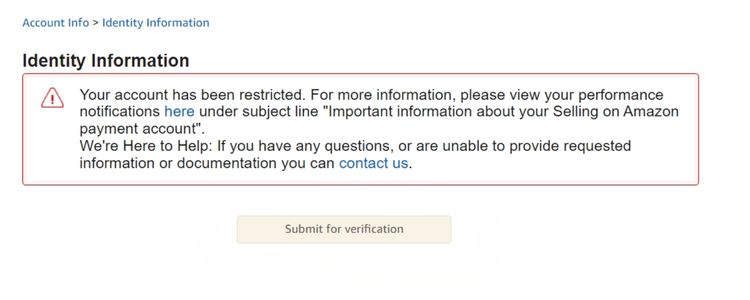
Amazon applies conservative spending limits and lower trust scores to newly registered seller accounts as a fraud prevention measure. These initial restrictions throttle ad delivery and limit daily spend regardless of your set budget, with the system gradually increasing your spending capacity as your account builds sales history and demonstrates compliance with platform policies.
Focus on generating organic sales through competitive pricing and optimized listings to build account trust while running smaller campaigns with $10-20 daily budgets that align with Amazon’s initial limits. Meanwhile, maintain excellent seller metrics and complete identity verification promptly to remove restrictions within 30-60 days.
How to Prevent Amazon Ads From Not Spending
Prevention starts with addressing the most critical technical requirements that block ad delivery before launch. These two essential checkpoints ensure your campaigns meet Amazon’s baseline criteria for spending budget and reaching customers.
Verify Buy Box Eligibility
Amazon ads only run when you own the Buy Box, so checking this status should be your first step before launching any campaign.
Steps to verify Buy Box ownership:
- Open your product listing in incognito mode or while logged out of your seller account
- Check if the “Add to Cart” button shows your offer as the primary buying option
- If it shows “See All Buying Options” or another seller’s price, you don’t have the Buy Box
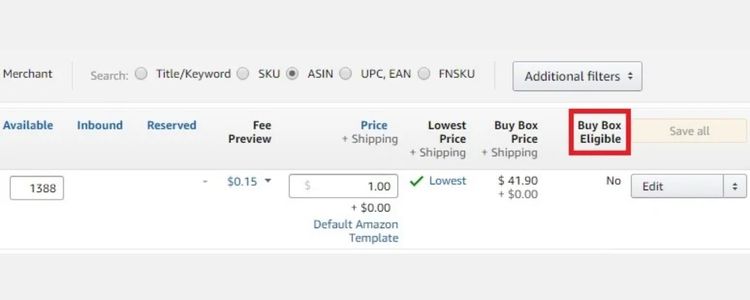
- Go to Seller Central > Inventory > Manage Inventory and look for the “Buy Box Eligible” indicator next to your ASIN
To regain Buy Box if you’ve lost it, lower your price to match or beat the lowest FBA competitor, switch from FBM to FBA fulfillment for better positioning, improve your Order Defect Rate below 1%, and maintain at least 30 days of inventory to avoid stockout penalties.
Ensure Campaign Status and Policy Compliance
Campaign status and policy violations are common technical issues that prevent ad delivery even when bids, budgets, and targeting are correctly configured.
You need to verify campaign delivery status regularly:
- Go to Campaign Manager and check the “Status” column for each campaign
- Ensure campaigns show “Enabled” or “Delivering” status, not “Paused” or “Ended.”
- Click into ad groups and verify individual ad group status is also set to “Enable.d”
- Check that campaign start/end dates haven’t expired or are set for future dates
You should also check for policy violations that may be blocking delivery:
- Look for red warning icons or “Under Review” status next to campaigns in Campaign Manager
- Click the warning icon to view specific policy violation details from Amazon’s editorial review
- Review ad copy and product listings for prohibited claims like “cure,” “treat,” superlatives without proof, or unauthorized brand references
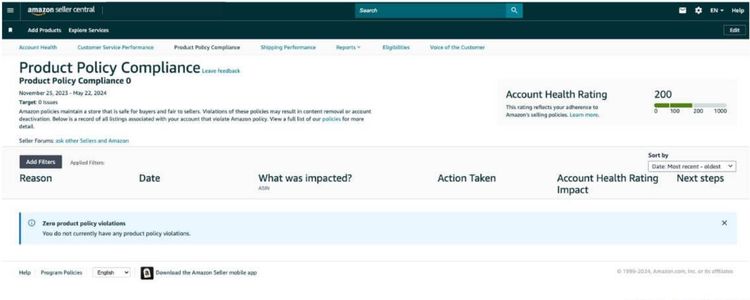
- Navigate to Account Health > Advertising Policies to see any account-level restrictions limiting ad delivery
If you find policy violations, edit your ad creative or product listing to remove the flagged content, then resubmit the campaign for review. Amazon typically completes re-review within 24-48 hours, after which ads resume normal delivery if violations are properly addressed.
Best Practices To Maximize Ad Delivery
Beyond fixing immediate spending issues, implementing strategic best practices ensures your campaigns consistently consume budget and reach maximum audience potential. These three proven strategies optimize campaign structure, bidding efficiency, and ongoing performance to sustain high ad delivery rates.
Use Automatic Campaigns To Discover New Opportunities
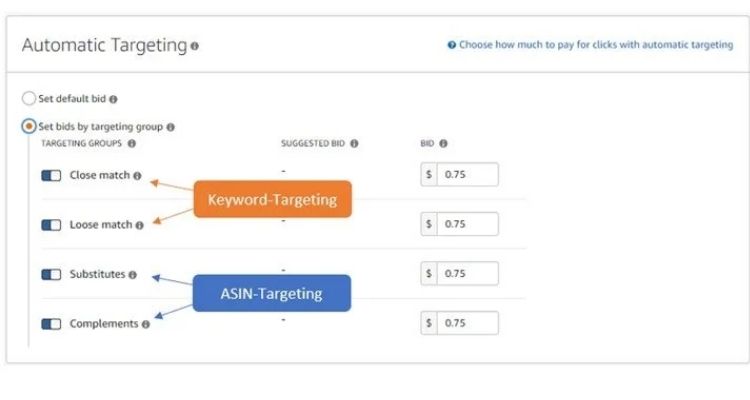
Automatic campaigns let Amazon’s algorithm test your products across various search terms and placements without requiring manual keyword research upfront. This campaign type provides the fastest path to ad spend and visibility for new products while simultaneously discovering which customer searches actually convert for your specific listings.
After running automatic campaigns for 2-3 weeks with sufficient data, mine the search term reports to identify high-performing keywords and ASINs:
- Download Search Term Reports: Go to Campaign Manager > Select your automatic campaign > Click “Search Term Report” to export data showing actual customer searches that triggered your ads
- Filter by performance metrics: Sort by conversions, ACoS, and click-through rate to identify terms generating sales at profitable rates (typically ACoS below your target threshold)
- Add winners to manual campaigns: Create new manual exact or phrase match campaigns using the top-performing search terms discovered, allowing you to bid more aggressively on proven converters
- Negative match poor performers: Add non-converting or high-ACoS terms as negative keywords in your automatic campaign to prevent wasted spend while maintaining discovery for new opportunities
Implement Dynamic Bidding Strategies
Dynamic bidding allows Amazon to automatically adjust your bids in real-time based on conversion likelihood, helping you spend your budget more efficiently without constant manual oversight. Instead of fixed bids, dynamic strategies respond to actual auction conditions and customer behavior patterns throughout the day.
Choose the right dynamic bidding strategy in Campaign Settings based on your goals:
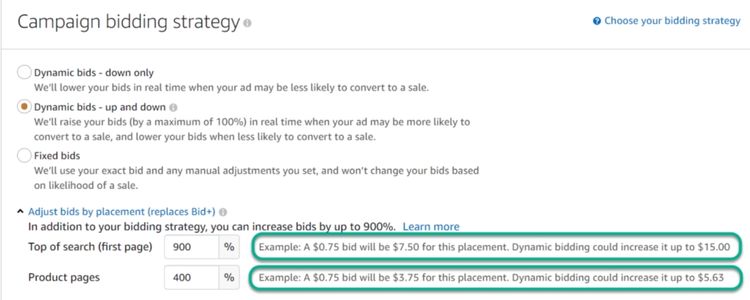
- Dynamic bids – down only: Amazon lowers your bid up to 100% when conversion is unlikely, protecting wasted spend while maintaining your max bid for high-value placements (best for strict ACoS targets)
- Dynamic bids – up and down: Amazon increases bids up to 100% for most placements (and up to 900% for top-of-search) while lowering them when conversion drops, allowing aggressive bidding on premium positions (ideal for growth-focused campaigns)
- Fixed bids: Your bid stays constant regardless of placement, giving complete control but requiring more manual monitoring (use only with extensive historical data)
- Adjust placement multipliers: Set top-of-search adjustments 50-300% higher for maximum visibility or reduce product page placements 10-50% if they underperform
Monitor And Adjust Campaign Performance Regularly
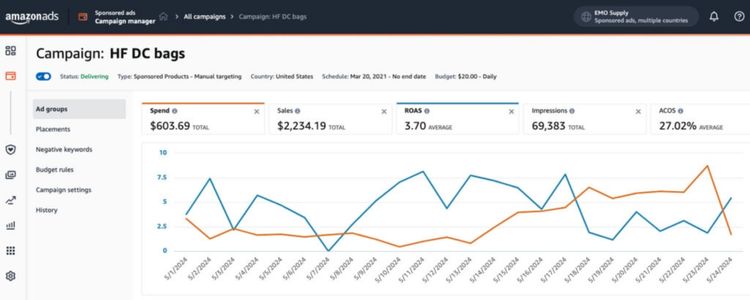
Consistent monitoring prevents wasted spend and identifies optimization opportunities before they significantly impact your budget. Set a weekly review schedule to analyze key metrics like impressions, clicks, conversion rate, and ACoS across all active campaigns, allowing you to catch declining performance or budget exhaustion patterns early.
Take these specific actions during your weekly performance reviews:
- Check impression share: Navigate to Campaign Manager and review impression share percentage – if below 50%, increase bids by 10-20% or raise daily budgets to capture more auction opportunities
- Analyze search term reports: Download reports weekly to identify new negative keywords (terms with clicks but no conversions after 20+ clicks) and add them immediately to prevent continued waste
- Adjust budgets for top performers: Increase daily budgets by 25-50% on campaigns with ACoS below target and high conversion rates that are hitting budget caps before the end of the day
- Pause underperformers: Disable campaigns or ad groups running for 30+ days with zero sales despite adequate impressions (1000+), reallocating that budget to proven winners
FAQs About Amazon Ads Not Spending
Your ads lack impressions due to: no Buy Box ownership, bids too low, narrow targeting, or poor listing relevance. Check Buy Box status first, increase bids 20-30%, and expand to phrase or broad match.
Check impression share in Campaign Manager – below 30% indicates low bids. Amazon shows a “bid suggestion” range; if your bid is below it, increase by 10-20% and monitor for 3-5 days.
Amazon requires a $1 minimum, but effective campaigns need $10-20 daily for low-competition products and $50-100+ for competitive categories to achieve consistent delivery.
New campaigns begin spending within 1-4 hours if requirements are met. However, meaningful optimization data requires 7-14 days to accumulate sufficient impressions and clicks.
Get Professional Help from Megaficus
Understanding what causes Amazon ads not spending and implementing the right fixes ensures your campaigns deliver consistent impressions and consume budget effectively. By addressing Buy Box eligibility, bid competitiveness, and targeting parameters, you prevent idle campaigns and maximize advertising ROI.
Success requires proactive monitoring and continuous optimization based on performance data. When you apply these prevention strategies and best practices, your campaigns spend efficiently while maintaining profitability.
If you need expert support to fix non-spending campaigns or optimize ad delivery for consistent performance, Megaficus provides proven strategies and guidance to help sellers maximize advertising results and achieve sustainable growth.