Is your warehouse “dead weight” quietly siphoning away the hard-earned profits from your fastest-selling product lines? Mastering the management of Amazon-aged inventory with the Megaficus guide below is a vital survival skill for any brand looking to maintain a healthy Inventory Performance Index and a lean, profitable fulfillment cycle.
Quick Summary
- Fee Thresholds: Surcharges typically begin after 180 days, with recent updates introducing a new $0.35 per unit tier for stock older than 15 months.
- Listing Safety: Items often age because they are “Stranded,” meaning they are physically in the warehouse but not available for customers to purchase.
- Recovery Tools: The Amazon Outlet program offers a high-traffic spotlight for slow-movers, requiring a minimum 20% discount to boost velocity.
- Lean Operations: Switching to smaller, frequent shipments rather than bulk batches reduces your risk of hitting expensive long-term storage penalties.
Why Does Your Stock Turn into Amazon Aged Inventory?
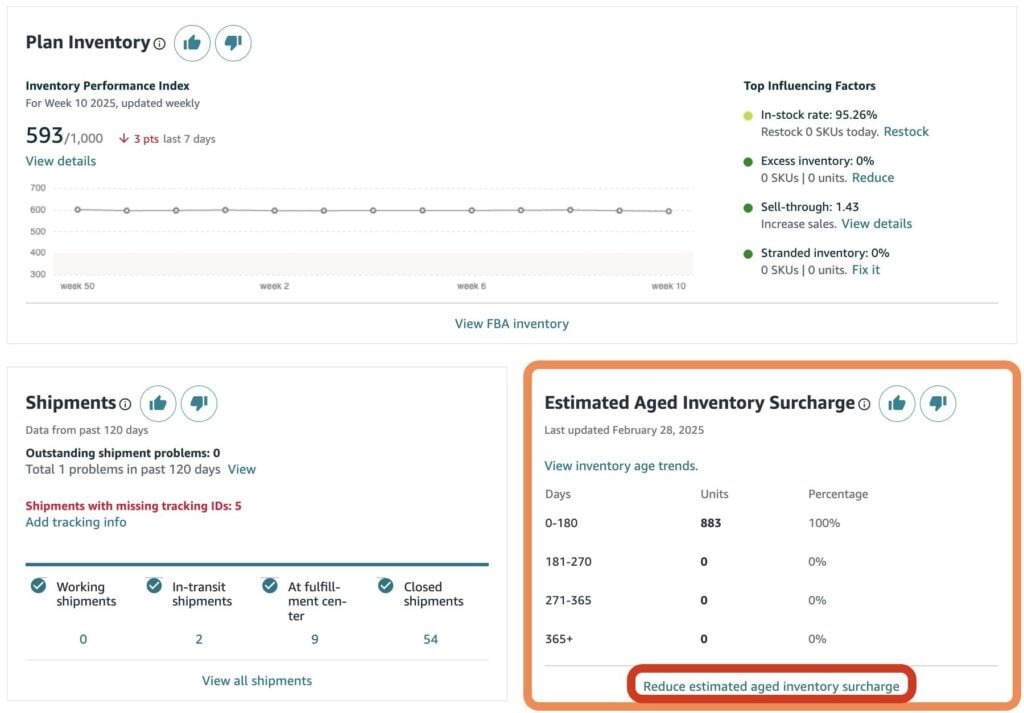
Amazon aged inventory is essentially any stock that has remained in a fulfillment center for a prolonged duration, usually beyond the 180-day mark, without generating a confirmed customer sale. This specific timeframe is used as a benchmark for “stale” stock, signaling that the supply in the warehouse is significantly outstripping the current demand from shoppers.
It’s Amazon’s automated way of flagging items that are taking up space without contributing to the marketplace’s overall efficiency. When a SKU sits for too long, it blocks the path for newer, more relevant items to enter the system. Amazon uses these aged inventory metrics to determine how much of their physical footprint you are allowed to use in the coming months.
For example, you might launch a new line of organic soaps but find that only one of the three scents is truly resonating with the target audience. The remaining two scents, if left unmanaged, slowly drift into the aged category, eventually incurring the “Aged Inventory Surcharge” that eats away at the profits generated by the popular scent, effectively taxing your success.
What’s Usually Behind These Amazon Aged Inventory Issues?
Pinpointing the exact reason why your items have stopped moving is the essential first step toward reclaiming your storage space and your frozen capital.
The “Invisible” Listing
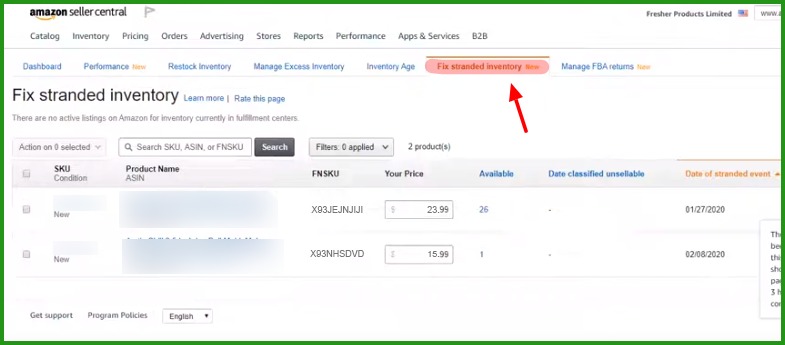
A surprisingly common culprit behind Amazon aged inventory is the “Stranded Inventory” trap, where your goods are physically present in the warehouse but have no active digital offer. This can be caused by a deleted SKU, a pricing error that falls outside your “Minimum/Maximum” settings, or a sudden category restriction that you haven’t yet addressed in Seller Central.
Because there is no active connection between the physical item and a digital listing, the product is essentially locked in a “black hole” where it cannot be sold. If you have 150 units of a premium yoga mat that suddenly stopped selling, they might simply be stranded due to a minor technical glitch in the catalog or an expired certificate that requires a quick re-upload.
Because the listing is inactive, no shopper can find the product through search or ads, causing it to age and rack up storage fees while you lose daily revenue. Megaficus suggests that checking this specific dashboard twice a week is the best defense against this invisible drain on your profits, ensuring that every unit you pay to store remains available for purchase.
Over-Ordering Blues
Over-ordering often stems from an overly optimistic sales forecast or a desire to hit a manufacturer’s bulk discount tier to lower the cost of goods per unit. While saving $1 per unit on the factory floor sounds like a win, those savings quickly disappear if those units sit in FBA for nine months, incurring monthly storage and long-term penalties that add up.
The cost of capital and the risk of the product becoming obsolete or damaged over time are often overlooked when sellers are lured by high-volume price breaks. It is almost always better to pay a slightly higher price for a smaller shipment than to gamble your account health on a massive order that might not move as quickly as your data initially suggested.
| Comparison Factor | Massive Orders | Smaller Orders |
|---|---|---|
| Storage Fee Impact | Rapidly accruing monthly fees ($0.78–$1.02/cu ft) and aged surcharges. | Minimizes holding time; stays within non-peak and standard storage tiers. |
| Aged Inventory Surcharges | Hits $0.30/unit at 12 months; jumps to $0.35/unit or $7.90/cu ft after 15 months. | Avoids surcharges entirely by maintaining a sell-through rate under 180 days. |
| IPI Score & Capacity | Dangerous: Excess inventory over 90 days supply tanks IPI scores. | Healthy: Maintains IPI above the 350–400 threshold for unlimited storage. |
| Account Health Risk | High Gamble: Scores below 350 face up to 40% storage reductions. | Low Risk: Priority bidding for extra capacity via Capacity Manager. |
| Hidden Capital Costs | Capital is frozen in stale stock while incurring “hidden tax” penalties. | Capital remains liquid; funds are available for PPC and new product testing. |
| Strategic Advantage | Temporary $1/unit savings at the factory (often lost to FBA fees). | Strongest Defense: Protects margins and secures prime storage for hot-selling units. |
For instance, you might buy a year’s worth of stock for a new electronics accessory, only to find the sales velocity is half of what you projected. This imbalance leaves the majority of the shipment sitting as aged stock, tying up business capital that could have been much more effectively used to test newer, faster-moving products or increase your PPC advertising reach.
Seasonal Slumps
Products with narrow windows of demand, such as winter coats, beach toys, or holiday decorations, are highly susceptible to becoming Amazon aged inventory if they don’t sell out by the season’s end. Once the weather shifts or the holiday passes, the organic traffic for these items drops significantly, leaving you with “stale” inventory for the next six to nine months.
| Product Category | Peak Selling Window | The “Slump” Period | Strategic Risk |
|---|---|---|---|
| Holiday Decor | Oct 15 – Dec 20 | Dec 26 – Sept 30 | Stock after Dec 25 becomes “dead stock” for 10 months. |
| Halloween Gear | Sept 1 – Oct 30 | Nov 1 – Aug 31 | Most sales occur in a 30-day window; demand drops to near zero in Nov. |
| Winter Apparel | Oct 1 – Jan 31 | Feb 1 – Sept 30 | Bulky items like coats rack up high storage fees during the summer months. |
| School Supplies | July 15 – Sept 15 | Oct 1 – June 30 | Excess backpacks or planners often require liquidation after the Sept peak. |
| Summer Floats | May 1 – Aug 15 | Sept 1 – April 30 | Demand “cools off” fast after August, leading to aged surcharges in Q4. |
Storing these items through their “off-season” is one of the most common ways that small businesses lose their Q4 gains to the overhead costs of the following spring. Without a proactive clearance plan in March for your winter gear, you will likely face peak-season storage rates throughout the summer for items that won’t be popular again until late November.
Strategic brands often use deep discounts at the end of a season to avoid these recurring “dead stock” penalties and keep their warehouse footprint agile. By clearing out the old season’s leftovers, you create the budget and the physical space needed to bring in the next season’s winners, ensuring your cash flow stays consistent throughout the entire fiscal year.
How Can You Clear Out Amazon’s Aged Inventory Without Stress?
When you realize a product has overstayed its welcome in the fulfillment center, you can deploy several professional exit strategies to minimize your financial losses and regain control.
Try an Amazon Outlet Sale
The Amazon Outlet program provides a dedicated high-traffic platform for sellers looking to clear overstock and aged items at a significant discount. By submitting an Outlet Deal, your product can attract bargain-seeking shoppers who specifically browse the Outlet section for clearance prices and limited-time offers. This secondary marketplace is really an underutilized goldmine.
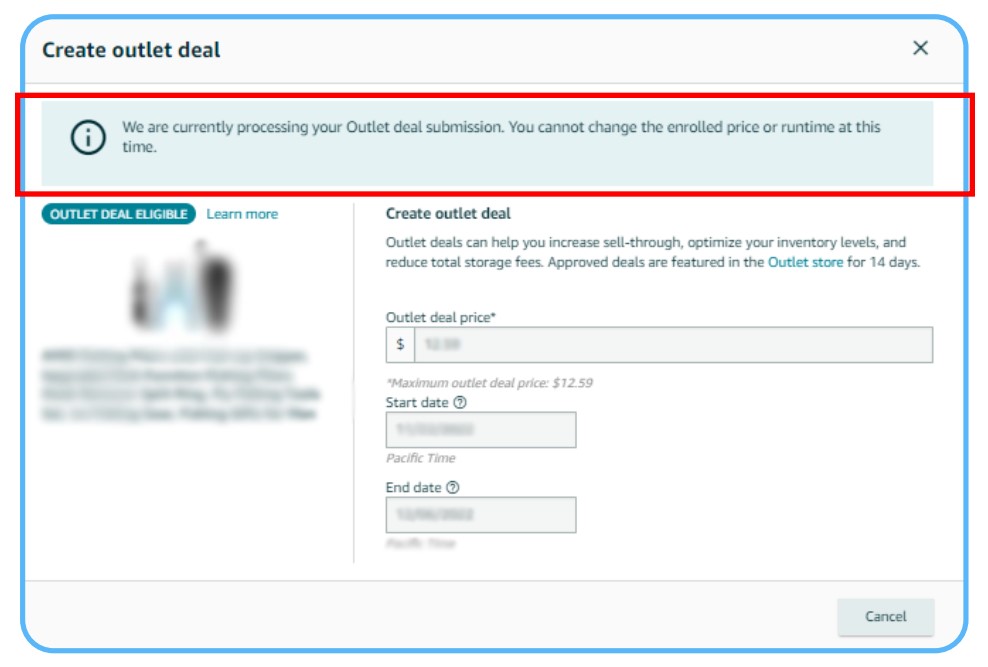
To qualify for this program, you typically need to offer a minimum 20% discount, but the trade-off is a massive spike in sales velocity that can clear hundreds of aged units in just a few days. This surge not only recovers your capital but also dramatically improves your overall sell-through rate, which is a key metric for your IPI health and storage limit.
For many sellers, the increased sales rank that comes from an Outlet burst can even help the product continue to sell at a higher price once the promotion ends. It essentially re-trains the Amazon algorithm to see the product as “desirable” again, which can improve your organic keyword ranking for long-term recovery of a previously stagnant or forgotten product listing.
The Liquidation Route
If your primary goal is to exit a position instantly without the logistics of shipping items back to your warehouse, the FBA Liquidations service is a professional and efficient choice. Through this program, Amazon-vetted liquidators purchase your Amazon-aged inventory for a net recovery value, typically ranging from 5% to 10% of the original retail price listed in your catalog.
This option is particularly useful for products that are nearing their expiration date or those that are too heavy to cost-effectively ship back to your own facility. While this results in a lower recovery than a standard sale, it stops the bleeding of storage fees immediately and avoids the per-unit cost of a manual removal order that would otherwise hit your balance.
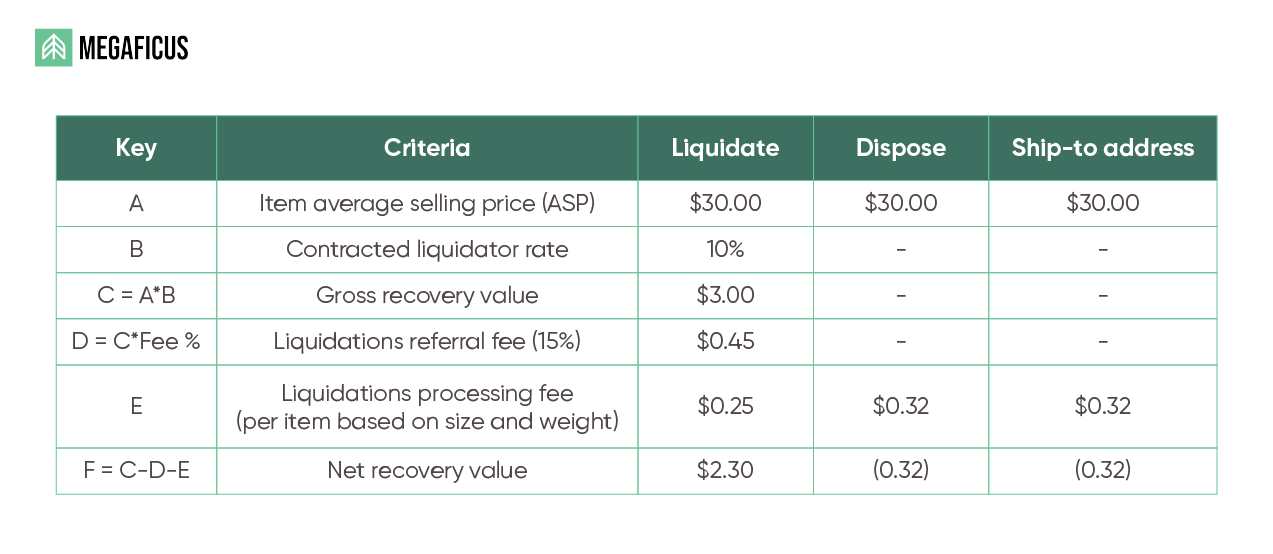
For items that are damaged, outdated, or simply too expensive to store, liquidation is often the most sensible financial decision to clear the books and move forward with fresh inventory. It allows you to salvage some value from a “failed” SKU while protecting your operational focus and ensuring your fulfillment account remains in good standing with the warehouse staff.
Strategic Removal Orders
Sometimes the smartest move is to reclaim your physical goods by creating a removal order to have the stock sent back to your own facility or a third-party prep center. This one-time fee is often much lower than paying for six months of aged inventory surcharges, especially for lightweight or high-value products that still have significant resale potential on other platforms.
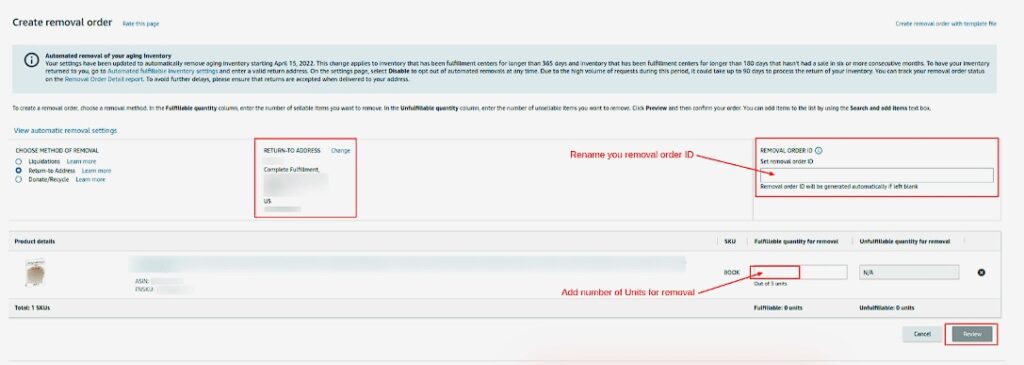
By physically removing the goods, you reset the “age” clock and give yourself the opportunity to inspect the items before deciding on a new sales channel. Imagine a brand with 50 premium leather wallets that are approaching their one-year anniversary in the warehouse. By paying for a return, the seller can inspect the stock for any damages or warehouse wear.
Once the stock is back in your hands, you can bundle it for a different sales platform like eBay or Shopify, or simply hold it in your own low-cost storage until demand picks back up during the next holiday. This level of control is essential for luxury or high-end goods where you don’t want to devalue the brand with deep discounts or risk liquidation.
What Are the Best Ways to Stop Amazon’s Aged Inventory Before It Starts?
Building a proactive prevention strategy is the most profitable path, as it ensures you never have to pay for disposal or liquidation in the first place.
Set Up Your Safety Net
You can implement a permanent “safety net” by configuring your automated removal settings within the backend of Seller Central. This tool allows you to set specific rules where Amazon automatically liquidates or returns items that have reached a certain age, such as 365 days, without you having to manually monitor every SKU every single day in your dashboard.
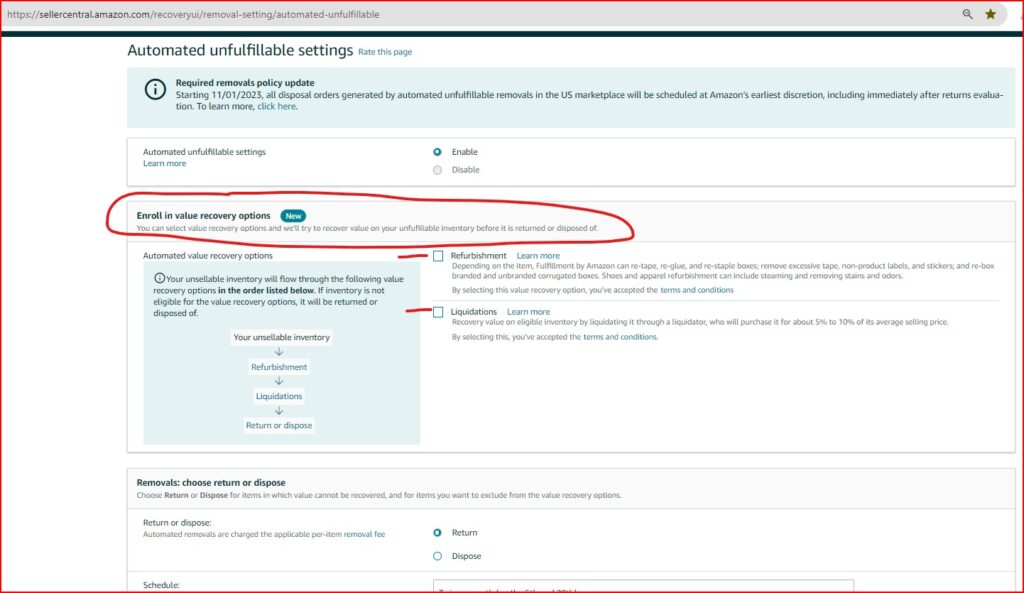
This automated approach ensures no single product is ever “forgotten” in the system to the point where it costs more in cumulative fees than the item is actually worth. It provides a baseline layer of inventory health, protecting your profit margins while you focus your energy on better marketing, branding, and new product development for your growing e-commerce store.
Most Megaficus’s top-tier sellers set these rules to trigger at the 12-month mark to avoid the “Extra Long-Term Storage Fees.” By automating this process, you eliminate the emotional attachment to slow-moving products and allow the system to protect your financial bottom line without constant human intervention or the risk of manual oversight during busy periods.
Keep a Close Eye on Health Reports
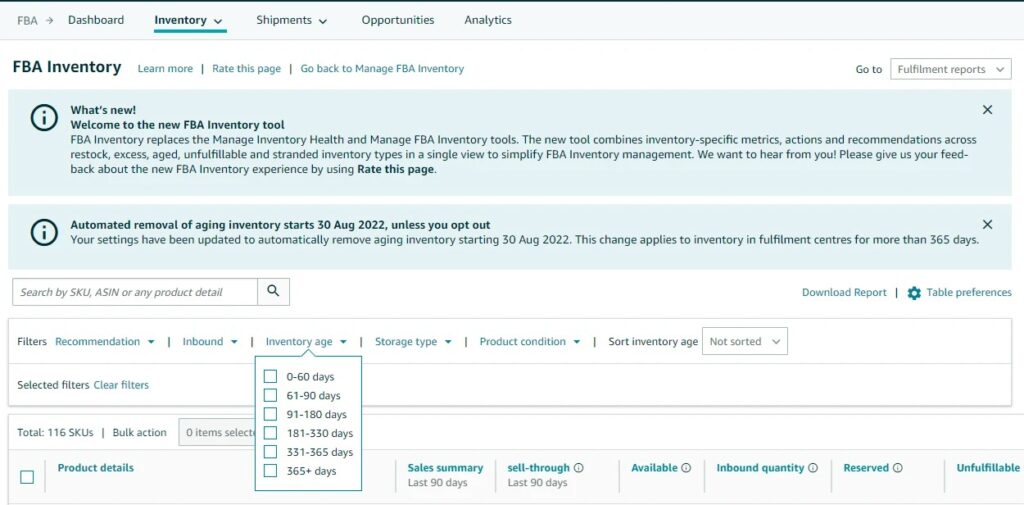
Maintaining a weekly habit of reviewing your “Inventory Age” and “Inventory Health” reports is the most effective way to identify “troubled” SKUs before they cross into the “aged” zone. These reports provide a detailed 30-day bucket view, showing you exactly which units are entering high-fee windows, so that you can spot trends long before they become crises.
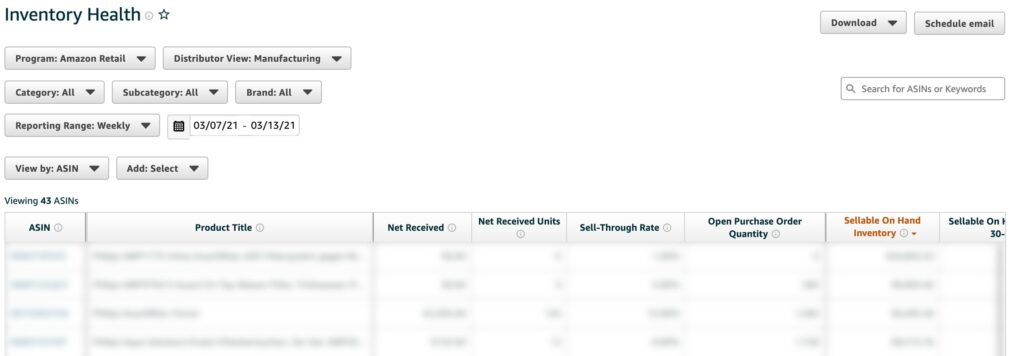
If you notice a specific SKU has a “90+ days of supply” remaining based on current sales, you can react immediately by launching a coupon or increasing your targeted PPC spend. Catching these trends early allows you to pivot your marketing strategy while you still have a wide window to avoid the heaviest storage penalties and the inevitable IPI score hits.
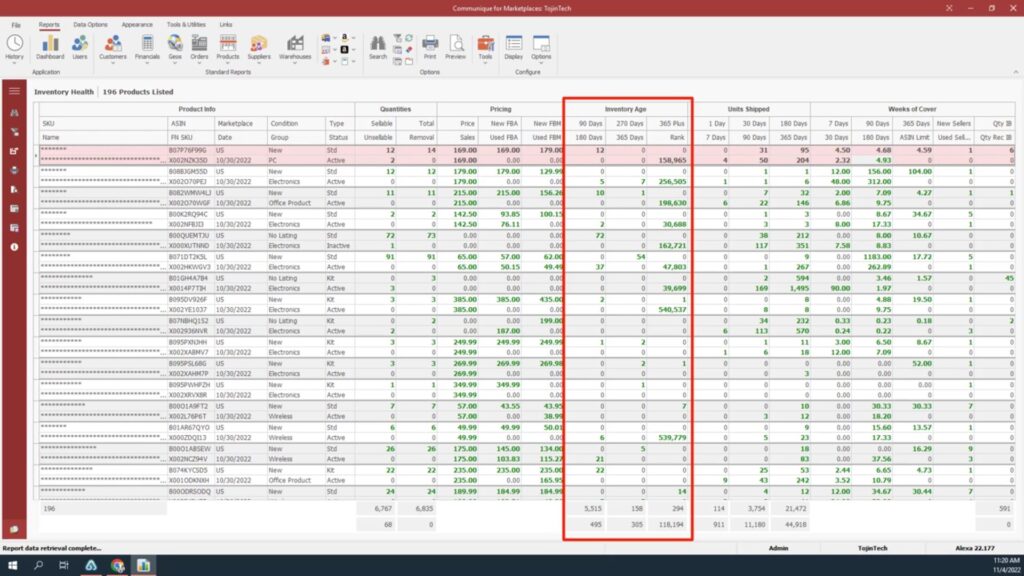
Knowledge is power in the FBA world, and these reports are the blueprint for your long-term inventory strategy. Megaficus recommends setting a calendar reminder every Monday morning to audit these metrics so that no surprises appear in your month-end settlement reports. This small habit can save your business thousands of dollars in unnecessary fees over the year.
Smart Restocking
Transitioning to a “Just-in-Time” restocking model, sending smaller, more frequent shipments, is a proven way to reduce the risk of creating Amazon-aged inventory. This agility allows you to respond to shifting market demands and competitor moves without being stuck with thousands of units that may no longer be trendy. It forces you to stay close to your data.
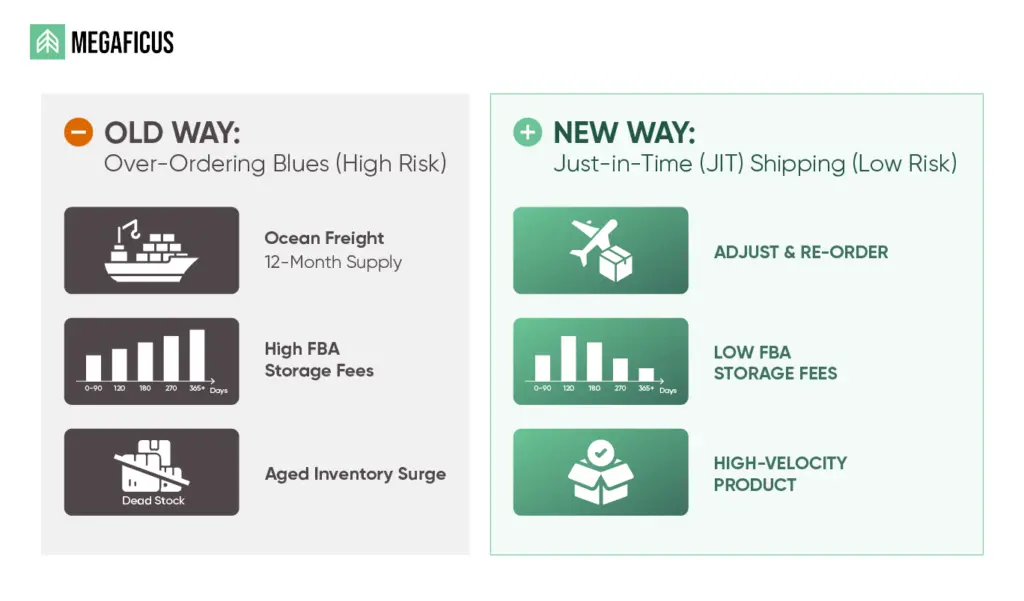
For a newer product with an unproven track record, you might start with only 45 days of estimated supply to test the true sales velocity before committing to a larger ocean freight container. This lean restocking strategy keeps your business capital fluid, and your FBA storage space will always be occupied by fresh, high-demand inventory that drives consistent revenue.
Smaller shipments might cost a bit more in logistics per unit, but the savings in storage fees and risk reduction far outweigh the extra shipping costs. By maintaining a lean inventory level, you remain flexible enough to adjust your pricing or product features based on customer feedback without having to liquidate a massive stockpile of older, less-optimized product versions.
>>> Read more: Amazon KPIs: Essential Metrics Every Seller Should Track
FAQs about aged inventory on Amazon
Yes, aged stock lowers your IPI score, which directly impacts the storage volume Amazon allows you to use.
Lowering the price is usually superior, as sales help your search ranking while removal is an unrecoverable expense.
Check the “Aged Inventory” report in Seller Central; it highlights units in the “331-365” day bucket for you.
You can generally cancel it if it is in the “Pending” stage, but once it reaches “Processing,” it cannot be stopped.
Yes, you pay the standard monthly storage fee in addition to the specific aged inventory surcharge once applicable.
Get Professional Help from Megaficus
Every professional FBA seller eventually encounters a slow-moving product, but the difference between profit and loss lies in how quickly and strategically you respond to the data. By utilizing tools like the Outlet program and keeping a close watch on your inventory health reports, you can manage Amazon aged inventory with total confidence and operational efficiency.
If you are looking for a deeper audit of your warehouse expenses or need help resolving complex inventory health issues, expert guidance is just a message away. Contact Megaficus today for expert assistance in auditing your FBA fees and recovering lost profits from Amazon’s aged inventory surcharges.