Have you noticed your Amazon sales suddenly dropping, even though your product listing looks fine? You’re likely facing Amazon Buy Box issues that cost you over 80% of potential sales. Most problems stem from fixable issues like pricing errors, inventory gaps, or poor seller metrics, and this guide shows you exactly how to recover fast.
Quick Summary: 8 main reasons you’re losing the Amazon Buy Box:
- Pricing not competitive: Your price is higher than the competitors’ or the recommended retail price
- Amazon pricing policy violations: Your product is cheaper on other websites
- Not using Amazon FBA: Self-fulfillment puts you at a disadvantage
- Stock and inventory issues: Frequent stockouts signal unreliability
- Poor seller performance metrics: ODR above 1%, late shipments, low ratings
- New seller or not prime eligible: 30-day testing period or missing Prime badge
- Listing quality problems: Poor keywords, weak images, incomplete descriptions
- Counterfeit or IP complaints: Authenticity concerns freeze your Buy Box access
What Is The Amazon Buy Box?
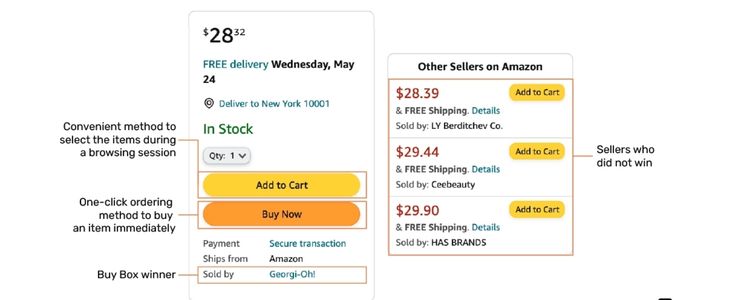
When you visit a product page on Amazon, you’ll notice the “Add to Cart” or “Buy Now” button displayed on the right side; that’s the Buy Box. This placement is crucial for your sales performance since over 80% of Amazon purchases happen through this button.
However, the Buy Box isn’t something you can claim permanently. Instead, it rotates among different sellers who meet Amazon’s requirements. The platform’s algorithm continuously evaluates sellers and decides who gets featured at any given moment. As a result, losing access to the Buy Box can severely impact your sales, often reducing them to nearly zero.
Where To Find Your Buy Box Metrics?
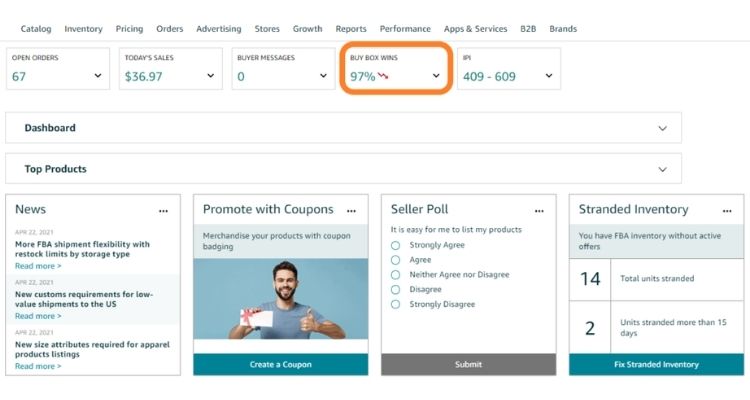
Since the Buy Box rotates among sellers, your product won’t appear in that spot 100% of the time. Amazon tracks this through a metric called the Buy Box percentage, which tells you how often your listing wins that coveted position. For instance, if 100 shoppers view your product page and your offer shows up in the Buy Box 60 times, your percentage sits at 60%.
To check your current Buy Box performance, sellers follow these steps:
- Log in to your Amazon Seller Central account
- Navigate to “Reports” → “By ASIN” → “Detail Page Sales and Traffic by Child Item.”
8 Reasons You’re Losing The Buy Box And How To Fix Them
Losing the Buy Box happens for specific reasons, and fortunately, most of them are fixable. Here are the eight most common issues and how to address each one.
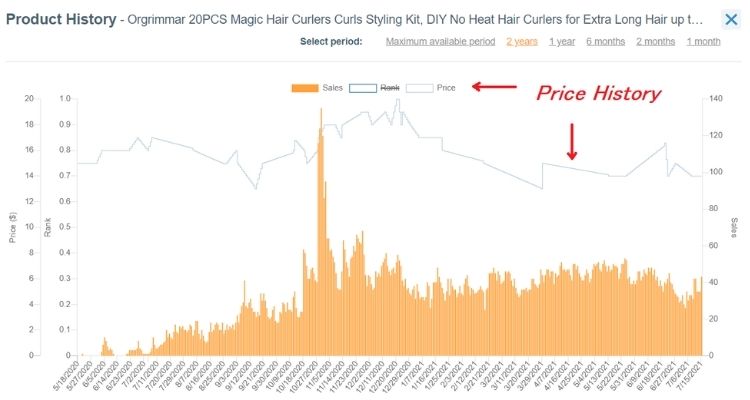
Pricing Not Competitive
Your product’s price directly affects your chances of securing the Buy Box, and even small pricing issues can knock you out of the running. Several pricing problems might be working against you:
- A third-party website is selling the same product for less
- Competing sellers offer similar items at lower prices
- Your price exceeds Amazon’s recommended retail price
For instance, if you’re selling kitchen gadgets and price your silicone spatula at $14.99 while competitors list similar products at $11.99-$12.99, your Buy Box percentage could drop from 75% to just 12% within 48 hours. Adjusting to $12.49 typically helps recover to around 68% within three days.
The fix isn’t simply slashing your prices to the lowest point. You need to find the balance between staying competitive and protecting your margins. Research shows sellers typically need to price within 5-7% of the lowest offer to stay competitive for the Buy Box.
Better yet, sellers with strong performance metrics can charge higher prices and still win. Amazon rewards those who deliver great customer experiences with more pricing flexibility. For instance, FBA sellers with ODR under 0.5% can often charge 8-10% more than competitors and still maintain 60%+ Buy Box share.
Amazon Pricing Policy Violations
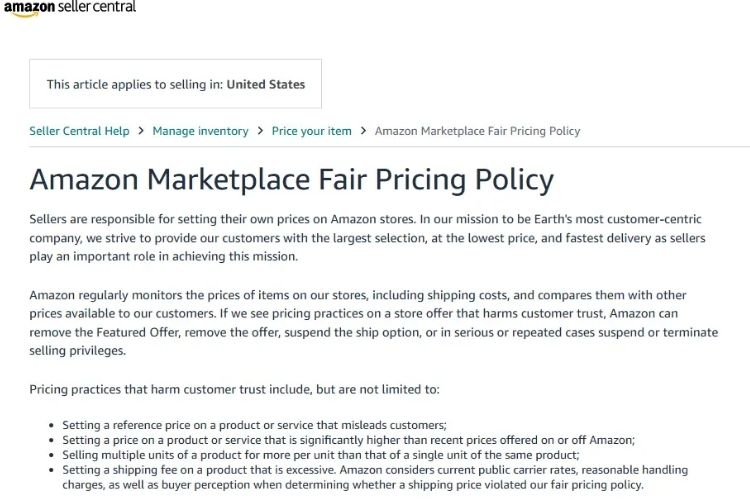
Amazon actively monitors your product’s price across major online marketplaces, and if shoppers can find it cheaper elsewhere, the platform will immediately suspend your Buy Box access.
Imagine you’re running a supplement business and decide to sell your protein powder for $39.99 on Amazon, but run a promotion on your Shopify store at $34.99. Within 6 hours, your Buy Box could disappear as Amazon’s automated system detects the price difference and suspends access until you match pricing across channels.
To fix this issue, start by ensuring your pricing remains consistent across all sales channels, then take these steps:
- Contact any third-party sellers offering your product below your intended price
- Educate them on your brand’s pricing guidelines and MAP (Minimum Advertised Price) policy
- Enforce your pricing rules consistently across all unauthorized sellers
- If the violation appears unintentional, work directly with the seller or marketplace to correct it
Not Using Amazon FBA
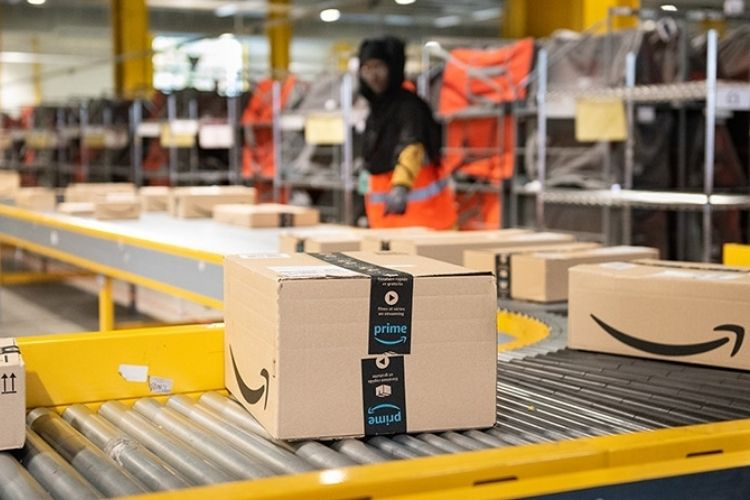
Amazon customers expect fast and free shipping, which is why the platform favors sellers who use Fulfillment by Amazon (FBA). When Amazon handles your storage, packing, and shipping, it can guarantee delivery speeds that meet customer expectations. This reliability gives FBA sellers a significant advantage in the Buy Box algorithm.
Consider what happened when one toy business switched from self-fulfillment to FBA in November, before the holiday rush. Within one week, their Buy Box percentage jumped from 42% to 79%, and their daily units sold increased from 15 to 48 units, a 220% sales increase with the same product at the same price.
For sellers who can’t afford FBA or prefer self-fulfillment, focus on matching FBA-level performance. Ship orders within 24 hours, use reliable carriers with tracking, and maintain stellar delivery metrics. While you’ll still face an uphill battle against FBA sellers, strong fulfillment performance can narrow the gap.
Stock And Inventory Issues
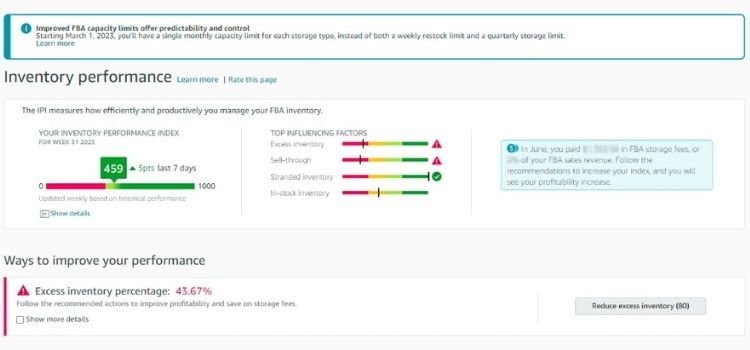
Amazon prioritizes sellers who can fulfill orders immediately, which means running out of stock directly hurts your Buy Box eligibility. The platform tracks your inventory history over time, so frequent stockouts signal unreliability to the algorithm.
Sellers who run out of stock lose an average of 15-30 days of Buy Box share recovery time even after restocking. If you’re selling electronics and go out of stock for just 3 days during Prime Day, you might not recover your previous 82% Buy Box percentage until 4 weeks later, potentially settling at 61%.
To prevent inventory problems from costing you sales, implement these strategies:
- Set up low-stock alerts at 15-20 units remaining (not when you hit 0)
- Maintain safety stock equal to 14-21 days of average sales velocity
- Track your IPI (Inventory Performance Index) score – keep it above 450 for best results
Poor Seller Performance Metrics
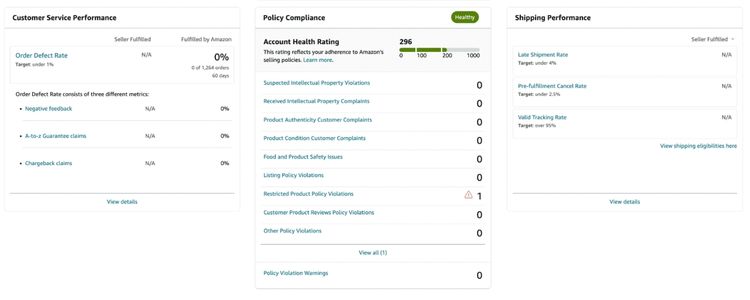
Amazon tracks your seller performance closely to protect its reputation for customer service. When your metrics drop below their standards, you’ll lose Buy Box access fast. Here’s what the data shows:
- Sellers with ODR at 0.8-1.0% (near the threshold) report Buy Box percentages around 40-55%
- Sellers maintaining ODR at 0.3% or lower consistently hold 75-90% Buy Box share
- Dropping below 97% on-time shipment rate can cut your Buy Box share by 25-40% within one week
Take the case of someone selling home goods who let their ODR climb to 1.2% after receiving several defective product complaints in one week. Their Buy Box percentage crashed from 73% to 8% in 72 hours. After fixing their quality control issues and getting their ODR back down to 0.6% over 30 days, they only recovered to 58% Buy Box share.
Three key metrics determine your eligibility:
- Order defect rate (ODR): Must stay below 1% (aim for under 0.5%)
- On-time shipment rate: Keep above 97% (top sellers maintain 99%+)
- Customer feedback rating: Hold at least 4.5 stars (4.7+ is ideal)
New Seller Or Not Prime Eligible
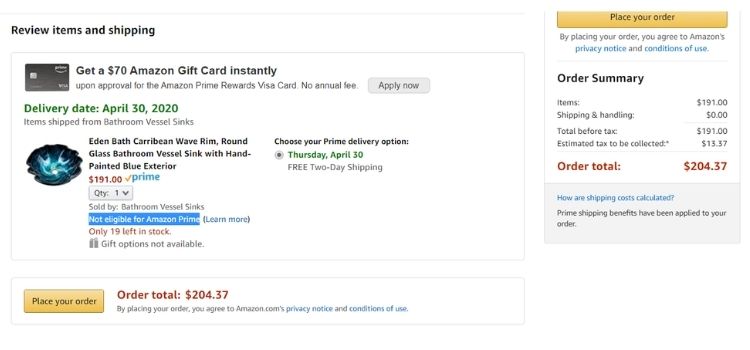
Amazon treats new sellers cautiously during their first 30 days to evaluate whether you can meet fulfillment standards and handle customer service. Your Buy Box eligibility stays limited during this testing period, regardless of pricing or product quality, so you’ll need to wait it out while maintaining solid performance.
The Prime badge creates another significant barrier. Customers heavily favor Prime shipping, so Amazon pushes Prime-eligible products ahead in the Buy Box algorithm. Without that badge, you’re fighting an uphill battle.
To become Prime eligible, sellers choose one of these paths:
- Use FBA: Enroll in Fulfillment by Amazon for automatic Prime eligibility
- Join Seller Fulfilled Prime: Handle fulfillment yourself but meet strict requirements (99% on-time delivery, same-day shipping)
Listing Quality Problems
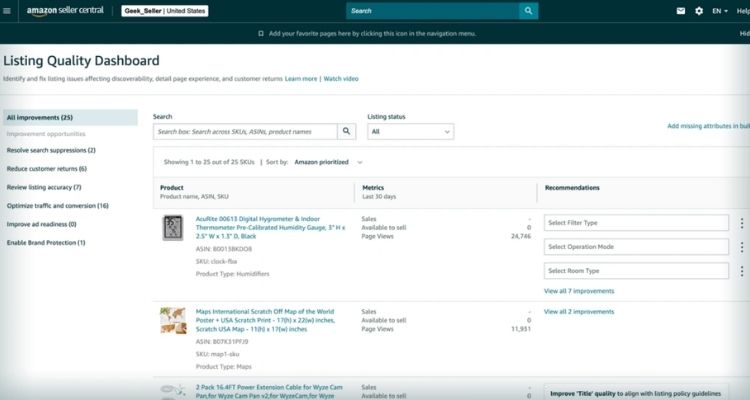
Amazon’s algorithm can’t push your product into the Buy Box if customers can’t find it in the first place. Poor listing optimization directly impacts your visibility in search results, which means fewer shoppers land on your product page. Without traffic, you won’t generate the sales history Amazon needs to trust you with Buy Box placement.
Common listing issues that hurt your Buy Box chances include:
- Missing or poorly chosen keywords in your title and description
- Product titles that don’t match what customers actually search for
- Incomplete or vague product descriptions that fail to answer buyer questions
- Low-quality images or missing image slots
To fix these issues, you should first research which search terms your target customers actually use, then incorporate those keywords naturally into your title and bullet points. Your product title needs to be descriptive and front-load the most important keywords without wasting characters on filler words. You should also fill out all available image slots with high-quality photos that show your product from multiple angles.
Counterfeit Or IP Complaints
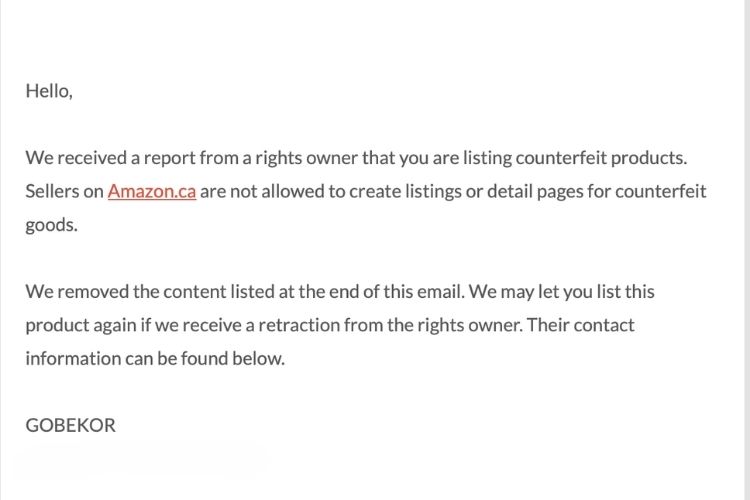
Amazon removes your Buy Box immediately when customers report authenticity concerns, even if you’re selling genuine products, and these investigations often last 2-6 weeks with completely stopped sales.
For example, if you’re in the beauty business and receive an “inauthentic” complaint because your face cream “looks different” from retail packaging (when the brand simply updated their design), Amazon will strip your Buy Box right away. Even after submitting supplier invoices within 24 hours, the investigation could drag on for 19 days, potentially costing you around $12,400 in lost revenue on that ASIN alone.
To fix this, you need to act fast:
- Check your Brand Dashboard for NCX notifications immediately
- Collect your authenticity documents (invoices from the last 365 days, authorization letters, supplier contracts)
- Submit a Seller Support case with your evidence – include at least 3 invoices covering recent inventory purchases
- Follow up every 48-72 hours since Amazon won’t restore access automatically
Frequently Asked Questions About Amazon Buy Box Issues
Visit your product page in incognito mode to see if the “Add to Cart” button shows your offer. You can also check the “Detail Page Sales and Traffic by Child Item” report in Seller Central for your Buy Box percentage.
Most sellers need at least 60% Buy Box share to stay profitable, though this depends on your margins. Anything above 80% puts you in an excellent position since the majority of sales will come through your listing.
Yes, but it’s much harder. You’ll need to match FBA performance with fast shipping, stellar delivery metrics, and high seller ratings. However, FBA sellers still get algorithmic preference even when your metrics are perfect.
Recovery time depends on the problem type. Pricing fixes can restore your Buy Box within hours, while serious issues like authenticity complaints or poor metrics might take weeks. Amazon needs to see consistent performance improvement before trusting you again.
Get Professional Help from Megaficus
Understanding Amazon Buy Box issues and how to fix them gives you control over your sales performance and revenue stability. By addressing problems like pricing errors, poor metrics, or inventory gaps proactively, you can maintain consistent Buy Box access instead of watching your sales disappear overnight.
Success on Amazon depends on more than just competitive pricing; it requires constant monitoring, metric optimization, and quick responses to algorithm changes. When you manage Buy Box factors effectively, you turn what could be a sales killer into a sustainable competitive advantage.
If you need expert support to win and maintain your Amazon Buy Box consistently, Megaficus provides proven strategies and hands-on guidance to help sellers optimize their performance and grow sustainably on the platform.