Have you ever wondered how those small, recurring charges in your settlement reports could be quietly draining your business growth? Managing Amazon FBA disposal fees is no longer just a warehouse task but a helpful strategy to protect your margins, boost your IPI score, and keep your FBA stock healthy with Megaficus’s detailed guide below.
Quick Summary
- Fee Optimization: Current rates for lightweight items are highly competitive, with standard products under 0.5 lb costing as little as $0.84 to discard.
- Profit Defense: Strategic disposal acts as a defensive shield against monthly aged inventory surcharges, which can range from $0.30 to $0.35 per unit.
- Cost Efficiency: Paying a one-time disposal fee is often more economical than recurring peak season storage rates, which can reach $2.40 per cubic foot.
- Recovery Value: Before choosing to dispose of stock, checking for FBA Liquidation eligibility could help you recover 5% to 10% of the item’s average selling price.
- IPI Optimization: Removing slow-moving inventory is a primary lever to help raise your Inventory Performance Index above the required thresholds to avoid storage limits.
What are Amazon FBA Disposal Fees?
Amazon FBA disposal fees represent the specific per-unit cost that Amazon charges to discard or donate inventory that is no longer sellable or cost-effective to store. These charges are not automatically applied unless you have specific settings enabled or manually request the destruction of your inventory.
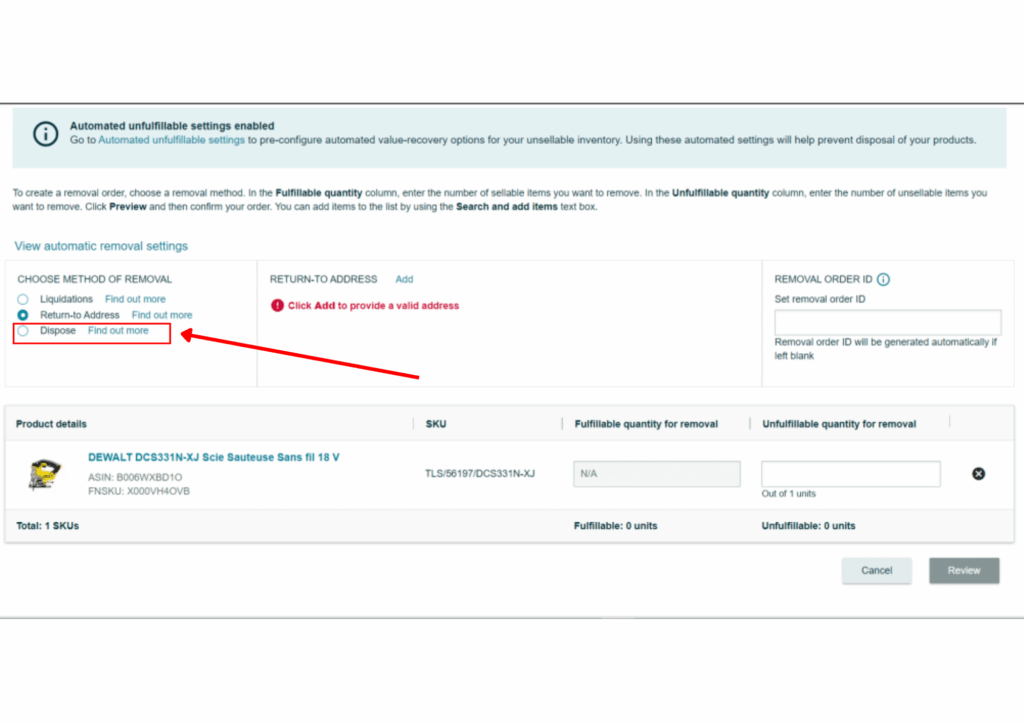
Sellers typically encounter these fees through the “Removal Order” workflow in Seller Central when they decide an item is not worth shipping back home. For example, if you have 500 units of a defective $5 plastic toy, you might choose disposal over a return to avoid high return shipping costs.
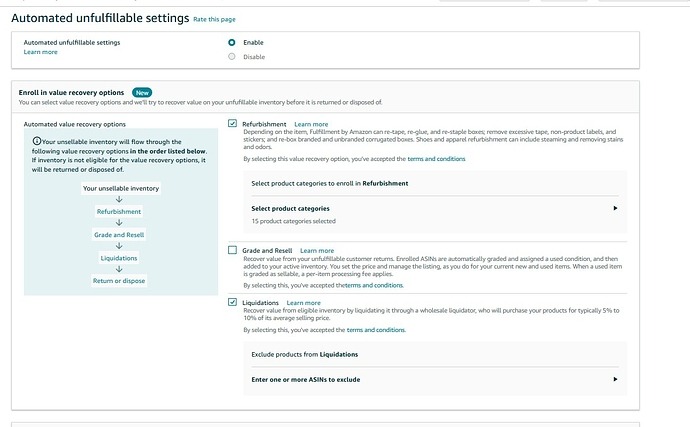
These fees are also triggered via “Automated Unfulfillable Settings,” where Amazon handles damaged returns for you on a set schedule. If you do not monitor these settings, Amazon will continue to dispose of items and bill your account according to the latest prevailing rate card.
How Much Do Amazon FBA Disposal Fees Typically Cost?
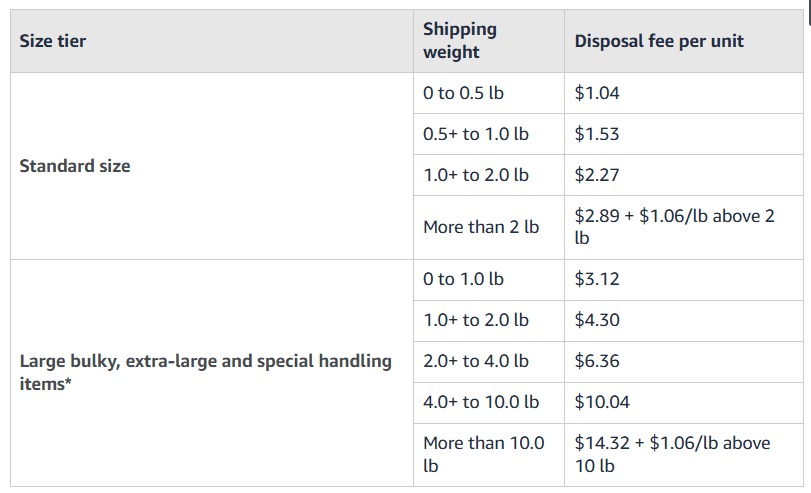
In recent updates, the fee structure has become more granular, rewarding sellers who remove lightweight excess inventory quickly to free up space. While some fulfillment fees have shifted, Amazon FBA disposal fees for standard-size items weighing less than 0.5 lb have been adjusted to encourage warehouse efficiency.
For standard-size products, current rates start as low as $0.84 per unit for the lightest items, scaling up based on weight. These costs are calculated at the time of the request but are only charged when the item is physically processed by the warehouse staff.
Oversized or “Large Bulky” items face different pricing, starting at a base rate of $14.32 for items over 10 lbs. A heavy furniture set weighing 50 lbs would naturally cost more to dispose of a single unit when adding the weight-based surcharges for handling.
Is Amazon FBA Disposal Worth the Cost?
Deciding to pay for Amazon FBA disposal fees is often a simple calculation where the goal is to choose the path of “least loss” for your business.
A standard-size item might cost $1.53 to dispose of, but if it stays in the warehouse, it will cost $0.87 per cubic foot per month. During the busy peak season, this storage rate can rise significantly, making a one-time disposal look like a very practical bargain.
Furthermore, clearing out “dead” stock allows you to maintain a lean, high-velocity account profile that Amazon’s algorithms appreciate. Amazon tends to reward sellers who move inventory quickly, often giving them better “Buy Box” opportunities and higher storage limits than others.
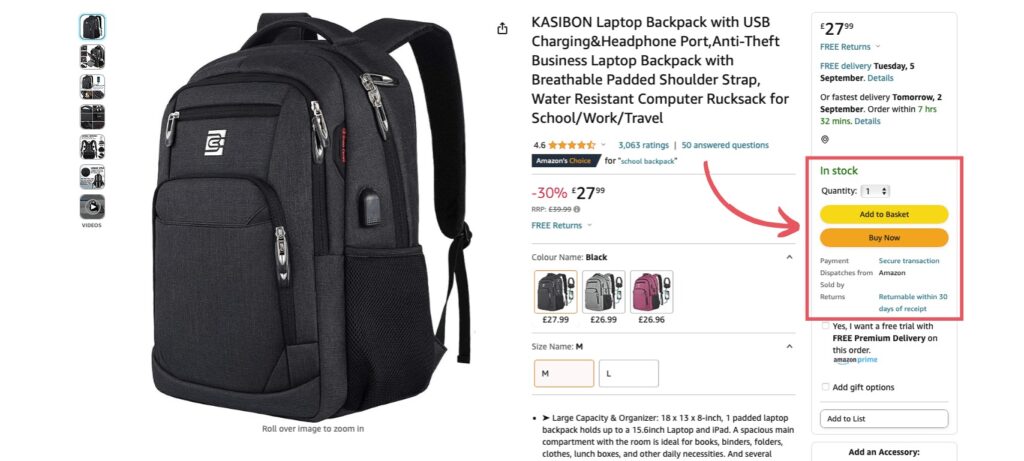
Imagine you’re holding 10 cubic feet of aged returns, which would pay a one-time $50 disposal fee for roughly 33 standard units. However, storing that same stock through the Q4 peak season would cost at least $72 in base storage fees alone. You’ll save not only over 30% in immediate costs but also prevent aged inventory surcharges and IPI penalties from eroding your profit.
What Factors Affect Amazon FBA Disposal Fees?
Understanding the variables behind these charges is quite helpful for accurate financial forecasting and choosing between disposal, removal, or liquidation options.
Product Size & Weight
The physical dimensions of your product are the primary driver of the fee, as larger items take up more space in the disposal bins. Standard-size items are relatively affordable to discard, but once a product crosses into the “Large Bulky” tier, the costs change significantly.
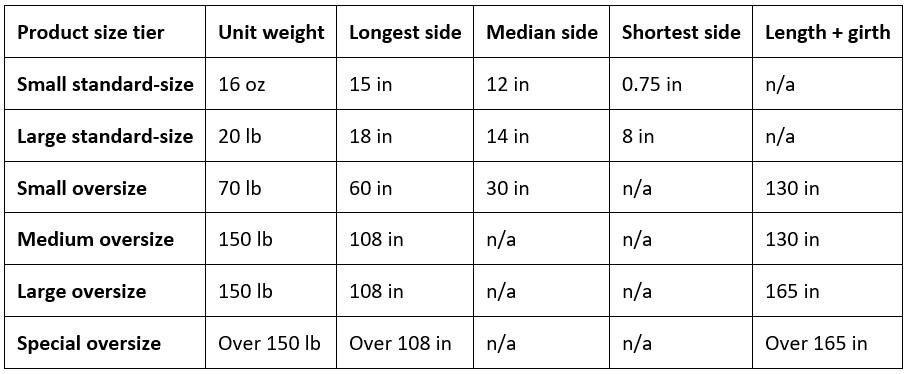
If you’re selling small phone cases, a disposal fee of $0.84 per unit is a minor cost you’d barely notice. However, if you scale up to weighted blankets, the financial math changes. Disposing of just 50 units at the bulky rate transforms a small fee into a massive hit to your margins. In this business, the physical size of your inventory is the difference between profit and a total loss.
Inventory Age
In the current ecosystem, disposal is often a defensive financial move used to avoid the aggressive “Aged Inventory Surcharge” for stock older than 180 days. Amazon now charges a minimum per-unit fee for items stored 12 to 15 months to prioritize high-velocity stock.
For instance, you’re a seller with 1,000 units of slow-moving socks, and you might pay $300 a month just in age surcharges alone if they are ignored. By paying the one-time Amazon FBA disposal fees to clear that stock, you’ll eliminate a recurring monthly expense that would otherwise continue.
Return vs. Dispose
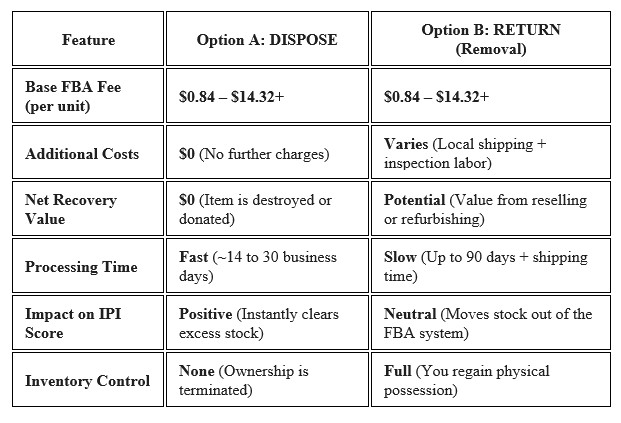
Choosing whether to have an item shipped back to your warehouse or destroyed depends entirely on the unit’s resale value versus the return shipping cost. For items with a high manufacturing cost, Megaficus suggests that paying for a “Return to Address” order is usually a smart investment.
However, for low-value or damaged items, disposal is often the more profitable choice because return shipping is significantly more expensive. An example is that for a standard 2 lb item, the base Amazon fees are the same for both removal and disposal, yet returning the item to your door often adds high “hidden” costs, including domestic shipping, inspection labor, etc.
When you choose disposal, your financial commitment ends at the flat per-unit fee because Amazon handles the entire destruction process onsite. If the item’s potential resale value is lower than the combined cost of recovery and processing, testing confirms that disposal is the most profitable decision.
How Disposal Fees Directly Erode Your Net Margins?
Every dollar spent on disposing of a product is a dollar that could have been used for PPC advertising or sourcing your next bestseller. These fees can sometimes feel like a “hidden tax” on inventory management because they are often the final cost in a long line of storage penalties.
Imagine you’re a seller who leaves 100 units of a standard-size product in an FBA warehouse for over a year without a clear sales strategy. By the time you choose disposal, you have already paid monthly storage fees and the aged inventory surcharge, which currently starts after six months.
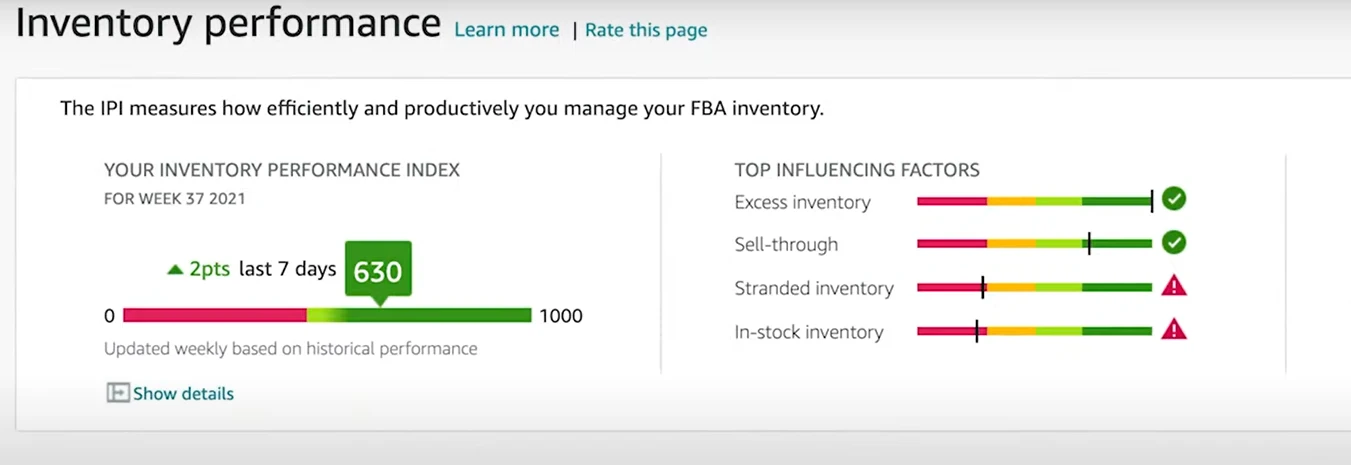
High disposal volumes can also be a signal for your Inventory Performance Index (IPI) score, which Amazon uses to determine your storage limits. A declining IPI score can lead to restricted capacity, preventing you from sending in high-velocity inventory during busy peak seasons like Prime Day.
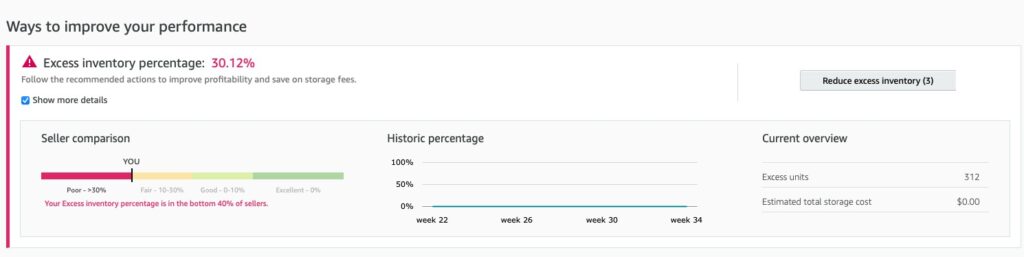
Consider a practical scenario where a kitchenware brand sees its IPI drop below 400 due to an “Excess Inventory Percentage” of 25%. By thoughtfully disposing of 200 units of non-moving spatulas, they stop the storage fee bleed and immediately improve their sell-through rate metric.
How to Optimize Your Amazon FBA Disposal Cost Step-by-Step?
Minimizing these Amazon FBA disposal fees can be a smooth process if you take a proactive approach rather than waiting for notifications about aging stock on your dashboard.
Step 1: Audit Your Inventory Health
You can start by downloading the “Inventory Age” and “Stranded Inventory” reports from your Seller Central dashboard to identify units incurring fees. These reports show exactly which SKUs are ready for a new strategy and how much you are currently paying.
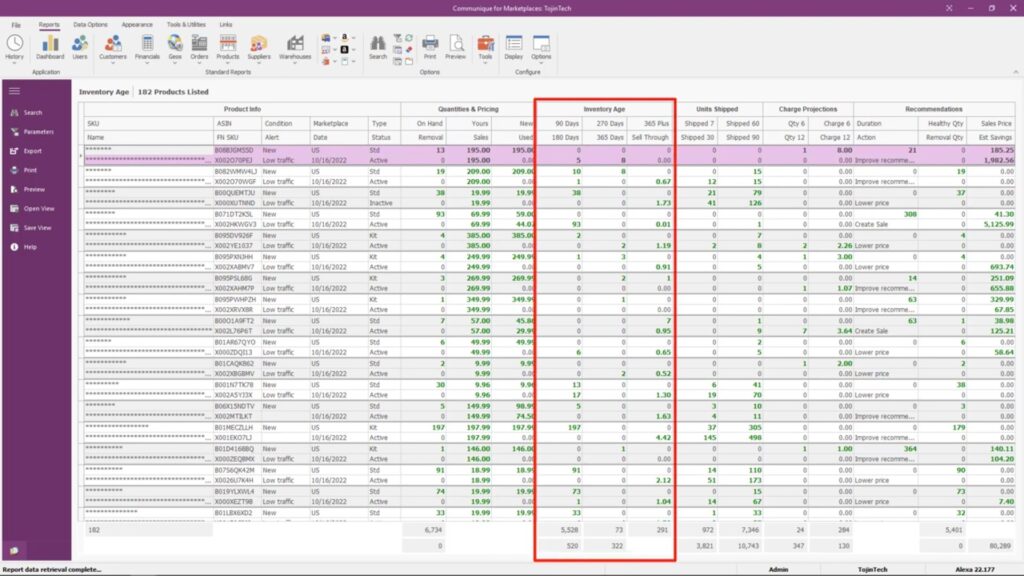
A successful brand might perform this audit on the 10th of every month, specifically looking for any ASINs with more than 90 days of supply. This allows them to take action before the inventory reaches the 181-day mark, where the first surcharges begin.
Step 2: Compare Recovery Options
Before deciding on total destruction, you might want to evaluate the “FBA Liquidation” program to see if you can recover a small percentage of your initial investment. Liquidation typically pays out 5% to 10% of the item’s average selling price, which helps offset costs.
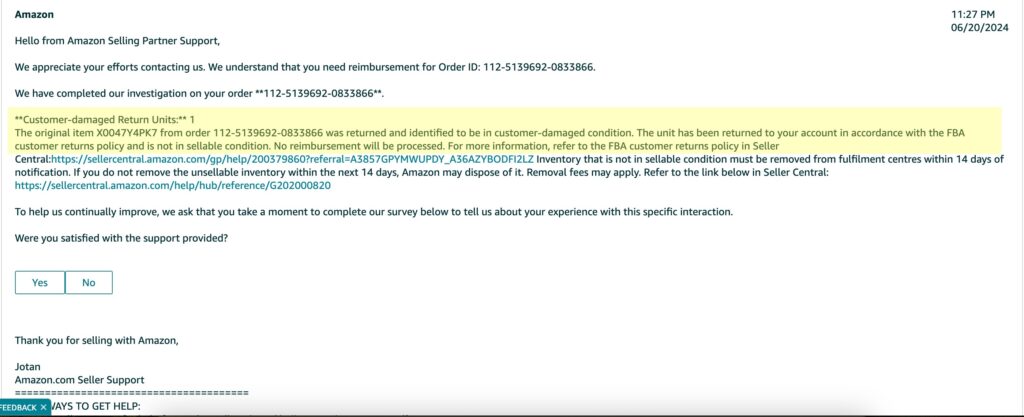
If you have a high-end electronic item that is “Customer Damaged,” liquidation might net you $10, whereas disposal would cost you $2. In this case, liquidation is a helpful financial choice for maintaining your overall profitability and protecting your business capital.
Step 3: Create a Disposal Order
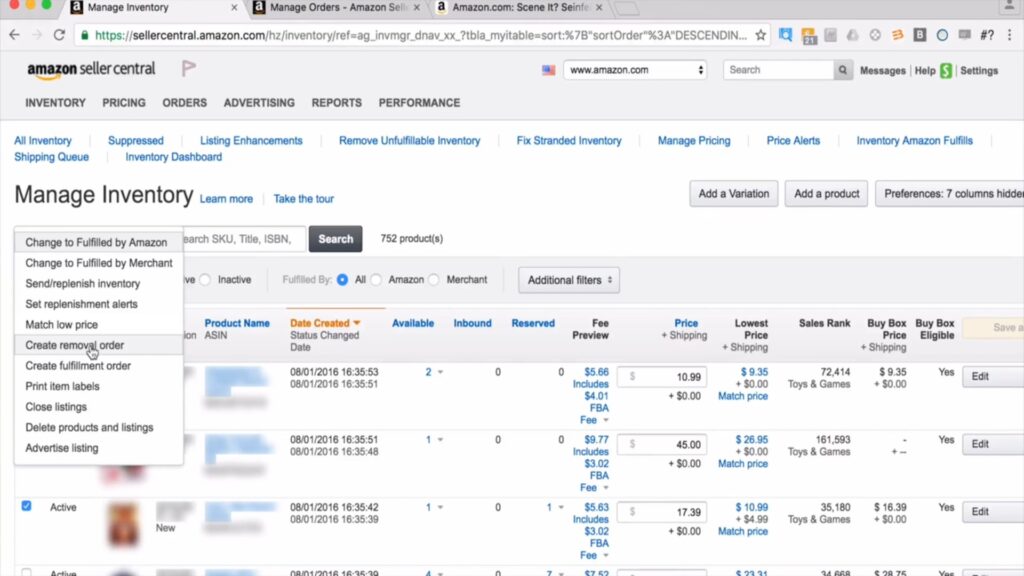
Once you have identified the items to discard, you can navigate to “Manage Inventory,” select the specific SKUs, and choose “Create Removal Order.” From the “Method of Removal” dropdown menu, select “Dispose” to authorize Amazon to destroy or donate the units.
Step 4: Update Automation Settings
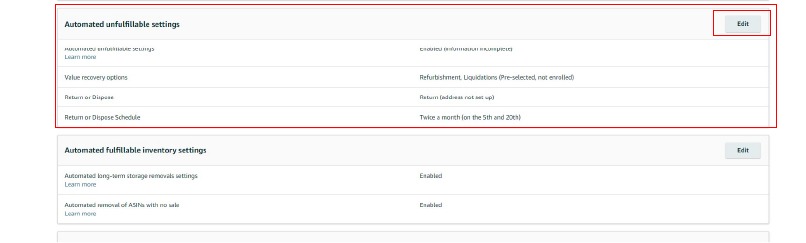
To help manage your time, you can configure your “Automated Unfulfillable Removal Settings” to handle low-value damaged goods on a weekly basis. You can set a price threshold so that only items worth less than, say, $10 are automatically disposed of.
This prevents the rare mistake of Amazon disposing of a $100 returned camera because the seller had different default settings. By automating only the “low-value” disposal, you protect your high-value assets while keeping the fulfillment center clean and organized.
Common Disposal Fee Mistakes and How to Fix Them
Even experienced sellers can sometimes find themselves in situations that lead to unnecessary expenses or the accidental loss of valuable inventory during the removal process. These small oversights can add up quickly, but fortunately, they are quite easy to resolve once you understand the tools available.
Leaving Automated Disposal Active for High-Value Stock
A common mistake is leaving “Automated Disposal” active for all unfulfillable items, which may include high-value products that were simply returned with a torn box. If a seller of $200 headphones has this setting on, Amazon might destroy a perfectly fixable unit just to clear shelf space.
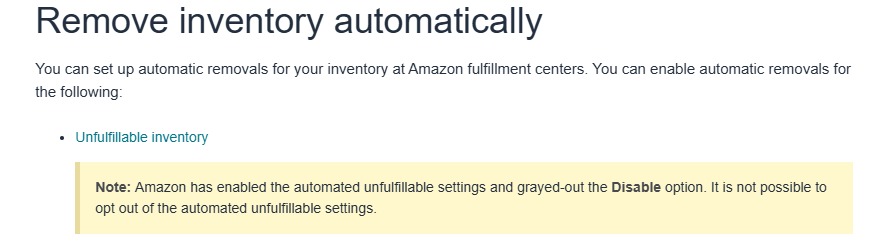
A helpful fix is to set a specific price threshold in your “Automated Unfulfillable Settings,” so only low-cost items are disposed of automatically. For anything above a certain value, you can select “Return to Address,” allowing you to inspect the unit and potentially relist it as “Used – Like New.”
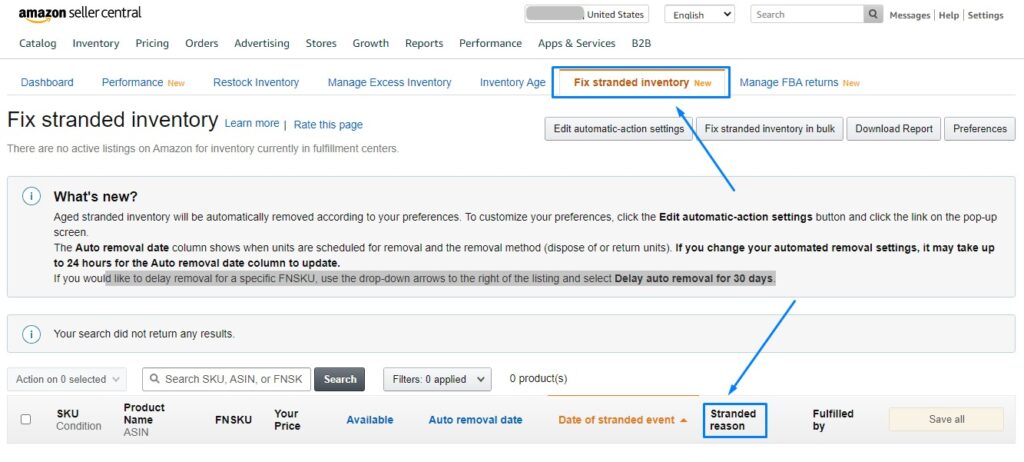
Ignoring Stranded Inventory Notifications
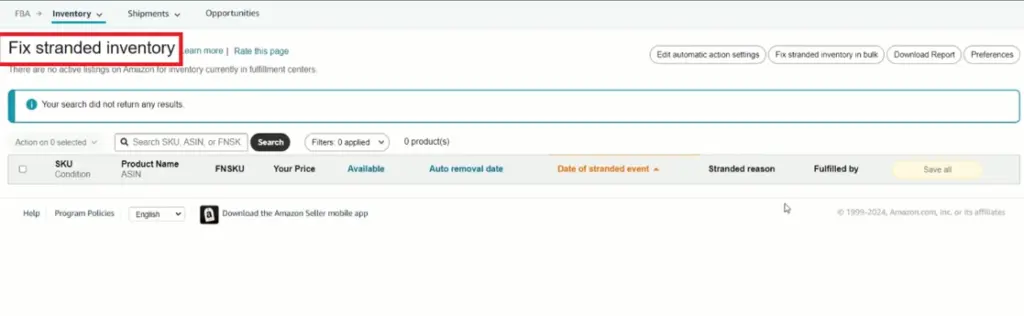
Stranded inventory refers to units that are in an FBA warehouse but lack an active listing, meaning they generate storage fees without being available for purchase. If these units are ignored for too long, Amazon may automatically move them to the disposal queue to keep their facility efficient.
To resolve this, you can check the “Fix Stranded Inventory” dashboard every week to see why your units are inactive. Often, a simple fix like updating a missing price or relisting a deleted SKU can reactivate the offer, preventing the need for Amazon FBA disposal fees entirely.
Failing to Audit Disposal Weight Surcharges
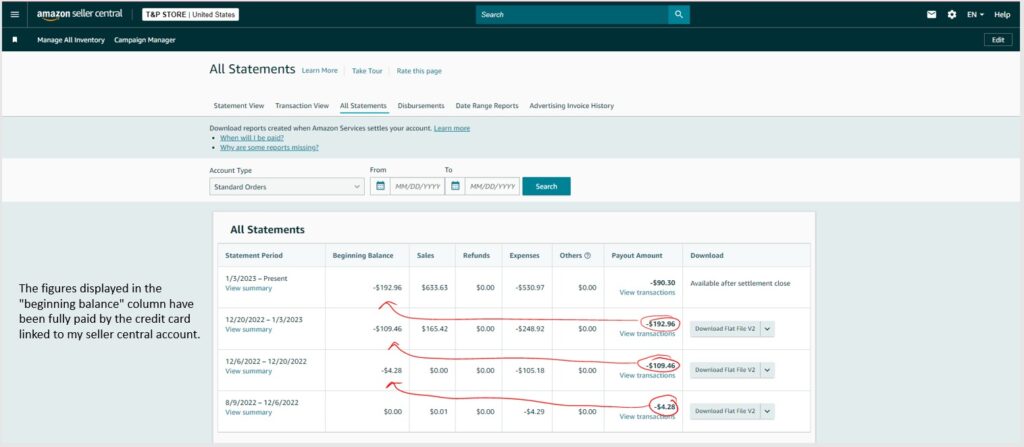
Many sellers from Megaficus assume that Amazon’s weight tier calculations for disposal are always perfect, but sometimes a small item is incorrectly flagged in a heavier category. If a 0.4 lb item is billed at the 2 lb rate, you are paying nearly double the fee for every single unit disposed of.
A smart approach is to regularly review the “Transaction View” in your Payments report to ensure your disposal charges align with your product’s actual dimensions. If you find a discrepancy, providing your flat-file specs to Seller Support can help you secure a reimbursement for the overcharged fees.
Disposing of Stock Eligible for Liquidation
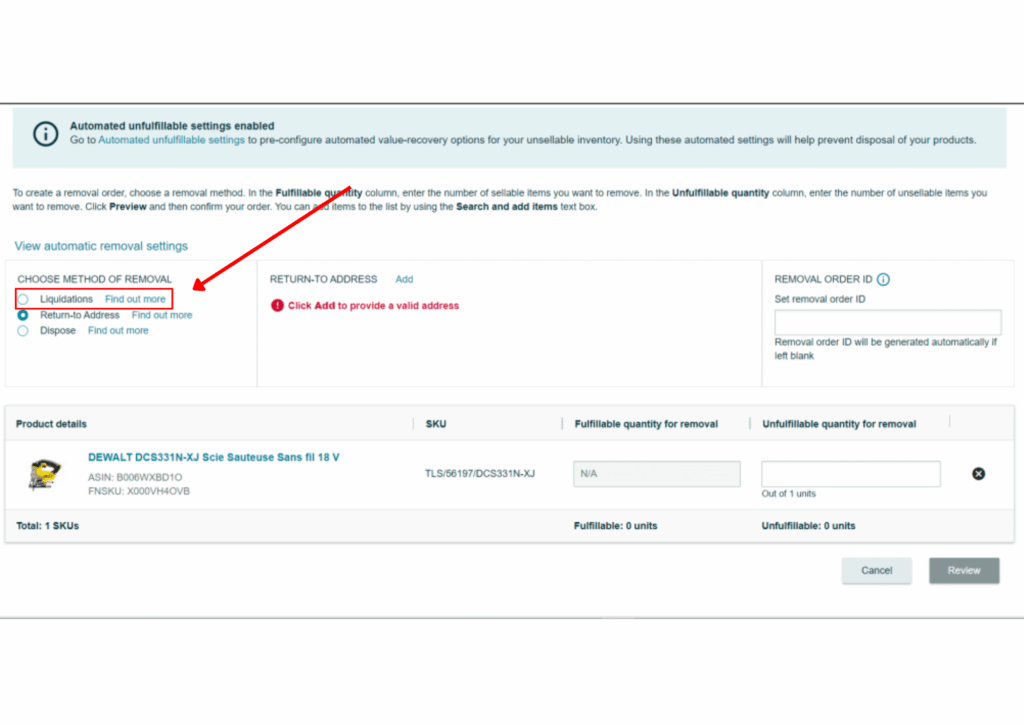
A frequent oversight is choosing “Dispose” for items that are actually eligible for the FBA Liquidation program, which allows you to recover some of your costs. By simply destroying the stock, you are essentially throwing away the 5% to 10% gross recovery value that liquidators pay.
Instead of jumping straight to disposal, you can try enabling “Liquidation” as your first automated preference for unfulfillable inventory. This way, Amazon tries to sell the stock to professional liquidators first, and only proceeds to disposal if the items are completely ineligible or unsellable.
>>> Read more: Amazon FBA Fees: Complete Guide To All Costs & How To Save
Frequently Asked Questions (FAQ) about Amazon FBA disposal fees
Current fees range from $0.84 for standard items under 0.5 lb to over $14.32 for heavy, bulky items. Costs are tiered based on size and shipping weight.
You can cancel a disposal order if it is still in the “Planning” or “Pending” status on your dashboard. Once it moves to “Processing,” the fee is typically locked in and processed.
Amazon attempts to donate eligible items through their “FBA Donations” program to help various charities. If an item is not eligible for donation, it is physically destroyed or recycled to clear space.
Disposal is almost always cheaper for the transaction itself, but if the item has a high resale value, shipping might be better. The cost of return shipping is worth it to recover your asset for future sales.
It affects it positively by helping to reduce your “Excess Inventory Percentage” and increasing your “Sell-Through Rate” metrics. These are two major components that Amazon uses for the IPI calculation.
Get Professional Help from Megaficus
Mastering Amazon FBA disposal fees is about shifting your perspective from seeing it as a “lost sale” to seeing it as a “saved profit.” By proactively clearing out aging or damaged stock, you protect your account health and ensure your capital is always working for you.
Staying ahead of recent fee changes requires a little time for auditing your Seller Central reports and a willingness to cut ties with underperforming SKUs. Remember that a lean warehouse is a profitable warehouse, especially in an era of storage penalties.
If you find yourself looking for more clarity on fee structures or need an expert audit of your FBA expenses, professional help is available. Contact Megaficus for expert assistance in auditing your FBA fees and recovering lost profits from overcharged disposal orders.