Are removal fees eating into your Amazon profits while slow-moving inventory triggers double penalties? Megaficus’s guide breaks down Amazon FBA removal fees, shows you step-by-step calculation methods, and delivers four actionable strategies to cut costs by 50% through smart inventory management and early intervention tactics.
Quick Summary
- Amazon removal fees range from $1.04 to $14.32+ per unit based on product size and shipping weight when removing inventory from fulfillment centers.
- Why it matters: These fees compound with aged inventory surcharges ($0.50-$0.69/cubic foot after 181 days) and long-term storage fees ($6.90/cubic foot after 365 days), turning profitable products into losses.
- Three options: Return items to your address, dispose of them onsite, or liquidate to recover 5-10% of product value, all using the same fee structure.
- Cost-cutting strategies: Run clearance sales first (25-40% off), monitor inventory age weekly, enable auto-removal at 270 days, and use liquidation as a last resort.
What Are Amazon Removal Orders Fees?
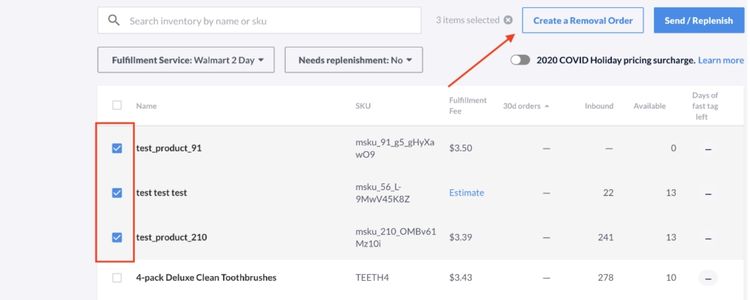
Amazon charges removal fees when sellers request to take their products out of fulfillment centers. These costs apply whether you’re retrieving unsold items, dealing with customer returns, or clearing out slow-moving stock from Amazon’s warehouses.
Sellers typically initiate removal orders for two common reasons: either their products aren’t generating expected sales, or they need to refresh their inventory with updated merchandise. In both cases, removing inventory helps avoid accumulating long-term storage fees that can significantly impact profit margins.
Why Removal Fees Matter for Your Profit?
Poor management of removal fees can quietly drain your Amazon business profits in several ways:
- Direct cost accumulation: Removal fees stack up quickly when you need to clear multiple SKUs, with costs ranging from $0.97 to $13+ per unit, depending on product size.
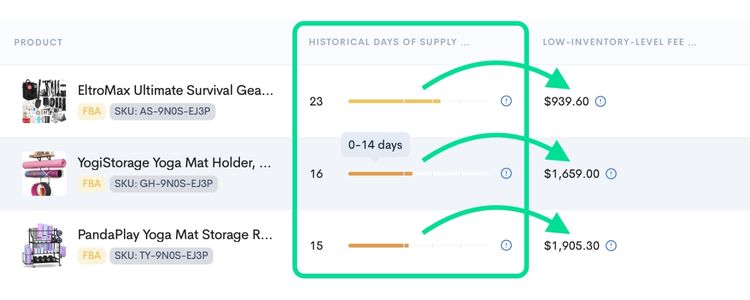
- Compound storage penalties: Products sitting too long trigger both aged inventory surcharges and long-term storage fees, creating a double financial hit before you even initiate removal.
- Cash flow disruption: Money spent on removing dead stock is capital that could have been invested in profitable inventory or marketing campaigns.
- Margin erosion: The combined impact of removal fees plus lost storage costs can turn initially profitable products into net losses.
Types of FBA Removal Fees
Amazon offers three options when removing inventory from fulfillment centers, each with different fee structures:
- Disposal Fees: Amazon destroys your products at their warehouse. This option works best for damaged, expired, or unsellable items that have no resale value.
- Return Fees: Amazon ships your inventory back to your designated address. Choose this when you want to repurpose, resell through other channels, or inspect returned items.
- Liquidation Fees: Amazon sells your products in bulk through their liquidation program. Unlike the first two options, liquidation involves both a per-unit fee and a 15% referral fee, with sellers typically recovering only 5-10% of the original product price.
Important note: Disposal and return fees follow the same rate structure; you’ll pay identical amounts whether you choose to destroy items or have them shipped back.
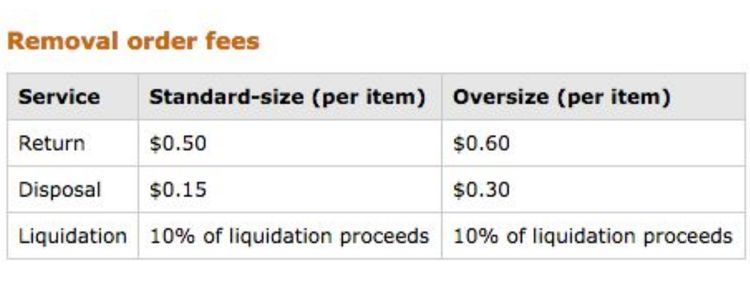
The table below shows the current removal fee rates based on your product’s size tier and shipping weight:
| Size tier | Shipping weight | Removal fee per unit |
|---|---|---|
| Standard size | 0 to 0.5 lb | $1.04 ($0.84 from January 15, 2026 onwards) |
| 0.5+ to 1.0 lb | $1.53 | |
| 1.0+ to 2.0 lb | $2.27 | |
| More than 2 lb | $2.89 + $1.06/lb above 2 lb | |
| Large bulky, extra-large and special handling items | 0 to 1.0 lb | $3.12 |
| 1.0+ to 2.0 lb | $4.30 | |
| 2.0+ to 4.0 lb | $6.36 | |
| 4.0+ to 10.0 lb | $10.04 | |
| More than 10.0 lb | $14.32 + $1.06/lb above 10 lb |
How Amazon Calculates Removal Fees
Amazon determines your removal costs through a three-step calculation process based on product characteristics and order quantity.
Step 1: Identify Your Product’s Size Tier
Amazon categorizes inventory into size tiers that determine your base fee rate:
- Standard size: Compact items like kitchen gadgets, phone cases, beauty products, and small books
- Large bulky: Bulkier items such as storage bins, pet food bags, or small furniture pieces
- Extra-large: Oversized products, including folding chairs, large sporting equipment, or appliances
- Special handling: Items requiring extra care, such as apparel, footwear, jewelry, or hazardous materials
Note: Once determined, Amazon rounds this weight according to your size tier (see note in fee table above).
Step 3: Calculate Total Fees
Find your product’s fee rate from the table based on size tier and rounded shipping weight, then multiply by the number of units you’re removing:
Total Removal Fee = Fee per Unit × Number of Units.
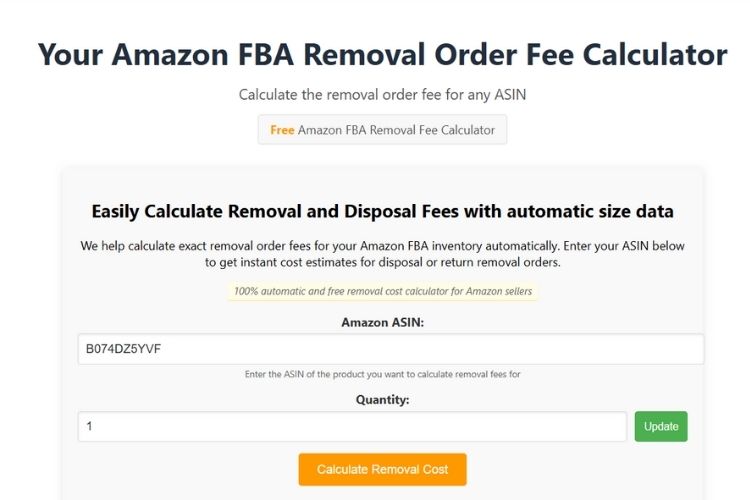
For example, let’s start with a standard-size product to see how fees work for smaller items:
- Product: Silicone baking mat
- Shipping weight: 12 oz (rounds to 1.0 lb)
- Fee rate: $1.53 per unit
- Removing 75 units
- Total cost: 75 × $1.53 = $114.75
Note: For large bulky items over 10 lb, the fee is $14.32 base plus $1.06 per additional pound. For example, a 28 lb item would cost $33.40 per unit ($14.32 + 18 lb × $1.06). Refer to the fee table above for complete rates.
Comparing Removal and Disposal Fees
While both options use identical pricing structures, they serve different purposes and have distinct processing timelines:
| Criteria | Removal Orders | Disposal Orders |
|---|---|---|
| Purpose | Return inventory to your address or send to liquidation | Destroy unsellable or hazardous items at Amazon’s facility |
| What happens to inventory | Items are shipped out of fulfillment centers to your designated location | Items are discarded onsite without leaving the warehouse |
| Processing timeline | 90 days for processing + 2 weeks for delivery (total ~3 months) | 14 business days under normal conditions; 30+ days during peak periods |
| Fee structure | $1.04-$14.32+ per unit based on size tier and weight | Identical rates: $1.04-$14.32+ per unit based on size tier and weight |
| Best for | Products you can resell through other channels or liquidate for partial recovery | Damaged, expired, hazardous, or completely unsellable items with no resale value |
| Physical movement | Yes, inventory physically leaves Amazon’s warehouses | No, items stay onsite until destroyed |
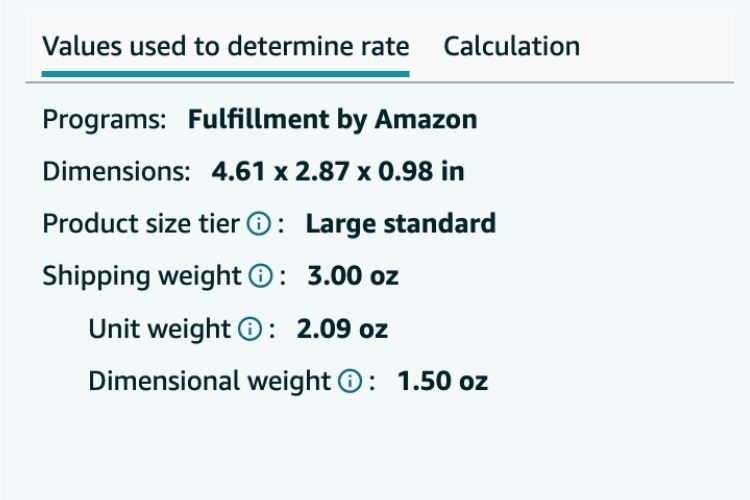
You check your product’s size tier in Seller Central under Inventory → Manage FBA Inventory or reference your Fee Preview Report.
Step 2: Determine Shipping Weight
Amazon uses the greater of two measurements:
- Actual weight: The physical weight of your product
- Dimensional weight: Calculated as (Length × Width × Height) ÷ 139 for inches
When Do You Need to Remove Inventory?
Removal fees kick in whenever you take inventory out of Amazon’s fulfillment centers, regardless of the reason. Here are the most common scenarios:
- Manual removal requests: You initiate a removal order for slow-moving stock, seasonal items past their peak, or products you’re discontinuing from your catalog.
- Automatic removal settings: You’ve enabled auto-removal rules that trigger when inventory reaches a certain age (typically 180+ days) or meets specific performance thresholds.
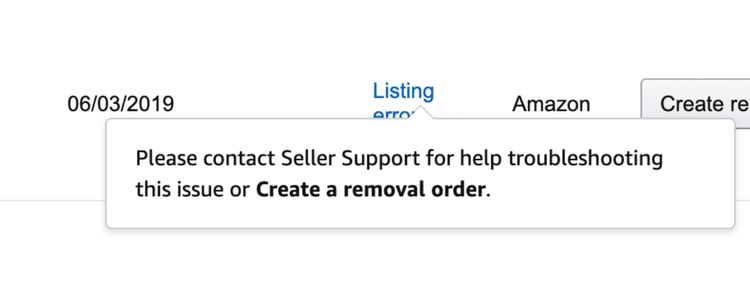
- Compliance-related removals: Amazon flags products as hazardous materials, restricted items, or policy violations that cannot remain in their warehouses.
- Amazon-initiated removals: Amazon determines your units are unfulfillable due to damage, expiration, or other quality issues and must be cleared from inventory.
Step-by-Step Guide to Creating Removal Orders
Removing inventory from Amazon’s fulfillment centers requires just a few straightforward steps through Seller Central:
Step 1: Access Your Inventory
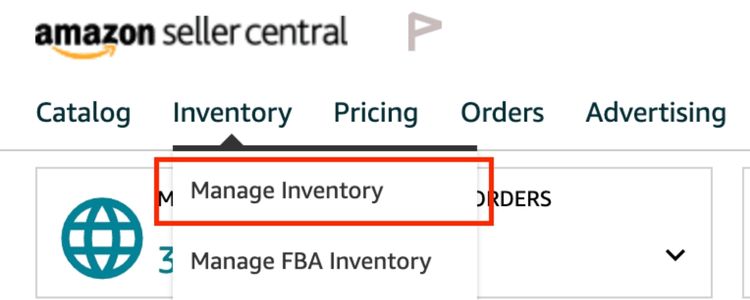
Log into Seller Central and navigate to Inventory → Manage Inventory. You can create removal orders in two ways: select products directly from your inventory listing, or use the bulk action menu to process multiple SKUs simultaneously.
Step 2: Create the Removal Order
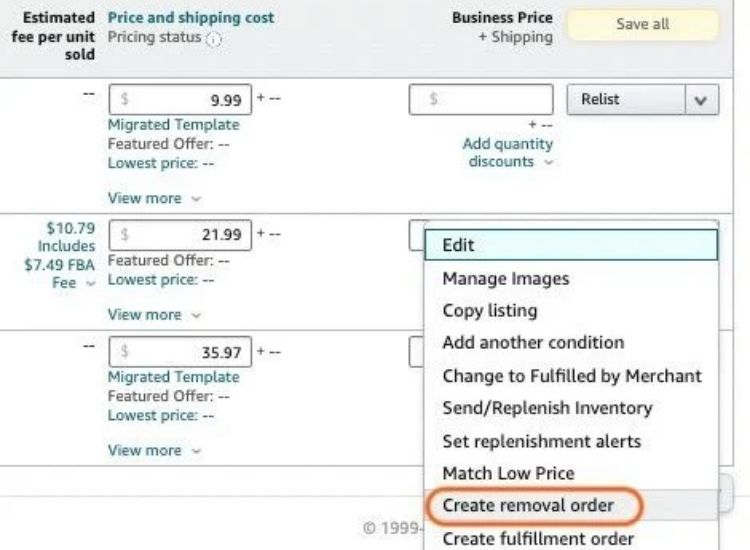
Select the items you want to remove, click the Action dropdown menu, and choose “Create Removal Order”. This opens the removal order interface where you’ll configure your request.
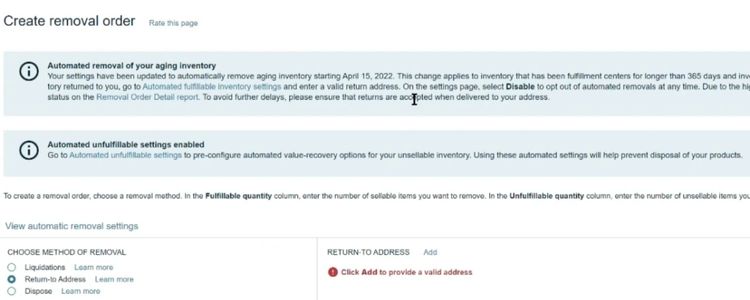
Step 3: Choose Your Removal Method
Decide how you want Amazon to handle your inventory:
- Return to address: Requires a valid shipping address
- Dispose: Amazon destroys items at their facility
- Liquidate: Send to Amazon’s liquidation program
Step 4: Add Products and Quantities
Search for specific items using ASIN, FNSKU, or MSKU identifiers. Enter the quantity you want to remove for each product; this number cannot exceed your available inventory count. Click “Add Selected” to include them in your order.
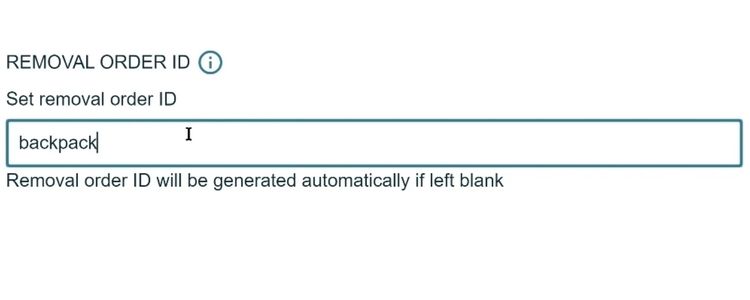
Step 5: Review and Confirm
Double-check all details before submitting: Order ID (auto-generated if not provided), removal method, product list, quantities, and shipping address for returns. Errors here can result in lost inventory without refunds.
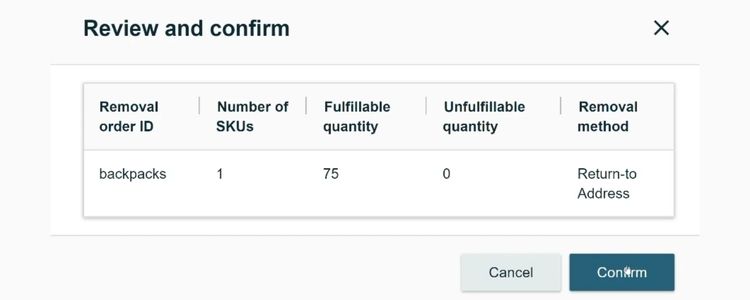
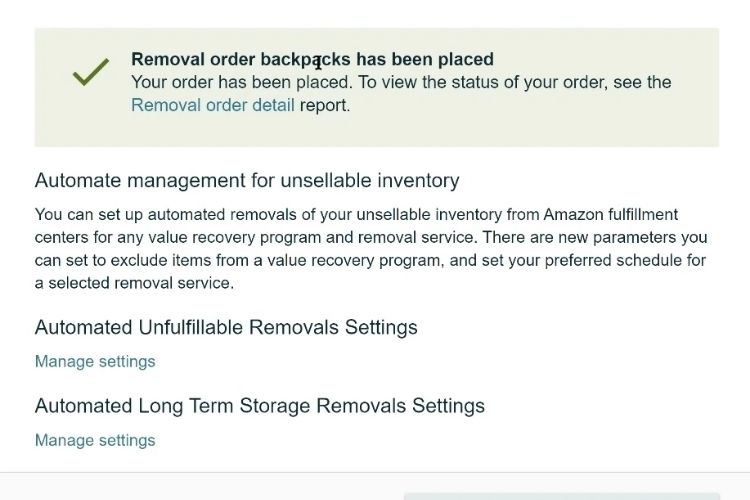
Step 6: Submit and Track
Click “Confirm” to submit your removal order. Amazon assigns a tracking ID, which you can monitor under Inventory → Removal Order Detail Report. Expect 1-3 months for processing, after which fees will appear in your Payments report.
Ways to Reduce Removal Costs
Removal fees can significantly impact your profit margins, but strategic inventory management helps you minimize these costs. Here are four actionable methods to reduce or avoid removal fees entirely.
Run Clearance Sales First
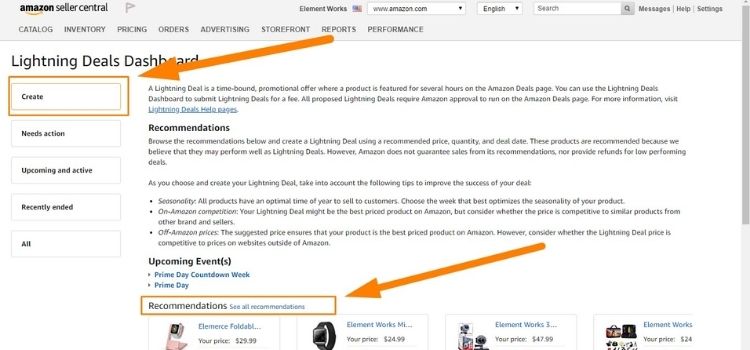
Discounted inventory generates revenue while avoiding removal fees. For example, silicone baking mats selling at 30% off recover 70% of their value, whereas disposal costs you $1-$10+ per unit and returns nothing. Therefore, even breakeven pricing beats removal fees.
You can launch a clearance campaign by following these steps:
- Navigate to Advertising → Deals and create a Lightning Deal for aged inventory
- Set discounts at 25-40% based on storage duration
- Alternatively, create coupons offering $3-$5 off under Advertising → Coupons
- Run promotions for 14-21 days and monitor results through Business Reports
- If sales don’t improve after three weeks, proceed with removal orders
Check Inventory Age Reports Weekly
Products stored beyond 181 days trigger aged inventory surcharges of $0.50-$0.69 per cubic foot monthly. These fees compound with standard storage costs. However, catching slow-movers at 120-150 days gives you time to act before penalties hit, potentially saving $50-$200+ per SKU.
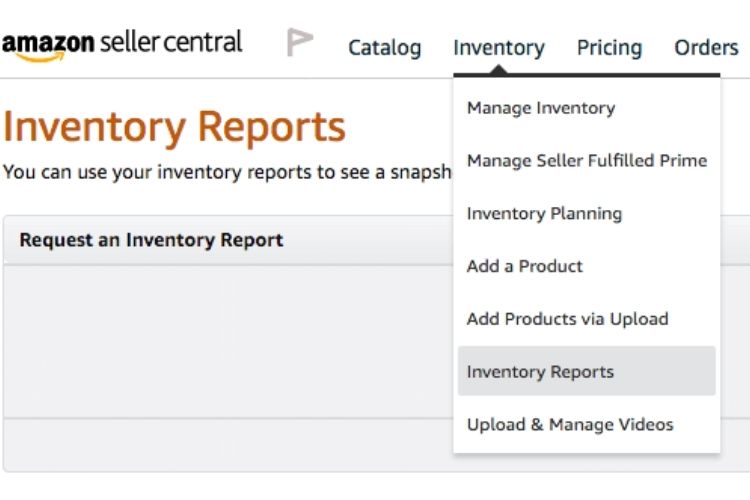
You should establish your weekly tracking system with these actions:
- Access Inventory → Inventory Planning → Inventory Age in Seller Central
- Filter by “Aged 91+ days” and sort by dollar value
- Download the CSV report for tracking
- Create a spreadsheet with columns for ASIN, units, storage days, and actions taken
- Set a Monday reminder to review weekly and flag SKUs approaching 150 days
Set Up Automatic Removals
Long-term storage fees jump to $6.90 per cubic foot after 365 days, which often exceeds your product’s actual value. By setting automatic removal at 270-300 days, you trigger standard fees instead of these costly penalties.
This strategy proves especially valuable for bulky items like patio furniture or exercise equipment, where early removal can save you $15-$50+ per unit compared to waiting for long-term storage charges to accumulate.
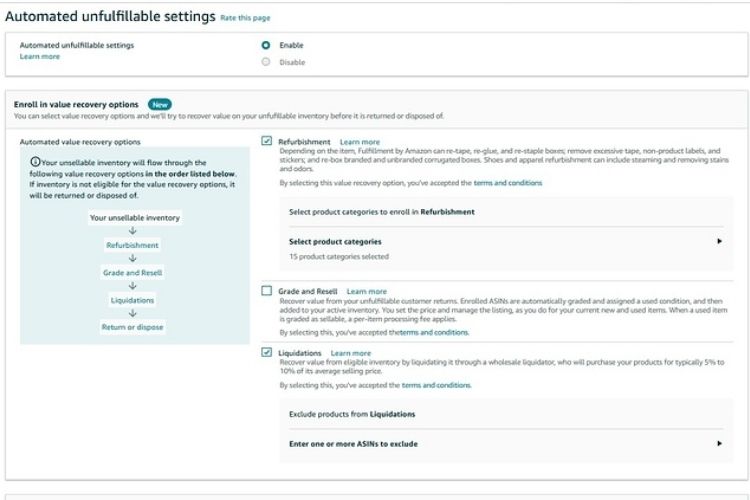
You can complete the configuration in minutes using these steps:
- Go to Settings → Fulfillment by Amazon → Automated Unfulfillable Settings
- Toggle on “Automatically remove unfulfillable inventory”
- Set thresholds to 270 days for regular products or 180 days for seasonal items
- Choose “Return to address” if you can resell elsewhere, or “Dispose” for damaged goods
- Save settings and confirm via email
Use FBA Liquidations Last
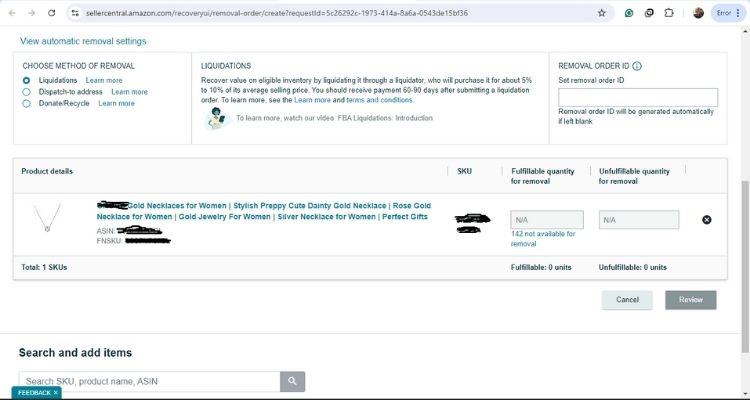
Liquidation recovers 5-10% of selling price, typically $2-$8 per unit for $40-$80 products. Although low, this still beats paying $3-$33 in removal fees with zero return. For instance, liquidating 100 units at $50 each nets $300-$500 versus losing $600-$1,200 in removal costs.
You need to complete these steps to initiate liquidation:
- Navigate to Inventory → Liquidations in Seller Central
- Select SKUs you want to liquidate
- Click “Create Liquidation Order” and review estimated recovery value
- Confirm order (note: cannot be canceled once submitted)
- Wait 60-90 days for processing and payment minus 15% referral fees
- Track orders under Reports → Fulfillment → Removal Order Detail for future optimization
>>> Read more: Amazon FBA Fees: Complete Guide To All Costs & How To Save
Frequently Asked Questions (FAQs) About Amazon FBA Removal Fees
Navigate to Inventory → Manage Inventory in Seller Central. Select products, click Action → “Create Removal Order”, choose your removal method (return, dispose, or liquidate), enter quantities, and confirm your address. Amazon processes orders within 1-3 months.
Removal fees range from $1.04 to $14.32+ per unit based on size and weight. Standard-size items under 0.5 lb cost $1.04, while large bulky items over 10 lb cost $14.32 plus $1.06 per additional pound.
Amazon charges aged inventory surcharges after 181 days ($0.50-$0.69 per cubic foot monthly). After 365 days, long-term storage fees jump to $6.90 per cubic foot. These penalties can exceed your product’s value and hurt your IPI score.
Removal fees are non-refundable once processed. However, you can dispute charges if Amazon makes processing errors by contacting Seller Support with your Order ID and evidence.
Get Professional Help from Megaficus
Mastering Amazon FBA removal fees is critical for sellers who want to protect profit margins, optimize inventory turnover, and avoid costly aged inventory penalties. Understanding fee structures, calculation methods, and proactive removal strategies helps you minimize expenses by up to 50%, prevent long-term storage charges from accumulating, and make informed decisions about when to liquidate, return, or dispose of slow-moving inventory.
Don’t hesitate to contact Megaficus for expert guidance on comprehensive inventory management strategies, cost optimization tactics, and FBA account analysis to minimize removal expenses while maximizing your overall Amazon business profitability in today’s competitive marketplace.