How much do you actually pay to store inventory in Amazon’s warehouses each month? Amazon FBA storage fees vary by season, size, and duration, often catching sellers off guard with hidden surcharges. Megaficus shows you current rates, calculation methods, and proven strategies to cut storage costs significantly.
Quick Summary of Amazon FBA Storage Fees
| Fee Type | When Charged | Rate Range | Key Factors |
|---|---|---|---|
| Monthly Storage | Every month (7th-15th) | $0.78-$4.28 per cubic foot | Product size, season (Jan-Sep vs Oct-Dec), storage utilization ratio |
| Aged Inventory Surcharge | Monthly for items 181+ days | $0.50-$6.90 per cubic foot | Storage duration (181-365+ days), product category exclusions |
| Dangerous Goods (Hazmat) | Every month (7th-15th) | $0.78-$3.63 per cubic foot | Hazmat classification, season, requires SDS documentation |
What Are Amazon FBA Storage Fees?
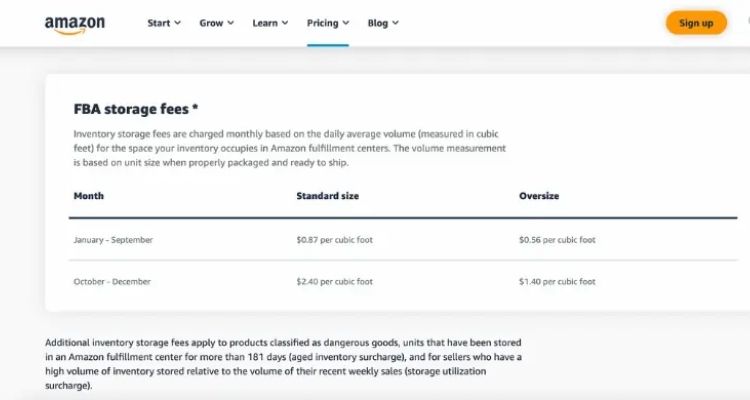
FBA storage fees are monthly charges that Amazon applies to sellers for storing their inventory in Amazon’s fulfillment centers. These fees are calculated based on the volume of space each product occupies, measured in cubic feet, which takes into account the product’s dimensions when properly packaged and ready to ship.
Amazon charges these fees to cover the operational costs of warehouse space, inventory management systems, and maintaining proper storage conditions for products until they are sold and shipped to customers.
Why Storage Fees Matter for Sellers?
Storage fees significantly impact FBA sellers’ profitability and operations in several ways:
- Profit margins shrink: Monthly charges and aged inventory fees (items stored over 365 days) directly reduce net profit, making slow-moving products unprofitable.
- Cash flow constraints: Money tied up in excess inventory cannot be used for new products or business growth.
- Constant inventory monitoring: Sellers must regularly track stock age and sales velocity to avoid escalating fees through pricing adjustments or removal orders.
- Pricing dilemmas: Rising storage costs force sellers to either increase prices (reducing competitiveness) or accept lower margins.
- Administrative burden: Managing aged inventory requires time reviewing reports, optimizing listings, and processing removals.
- Space penalties: Amazon charges premium rates for slow-selling items to prioritize warehouse space for high-turnover products.
Amazon FBA Storage Fee Categories Explained
Amazon charges three main storage fee types: monthly charges, aged inventory surcharges, and dangerous goods rates.
Monthly Inventory Storage Charges
Amazon bills sellers monthly for warehouse space based on cubic footage occupied by inventory. These rates vary significantly between off-peak and peak seasons, with additional surcharges applied when storage utilization ratios exceed 22 weeks.
Low-Season Rates (January Through September)
During off-peak months, Amazon charges reduced storage fees to reflect lower warehouse demand. Base rates begin at $0.78 per cubic foot for standard-size products and $0.56 for oversize items when storage utilization ratios stay below 22 weeks. However, sellers with slower-moving inventory incur escalating surcharges:
| Storage Utilization Ratio | Standard-Size | Oversize |
|---|---|---|
| Below 22 weeks | $0.78 per cubic foot | $0.56 per cubic foot |
| 22 – 28 weeks | $1.22 per cubic foot(Base: $0.78 + Surcharge: $0.44) | $0.79 per cubic foot(Base: $0.56 + Surcharge: $0.23) |
| 28 – 36 weeks | $1.54 per cubic foot(Base: $0.78 + Surcharge: $0.76) | $1.02 per cubic foot(Base: $0.56 + Surcharge: $0.46) |
| 36 – 44 weeks | $1.94 per cubic foot(Base: $0.78 + Surcharge: $1.16) | $1.19 per cubic foot(Base: $0.56 + Surcharge: $0.63) |
| 44 – 52 weeks | $2.36 per cubic foot(Base: $0.78 + Surcharge: $1.58) | $1.32 per cubic foot(Base: $0.56 + Surcharge: $0.76) |
| 52+ weeks | $2.66 per cubic foot(Base: $0.78 + Surcharge: $1.88) | $1.82 per cubic foot(Base: $0.56 + Surcharge: $1.26) |
High-Season Pricing (October Through December)
During Q4 peak season, Amazon significantly increases storage rates to manage heightened warehouse demand from holiday shopping. Base rates jump to $2.40 per cubic foot for standard-size items and $1.40 for oversize products, with identical surcharge structures applied to each utilization tier:
| Storage Utilization Ratio | Standard-Size | Oversize |
|---|---|---|
| Below 22 weeks | $2.40 per cubic foot | $1.40 per cubic foot |
| 22 – 28 weeks | $2.84 per cubic foot(Base: $2.40 + Surcharge: $0.44) | $1.63 per cubic foot(Base: $1.40 + Surcharge: $0.23) |
| 28 – 36 weeks | $3.16 per cubic foot(Base: $2.40 + Surcharge: $0.76) | $1.86 per cubic foot(Base: $1.40 + Surcharge: $0.46) |
| 36 – 44 weeks | $3.56 per cubic foot(Base: $2.40 + Surcharge: $1.16) | $2.03 per cubic foot(Base: $1.40 + Surcharge: $0.63) |
| 44 – 52 weeks | $3.98 per cubic foot(Base: $2.40 + Surcharge: $1.58) | $2.16 per cubic foot(Base: $1.40 + Surcharge: $0.76) |
| 52+ weeks | $4.28 per cubic foot(Base: $2.40 + Surcharge: $1.88) | $2.66 per cubic foot(Base: $1.40 + Surcharge: $1.26) |
For example, if you stored 350 average daily units of kitchen blenders (standard-size products) in June, with each unit measuring 1.5 ft × 2 ft × 1.8 ft (5.4 cubic feet per unit), and your storage utilization ratio stands at 20 weeks:
- Formula: Monthly storage fees = average daily units × volume per unit × applicable rate
- Calculation: 350 average daily units × 5.4 cubic feet per unit × $0.78 rate (standard-size, Jan-Sept) = $1,474.20 in monthly storage fees
Aged Inventory Surcharge for Long-Term Stock
Amazon charges additional fees for products stored longer than 181 days to encourage faster inventory turnover. These surcharges are assessed through monthly inventory snapshots taken on the 15th of each month, with charges applied between the 18th and 22nd of the following month.
Fees are calculated per cubic foot using a first-in, first-out (FIFO) methodology and stacked on top of regular monthly storage fees. Here are the current aged inventory surcharge rates based on storage duration:
| Inventory Age | Fee (per cubic foot) | Notes |
|---|---|---|
| 181 – 210 days | $0.50 | *Excludes clothing, shoes, bags, jewelry, watches |
| 211 – 240 days | $1.00 | *Excludes clothing, shoes, bags, jewelry, watches |
| 241 – 270 days | $1.50 | *Excludes clothing, shoes, bags, jewelry, watches |
| 271 – 300 days | $5.45 | All categories |
| 301 – 330 days | $5.70 | All categories |
| 331 – 365 days | $5.90 | All categories |
| 365+ days | $6.90 or $0.15 per unit | Whichever is greater |
For example, if you stored 120 average daily units of wireless headphones for 215 days, with each unit occupying 0.8 cubic feet:
- Formula: Aged inventory surcharge = units × volume per unit × applicable rate
- Calculation:
- 120 units × 0.8 cubic feet = 96 cubic feet total
- Fee for 211-240 day inventory = $1.00 per cubic foot
- Total aged inventory surcharge = 96 cubic feet × $1.00 = $96.00
Dangerous Goods (Hazmat) Storage Fees
Products containing lithium batteries, flammable liquids, aerosols, or hazardous materials require specialized warehouse facilities with climate control and fire suppression systems. As a result, Amazon charges higher storage rates for these dangerous goods compared to standard products.
Common hazmat items include electronics with batteries, beauty products with alcohol, cleaning supplies, and perfumes. You can verify your product’s classification using the ASIN Lookup Tool in Seller Central under “Manage Dangerous Goods Classification”.
Here are the current dangerous goods storage rates by product size and season:
| Product Size | January – September | October – December |
|---|---|---|
| Standard-Size | $0.99 per cubic foot | $3.63 per cubic foot |
| Oversize | $0.78 per cubic foot | $2.43 per cubic foot |
For instance, if you stored 200 average daily units of wireless power banks (standard-size hazmat) in July, with each unit measuring 0.6 cubic feet:
- Formula: Monthly storage fees = average daily units × volume per unit × applicable rate
- Calculation:
- 200 units × 0.6 cubic feet = 120 cubic feet total
- Hazmat rate (Jan-Sep) = $0.99 per cubic foot
- Total monthly storage fees = 120 × $0.99 = $118.80
During peak season, the same inventory would cost 120 × $3.63 = $435.60 monthly, representing a 267% increase.
Therefore, strategic inventory planning becomes crucial for hazmat products to minimize peak-season storage expenses. Sellers must provide Safety Data Sheets (SDS) and meet specific packaging requirements to participate in the FBA Dangerous Goods Program.
How to Calculate Amazon FBA Storage Fees
Amazon sellers can estimate storage costs using two approaches, each serving different planning needs. The first method provides rapid estimates for decision-making, while the second delivers precise calculations for budget management.
Quick Manual Calculation
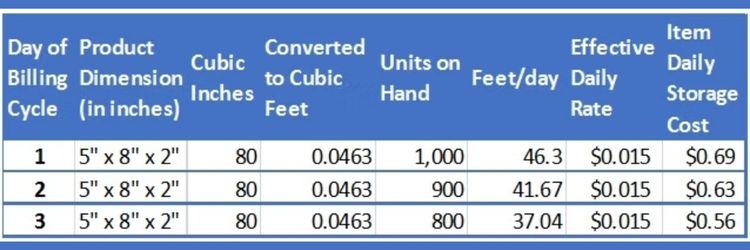
For fast estimates, multiply your average daily inventory units by the volume each unit occupies, then apply the relevant storage rate. This formula works as follows: Storage Fee = Average Daily Units × Cubic Feet per Unit × Monthly Rate.
For instance, if you maintain 400 units averaging 1.5 cubic feet each during off-peak season, your estimated monthly cost equals 400 × 1.5 × $0.78 = $468. This approach helps compare product viability quickly without accessing multiple reports.
However, this method excludes utilization surcharges and aged inventory fees, making it suitable only for preliminary assessments.
Tool-Based Accurate Calculation
For comprehensive cost planning, Amazon provides official calculation tools in Seller Central that automatically include all applicable fees:
- Fee preview report: Access under Reports > Payments in Seller Central to view projected charges for the upcoming billing cycle, including base storage rates, utilization surcharges, and aged inventory fees combined by ASIN.
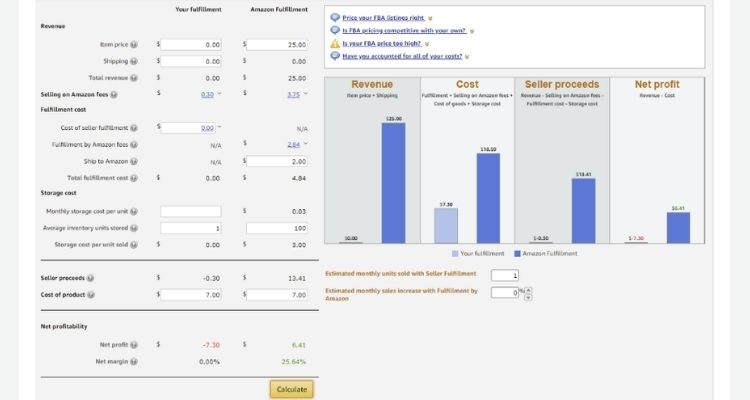
- FBA revenue calculator: Input product dimensions, quantity, and expected storage duration before sending inventory to receive automatic calculations incorporating all fees plus profit margin projections.
- Monthly storage fee report: Review actual charges between the 7th and 15th of each month under Reports > Fulfillment to track real costs and identify optimization opportunities.
Effective Strategies to Lower Your FBA Storage Expenses
Reducing storage costs requires proactive inventory management and strategic decision-making throughout the year. Megaficus recommends implementing these proven tactics to minimize fees while maintaining healthy stock levels.
Strategy #1: Optimize Your Inventory Stock Levels
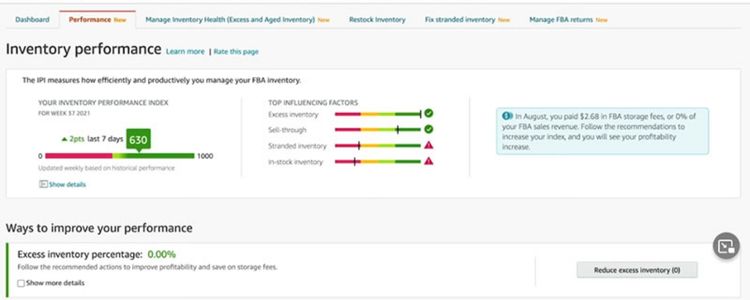
Sellers should monitor their Inventory Performance Index (IPI) weekly via the Inventory Performance Dashboard, keeping scores above 400. When inventory reaches 150-160 days, you should launch Lightning Deals or 15-25% discounts to avoid the 181-day surcharge. Additionally, you should remove or liquidate unsold items through Amazon Outlet to prevent accumulating monthly fees.
Your storage utilization ratio requires close monitoring in the FBA Dashboard, staying below 22 weeks. Once ratios exceed this threshold, you should pause new shipments and boost advertising spend on current stock. For ratios above 28 weeks, sellers must remove the slowest 15-20% of SKUs immediately to prevent escalating surcharges.
Strategy #2: Analyze and Address Slow-Moving Inventory
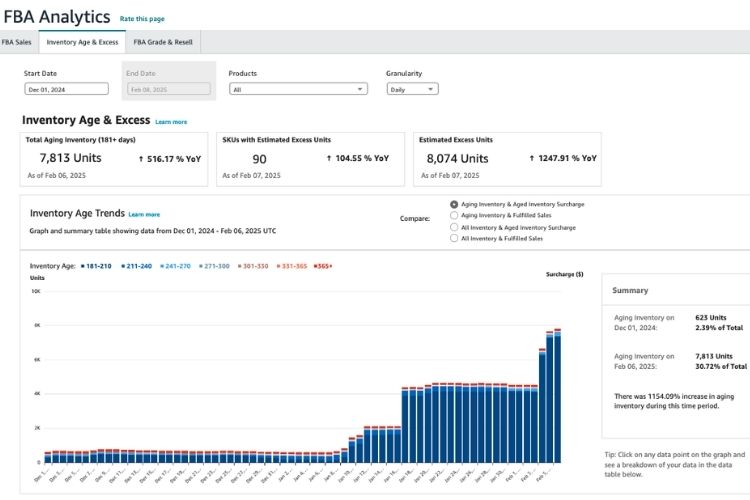
Sellers should review the Inventory Age Report monthly under Reports > Fulfillment to identify low sell-through products. When items remain unsold beyond 90 days, you should launch Subscribe & Save discounts, bundles, or coupons to accelerate sales. Additionally, you should analyze pricing against competitors to maintain competitiveness.
For inventory staying slow despite promotions, you should use FBA Liquidations to recover 5-10% of value while avoiding storage fees. Alternatively, sellers should submit removal orders before 181 days to minimize expenses and free capacity for faster-moving items.
Strategy #3: Implement Price Reductions and Promotional Campaigns
Sellers should create targeted discount campaigns when inventory ages beyond 120 days, starting with 10-15% price reductions through coupon codes or Subscribe & Save offers. When products reach 150 days, you should escalate to Lightning Deals or Deal of the Day with 20-30% discounts to generate urgency and accelerate sell-through.
Additionally, you should combine pricing strategies with increased advertising spend during these promotional periods to maximize visibility and conversion rates. For seasonal or holiday inventory approaching peak season end, sellers should implement aggressive clearance pricing of 30-40% off rather than carrying stock into low-demand periods with triple storage rates.
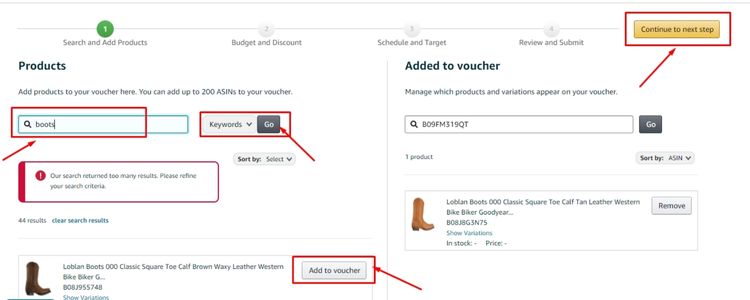
Furthermore, you should test bundle offers pairing slow-moving items with bestsellers to move excess inventory while maintaining overall profit margins and avoiding individual product markdowns.
Strategy #4: Leverage the Removal Recommendation Tools
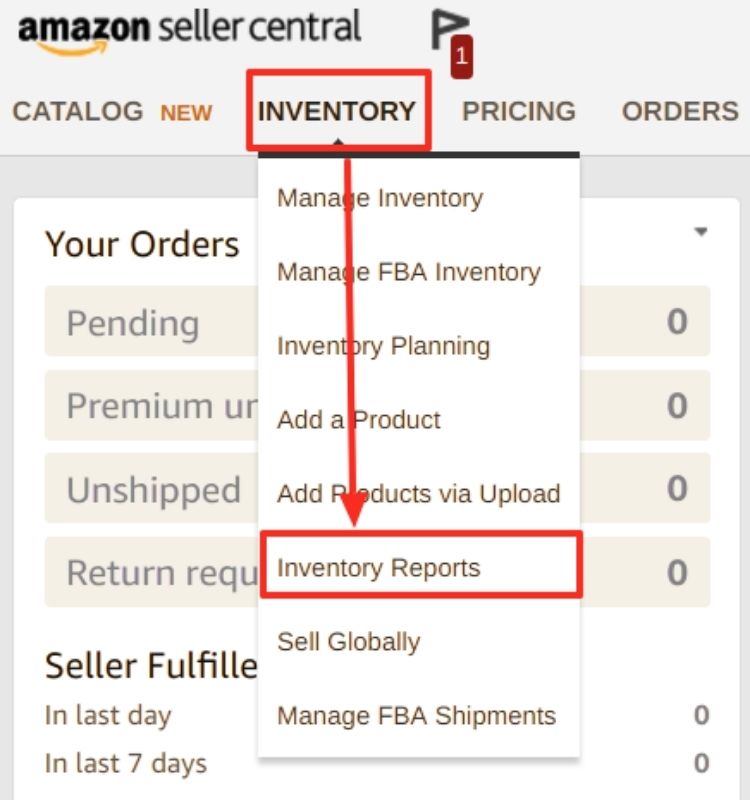
Sellers should check the Recommended Removals report under Inventory Planning for products approaching 170-175 days in storage. You should submit removal orders by the 14th of each month to avoid the 181-day surcharge on the 15th, comparing removal fees ($0.97-$2.83) against projected storage costs first.
For products with removal fees exceeding their remaining value, sellers should choose disposal orders instead of return shipments to minimize total costs. Furthermore, you should coordinate removal timing strategically during off-peak months when warehouse capacity pressures are lower and processing times faster than during Q4 peak season.
Storage Volume Limits and IPI Score Impact
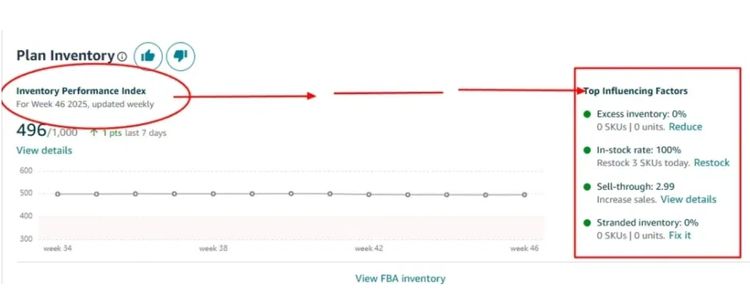
Amazon assigns storage capacity limits based on your Inventory Performance Index (IPI), a score from 0 to 1000. The IPI is calculated from excess inventory percentage, 90-day sell-through rate, stranded inventory, and in-stock rate for bestsellers. View your IPI score and capacity limits in the Inventory Performance Dashboard under Seller Central.
Your IPI score determines storage capacity through three threshold ranges, each with different restrictions:
- Below 400: Restricted storage capacity with potential shipment blocks when limits are reached, requiring inventory removal or sell-through before sending new stock.
- 400-450: Standard capacity limits with moderate flexibility for inventory planning and seasonal demand preparation.
- Above 450: Increased storage capacity, allowing greater inventory flexibility and reduced risk of shipment restrictions during peak seasons.
Consequences of Unpaid Storage Fees and Their Business Impact
Unpaid storage fees result in the following account restrictions and penalties:
- Listing suppression: Your product listings become inactive and invisible to customers, immediately halting all sales revenue from affected ASINs.
- Inventory lockdown: Amazon blocks access to your stored inventory, preventing both sales fulfillment and removal order submissions until payment is complete.
- Shipment restrictions: You cannot create new shipments or send additional inventory to fulfillment centers, limiting your ability to restock popular items.
- Account suspension risk: Continued non-payment escalates to full account suspension, terminating all selling activities and potentially triggering third-party debt collection procedures.
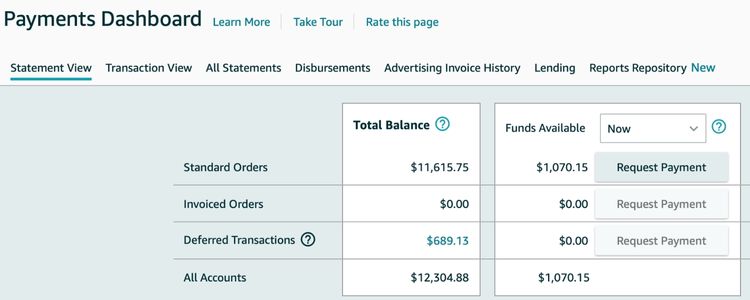
To prevent these consequences, sellers should enable automatic payment methods in Account Settings, monitor the Payments Dashboard weekly for upcoming charges, and maintain a minimum account balance buffer covering 60-90 days of projected storage fees.
>>> Read more: Amazon FBA Fees: Complete Guide To All Costs & How To Save
Frequently Asked Questions About Amazon FBA Storage Fees
Oversize items (exceeding 18″ × 14″ × 8″) are charged per cubic foot: Average Daily Units × Cubic Feet × Rate. Rates are $0.56 off-peak (Jan-Sep) and $1.40 peak season (Oct-Dec).
Use the FBA Revenue Calculator for pre-storage estimates, the Fee Preview Report (Reports > Payments) for upcoming charges, and the Monthly Storage Fee Report for historical cost analysis by ASIN.
Yes. Peak season (Oct-Dec) rates are 200-250% higher than off-peak (Jan-Sep). Standard-size increases from $0.78 to $2.40 per cubic foot; oversize rises from $0.56 to $1.40.
Access under Reports > Payments before the 7th monthly to view estimated charges, including surcharges. Use insights to adjust inventory, plan removals, or launch promotions proactively.
Get Professional Help from Megaficus
Managing Amazon FBA storage fees effectively protects your profit margins and prevents unnecessary expenses. These charges escalate quickly with aged inventory and peak-season rates, directly impacting your bottom line. Understanding fee structures and implementing smart inventory strategies helps you avoid costly surcharges while maintaining healthy cash flow.
Contact Megaficus for expert guidance on reducing FBA storage costs and developing tailored strategies that maximize your selling profits.