Struggling to stand out on Amazon’s crowded marketplace? Amazon Headline Search Ads put your brand at the top of search results where shoppers are ready to buy. Without the right strategy, you risk wasting ad spend with minimal returns. Learn how to launch profitable Headline Search Ads that boost visibility and maximize ROI in this guide by Megaficus.
Quick Summary
- Amazon Headline Search Ads (Sponsored Brands) are pay-per-click ads at the top of search results featuring brand logo, headline, and up to 3 products for brand awareness and sales.
- Three ad formats: Product Collection (3 products), Store Spotlight (Brand Store traffic), and Video (15-30 seconds, higher engagement).
- Eligibility: Amazon Brand Registry enrollment, active/pending trademark, professional seller account, and compliant products only.
- Technical requirements: Logo: 400×400px minimum; headline: 50 characters max (sentence case); product images: 72 ppi with a white background; optional video: MP4/MOV format.
- Optimization: Target ACoS under 30%, CTR above 0.5%, conversion rate above 7%. Adjust bids weekly, add negative keywords, and A/B test headlines for best performance.
What Are Amazon Headline Search Ads?
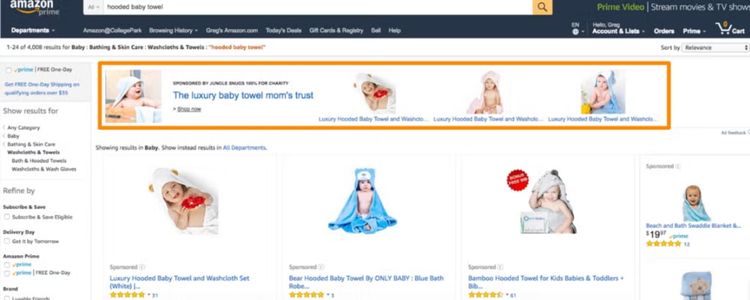
Amazon Headline Search Ads are a type of ad that helps sellers promote their products and brand to customers. They use keywords to target shoppers and charge sellers only when someone clicks the ad. These ads appear at the top of search results on both computers and mobile devices.
How Amazon Headline Search Ads Differ From Other Ad Types
Understanding the differences between Amazon’s ad types helps you choose the right strategy for your goals. Each format serves a distinct purpose in your advertising funnel, from driving immediate sales to building long-term brand awareness:
| Ad Type | Description | Best For | Key Considerations |
|---|---|---|---|
| Sponsored Brand Ads (Headline Search Ads) | Promote a brand and multiple products; large ad at the top of search results; includes logo and custom headline | Increasing brand awareness and showcasing multiple products | More setup effort; usually higher engagement and ROI |
| Sponsored Product Ads | Promote one product at a time; appear within search results; simple setup and lower cost per click | Driving quick product sales | Basic Amazon ad tool; easy and fast to launch |
| Display Ads | Appear on Amazon and external sites; reach audiences not actively shopping | Expanding reach beyond active shoppers | Slower sales cycle; more for awareness than immediate sales |
| Sponsored Display Ads | Target shoppers on/off Amazon, ideal for retargeting past visitors | Retargeting interested shoppers to boost conversions | Longer sales cycle; works best alongside search ads |
| Amazon DSP | Advanced audience targeting across devices; programmatic advertising | Large-scale, highly targeted campaigns | Requires a higher budget and expertise; not suited for small sellers |
The Role Of Headline Search Ads In Your Business Strategy
Headline Search Ads offer three distinct formats, each serving different marketing objectives. Choosing the right format helps you align your advertising with your business goals and maximize campaign effectiveness.
Product Collection Ads
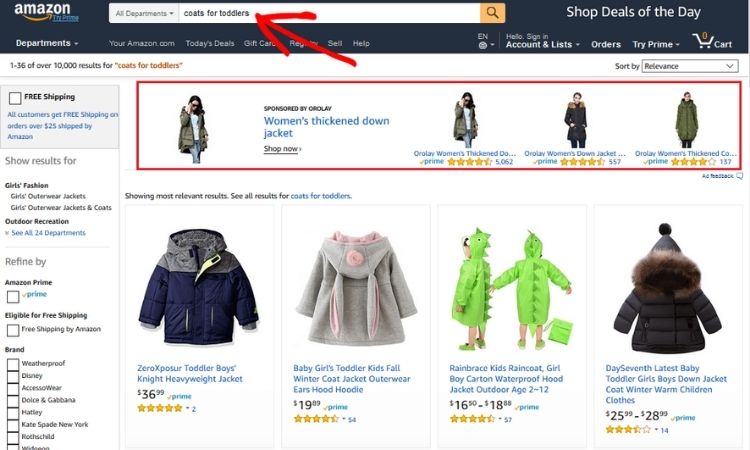
Product Collection Ads let you feature up to three products with images, titles, star ratings, and review counts. This format is particularly useful for sellers with related products because it allows customers to compare options directly within the ad, which can lead to higher engagement and multiple purchases.
By presenting several products together, these ads make it easier for shoppers to make informed decisions quickly. Consequently, sellers can see a direct impact on sales, especially in categories where buyers like to evaluate multiple options before committing.
Store Spotlight Ads
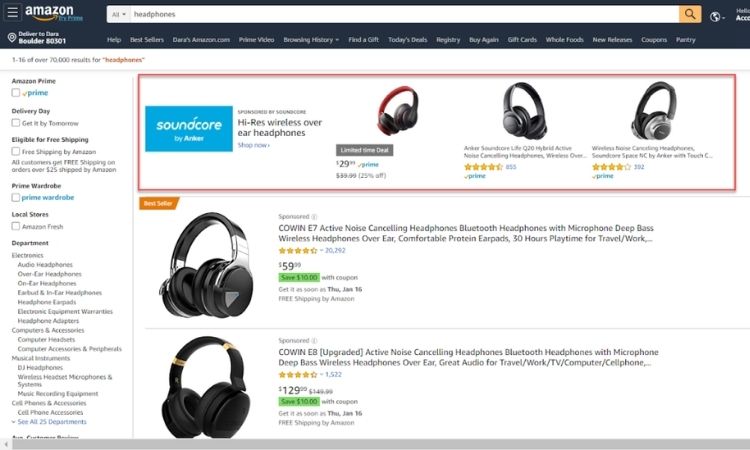
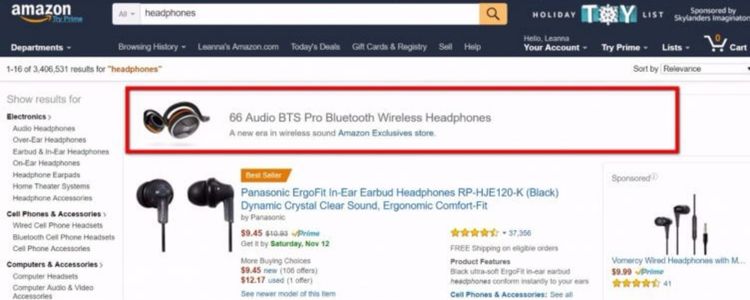
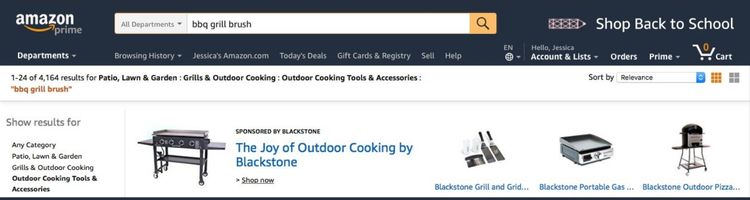
Store Spotlight Ads display your brand logo and a custom headline, guiding customers to your Amazon store rather than individual product pages. This approach helps sellers introduce new products and strengthen overall brand recognition, encouraging shoppers to explore the full range of offerings.
Because the ad focuses on the brand rather than single items, it creates a cohesive experience for the customer. In turn, this can increase long-term loyalty, as buyers become more familiar with your brand and are more likely to return for future purchases.
Video Ads
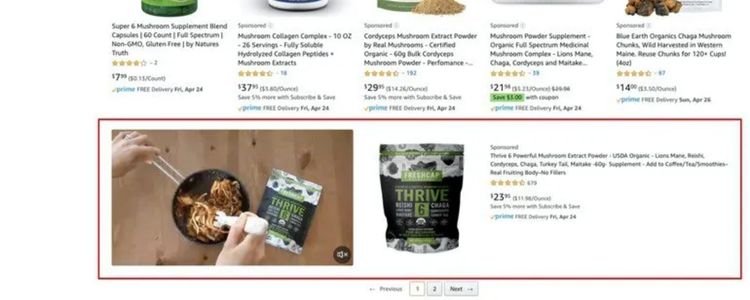
Video Ads allow 15–30 second videos to play directly in search results on both mobile and desktop devices. These ads capture attention more effectively than static images, giving sellers a powerful way to demonstrate product features or tell a short brand story.
The visual and interactive nature of videos keeps shoppers engaged longer, which often translates to higher click-through rates and conversions. As a result, businesses can use this format to not only inform but also emotionally connect with potential customers, boosting both awareness and sales.
Requirements For Launching A Sponsored Brands Or Headline Ads Campaign
Before launching your Sponsored Brands campaign, you need to meet Amazon’s eligibility criteria and technical specifications to ensure your ads pass moderation and display correctly.
Eligibility Requirements
Not every seller can run Sponsored Brands campaigns. Amazon requires specific account qualifications and product compliance to ensure ad quality and brand authenticity.
Account Requirements:
- Must be enrolled in Amazon Brand Registry
- Available for: Vendors, professional sellers, book vendors, KDP authors, and authorized agencies
- Requires active or pending trademark registration
Product Restrictions:
Adult products, used products, refurbished products, and closed category products cannot be advertised. Review Amazon’s creative acceptance policies for the full prohibited categories list.
Technical Specifications
Your ad creative must meet Amazon’s technical standards to pass moderation and display properly across all devices. Here are the exact specifications for each element:
Brand Logo Requirements
Your logo must meet these minimum specifications to ensure clear visibility on both desktop and mobile:
- Size: Minimum 400×400 pixels
- Format: JPEG or PNG
- Resolution: 72 ppi (highest possible)
- Background: White or transparent only
- File Size: Under 5MB
- Requirements: Must be your registered brand logo, legible on mobile and desktop, cannot be a product image, ASIN, lifestyle image, or logo combination
Product Images
Your product images must match Amazon’s listing standards for quality and format:
- Resolution: 72 ppi minimum
- Format: JPEG or PNG
- Background: White background required
- Quality: Professional photos, sharp and well-lit
- Requirements: Must match Amazon listing images, show actual product, no promotional text or badges, no GIFs or animations
Headline Text
Your headline must follow Amazon’s formatting rules and content restrictions:
- Character Limit: Maximum 50 characters (including spaces)
- Format: Sentence case only (no Title Case or ALL CAPS)
- Language: Must match marketplace language
- Restrictions:
- No pricing or discount percentages
- No superiority claims without proof (“Best”, “#1”)
- No pressuring language (“Hurry”, “Act now”)
- No repeated punctuation (???, !!!)
- No competitor brand names
- No special characters (@, *, periods replacing letters)
Video Requirements (for Sponsored Brands Video)
If you choose the video format, your content must meet specific technical and creative standards:
File Specifications:
- Format: MP4 or MOV
- File Size: Maximum 500MB
- Aspect Ratio: 16:9
- Duration: 6-45 seconds (recommended 15-30 seconds)
- Dimensions: 1280×720, 1920×1080, or 3840×2160
- Video Bitrate: Minimum 1mbps
- Frame Rate: 23.976, 24, 25, 29.97, 29.98, or 30 fps
Audio Specifications:
- Format: PCM, AAC, or MP3
- Bitrate: Minimum 96 kbps
- Sample Rate: 44.1 kHz or higher
- Channel: Stereo or mono
Content Requirements
Your video content must follow these guidelines to ensure engagement and compliance:
- Product must appear in the first 2 seconds
- Key benefits mentioned in the first 5 seconds
- Must be understandable without sound (use text or captions)
- Text minimum: 50pts for 720p/1080p, 100pts for 2160p
- No black bars (letterbox/pillar-box formats)
- No customer reviews or star ratings
- No deals/discounts messaging unless live during the campaign
Landing Page Requirements
All ads must link to:
- Your Amazon Brand Store (recommended)
- Product detail pages on Amazon
- Custom landing pages on Amazon
General Campaign Requirements
Beyond creative assets, your campaigns must follow these operational and compliance rules:
- Submit ads at least 1 week before the launch date for moderation
- All content must be suitable for a general audience
- Grammar and spelling must be correct
- Cannot promote out-of-stock products
- Must pause campaigns when products become unavailable
- Holiday promotions must run within a reasonable timeframe of the event
Step-By-Step Guide To Setting Up A Headline Ad Campaign
Follow these six steps to launch and optimize your Sponsored Brands campaign for maximum performance and profitability.
Step 1: Conduct Thorough Research
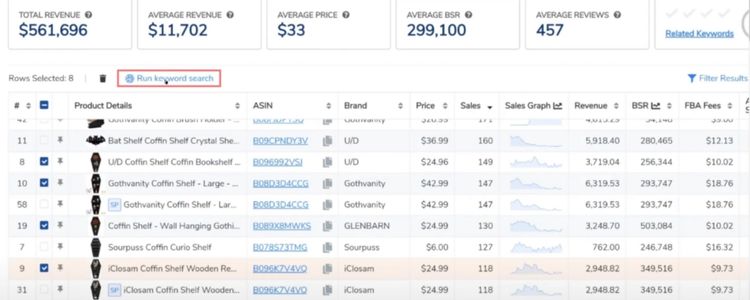
Start by analyzing competitor ads appearing for your target keywords to understand what’s working in your niche. Next, identify your top-performing products with strong conversion rates and healthy profit margins.
Use Amazon’s Search Term Report or tools like Helium 10 to compile 25-50 high-volume keywords, then calculate your target ACoS (15-30% for established products, 40-50% for new launches).
Step 2: Set Up Your Campaign And Ads
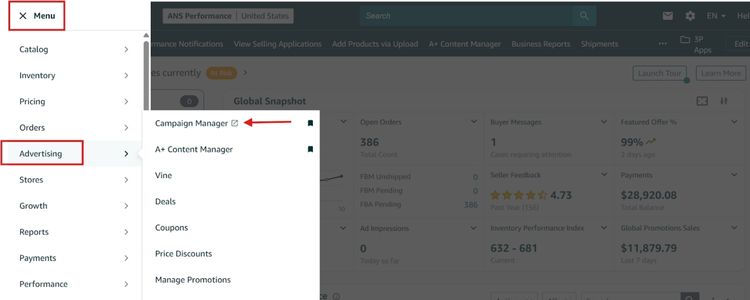
Log in to Seller Central and follow these steps to create your campaign:
- Navigate to Campaign Manager, click “Create Campaign,” and select “Sponsored Brands”.
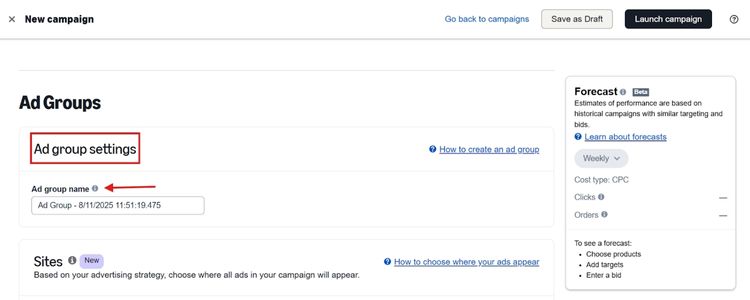
- Name your campaign clearly (example: “SB-KitchenTools-Sales-Jan2025”), set a daily budget $20-50 minimum, and choose “Dynamic bids – down only”.
Next, you should configure your ad creative by selecting your campaign goal (Drive Page Visits, Grow Brand Impression Share, or Reserve Share of Voice), choosing your ad format, uploading your logo, writing a headline under 50 characters, and selecting 3 products with your landing page destination.
Step 3: Choose Relevant Keywords
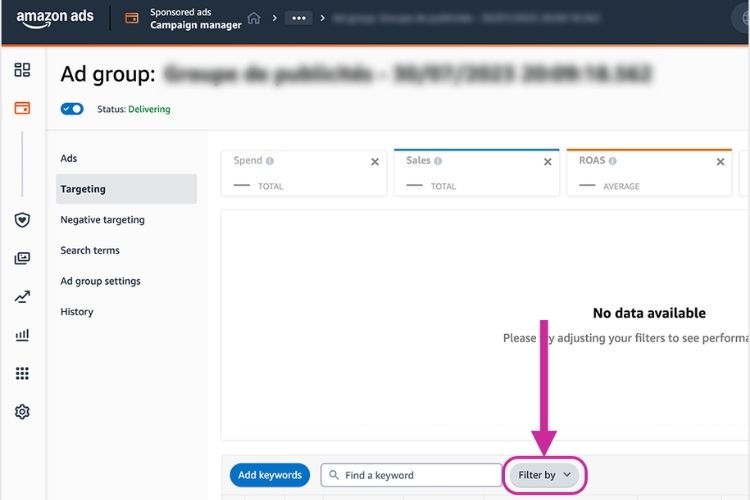
You can add 25–50 keywords by using exact match for control, phrase match for moderate reach, and broad match for discovery. You also need to include your branded terms, category keywords, and long-tail variations so that you can cover different search intents.
Next, you are advised to set your bids following Amazon’s suggested range (typically $0.50–$3.00), bidding slightly above the minimum to secure competitive placement. Additionally, you may allocate 20–30% higher bids for top-of-search positions, as conversions are typically strongest in these spots.
Step 4: Monitor Campaign Performance
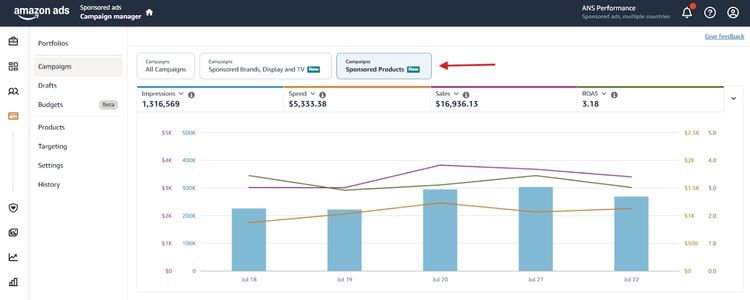
Check daily during the first week to ensure your budget paces correctly and ads display properly. After one week, switch to weekly monitoring by downloading your Search Term Report, Placement Report, and Targeting Report.
Focus on key metrics like impressions show visibility; CTR (target 0.3-0.5%) indicates creative effectiveness, conversion rate (target 10-15%) reflects listing quality, and ACoS measures profitability against your target.
Step 5: Adjust Based On ACoS And ROI
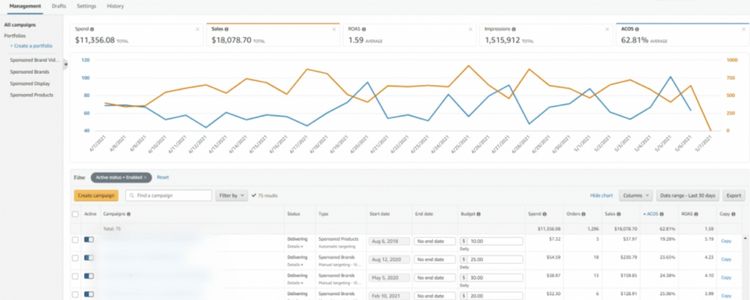
Review your campaign performance and make adjustments based on your ACoS results:
- If ACoS is above target: Lower bids on high-ACoS keywords by 15-25%, add negative keywords for irrelevant searches, and pause keywords with 3x average CPC spend and zero conversions.
- If ACoS is below target: Increase bids on profitable keywords by 15-30%, raise daily budget to capture more volume, and add more related keywords for top-of-search placement.
Step 6: Test And Refine Headlines
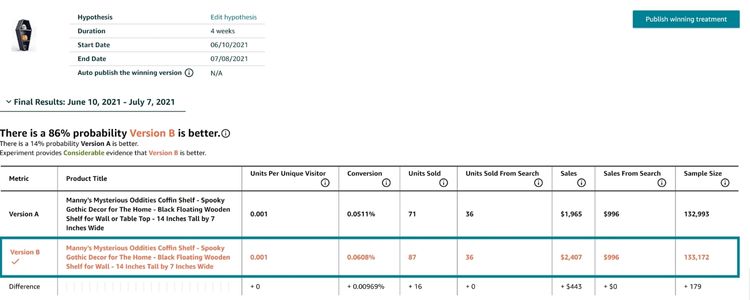
Start by duplicating your campaign with different headlines while keeping products, keywords, and bids identical. Then, you should test benefit-focused, problem-solution, or value proposition angles for 2 weeks. Finally, you compare CTR and conversion rates to identify the winner and implement the top-performing headline across all campaigns.
Tips To Boost Headline Search Ad Performance
Once your campaign is live, apply these proven optimization techniques to improve CTR, lower ACoS, and increase conversions.
Craft An Engaging Headline
Your headline is the first thing shoppers see, directly impacting your click-through rate. Strong headlines can increase CTR by 30-50% compared to generic copy, which means more traffic at the same ad spend.
For example, you should replace “High-Quality Kitchen Tool” with “Cut Prep Time In Half With Professional Chef Knives”. Next, you can test 3-4 variations using different angles: benefit-driven (Save 2 Hours Daily), problem-solving (Stop Wasting Money On Broken Tools), or value-focused (Premium Quality At Half The Price).
Review Impressions And Clicks
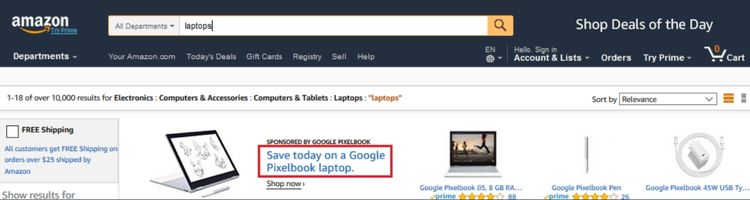
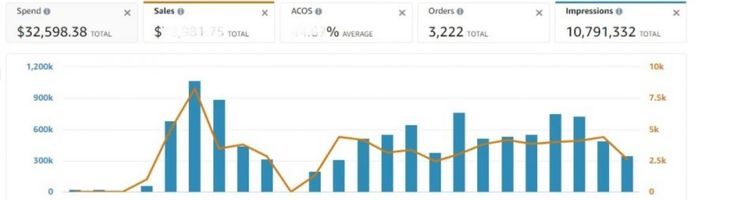
Check your Campaign Manager weekly to review impression and click data. If your impressions are low (under 1,000 per week), you need to increase your bids by 20-30% or add more keywords to expand reach. If your impressions are high but clicks are low (CTR under 0.3%), you should refresh your headline to be more benefit-focused or update your product images to stand out better.
Additionally, you can test different ad formats like switching from Product Collection to Video ads, which typically generate 2x higher engagement. After making these changes, track the results for at least one week before making further adjustments.
Evaluate Key Performance Metrics
You can optimize more effectively by tracking the key indicators behind your ad outcomes.
ACoS (Advertising Cost of Sales)
ACoS shows how much you spend on ads for every dollar of sales. For example, 25% ACoS means you spend $0.25 to make $1.00 in sales. Most sellers target ACoS under 30%, with the average ranging from 29-30% and new sellers typically achieve around 29%.
CTR (Click-Through Rate)
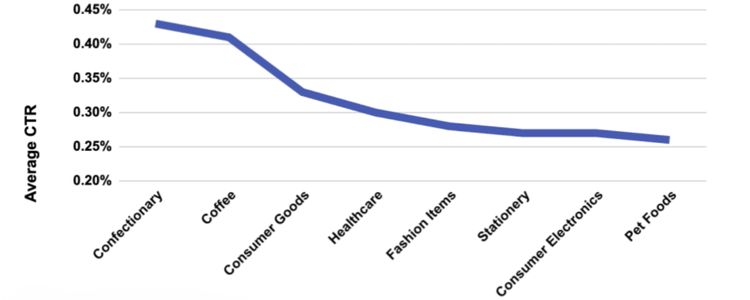
CTR measures how many people click your ad after seeing it. If 100 people see your ad and 1 clicks, that’s 1% CTR. Average CTR is around 0.4%, with good performance ranging from 0.5-1.0% and excellent performance above 1%.
Conversion Rate
Conversion rate shows how many clicks turn into purchases. If 10 people click and 1 buys, that’s 10% conversion rate. Sponsored Brands average around 6.9%, while Amazon’s overall conversion rates range from 9-10%, so you should target above 7% for solid performance.
Impression Share
Impression share indicates how often your ad appears compared to competitors. If customers search 100 times and your ad shows 50 times, you have a 50% impression share. Excellent impression share is above 70%, good performance ranges from 50-70%, and anything below 50% needs improvement.
>>> Read more: Master Amazon Digital PPC: A Starter Guide for New Sellers
Frequently Asked Questions About Amazon Headline Search Ads
The headline grabs shopper’s attention and communicates your main value proposition. It determines whether customers click your ad or scroll past, directly impacting your CTR and sales.
Amazon Search Ads are pay-per-click advertisements appearing in search results. They include Sponsored Products (individual listings), Sponsored Brands (banner ads with logo), and Sponsored Display (retargeting). You only pay when someone clicks.
Amazon Sponsored Brands allows one headline per ad with a 50-character limit. You can create multiple campaigns with different headlines to test which performs best.
A good headline focuses on specific benefits, stays under 50 characters, and uses sentence case. Examples: “Cut Prep Time In Half With Chef Knives” or “Stop Wasting Money On Broken Tools.” Test multiple variations to find what works.
Get Professional Help from Megaficus
Amazon Headline Search Ads offer a powerful way to build brand awareness and drive sales when managed correctly. By following technical requirements, optimizing your campaigns based on performance data, and continuously testing your creative elements, you can achieve strong ROI and sustainable growth.
Success with Sponsored Brands requires strategic planning, consistent monitoring, and data-driven optimization. Mastering these ad campaigns positions your brand to capture high-intent shoppers and outperform competitors in your category.
If you need expert guidance to maximize your Amazon advertising performance and scale your business profitably, the team at Megaficus is ready to help.