Vine fees, free units, no guarantee of positive reviews, and yet plenty of sellers keep coming back to this program because the results, when they land, tend to show up quickly and visibly. The Amazon Vine review program is one of the very few ways to collect early reviews that Amazon actually approves of, which already makes it worth understanding properly. Before you enroll in your next ASIN, here is what the program actually involves, what it will cost you, and how to tell whether it fits your situation.
Quick Summary
- Amazon Vine is an invitation-only program where trusted reviewers, called Vine Voices, receive free products from sellers in exchange for honest, unbiased reviews.
- Eligibility requirements: Sellers must hold a Professional Seller Account with Brand Registry, and products must have fewer than 30 ratings, active FBA inventory, and meet Amazon’s listing standards.
- How to enroll: Enrollment is done through Seller Central under the Advertising tab, where sellers select a product by ASIN, set unit quantity, add variations if needed, and confirm enrollment.
- Costs and fee structure: Fees are charged per parent ASIN: $0 for 1 to 2 units, $75 for 3 to 10 units, and $200 for 11 to 30 units, billed 7 days after the first review is published.
- Other ways to collect reviews: Beyond Vine, sellers can use Seller Central review requests, product inserts, sampling programs, social media, and strong post-purchase customer support.
- Tips for a stronger vine campaign: Enroll high-potential new products, optimize listings before submitting, track post-review metrics, and use reviewer feedback to improve both the product and listing.
What Is the Amazon Vine Program and How Does It Work?
Amazon Vine is an invitation-only program in which Amazon provides free products from participating sellers to a select group of trusted reviewers, called Vine Voices, in exchange for honest, unbiased feedback. The program helps customers make informed purchasing decisions while giving sellers early, credible reviews for their products.
Below is a closer look at how the Amazon Vine program operates:
- Seller enrollment: Sellers opt into the program by agreeing to supply free products in exchange for unbiased reviews. Enrollment signals a commitment to product transparency and customer trust.
- Product selection: Amazon curates which enrolled products enter the Vine catalog, factoring in category relevance, demand, and seller standing.
- Vine reviewer invitation: Amazon identifies and invites reviewers with a strong track record of helpful, high-quality reviews to join as Vine Voices.
- Reviewer selection: Vine Voices browse the available catalog and select products they genuinely want to review. To keep distribution fair, each reviewer can only claim a limited number of items at a time.
- Product shipment: Amazon coordinates direct shipment from the seller to the reviewer at no cost, ensuring the process remains seamless for both parties.
- Review submission: After testing the product, Vine Voices submit a detailed review on Amazon within a set deadline, sharing their honest experience with the broader customer base.

Why Reviews Matter for Your Amazon Business?
Reviews are one of the most powerful drivers of success on Amazon. Here is why building a strong review base through the Vine program can make a real difference for your business:
- Build customer trust: Vine reviews carry weight because they come from verified, experienced reviewers. Shoppers who encounter detailed, unbiased feedback are far more likely to feel confident purchasing a product they have never tried before.
- Improve search rankings: Amazon’s search algorithm factors in review volume and quality when ranking products. A steady stream of reviews helps your listing gain better visibility, which in turn drives more organic traffic.
- Boost Ad performance: Well-reviewed listings naturally convert better, which lowers your cost-per-click and makes your ad spend more efficient. Sponsored Ads perform stronger when the product page itself gives buyers a reason to trust the listing.
- Drive conversions and sales: Social proof is a proven purchase trigger. Positive reviews reduce buyer hesitation and push undecided shoppers toward checkout, directly lifting your conversion rate and overall sales volume.

Amazon Vine Eligibility Requirements for Sellers
Joining Amazon Vine is not open to all sellers. To participate, both your seller account and the products you plan to enroll must meet a specific set of criteria set by Amazon.
Seller requirements:
- Hold an active Professional Seller Account on Amazon.
- Have your brand enrolled in Amazon Brand Registry and be recognized as the Brand Owner.
- Operate eligible FBA offers and not participate in the FBA Onsite program.
Product requirements:
- Have fewer than 30 existing ratings at the time of enrollment.
- Be listed as a buyable FBA offer in new condition and already launched on Amazon.
- Have sufficient FBA inventory available to fulfill reviewer requests.
- Include at least one product image and a complete product description.
- Not classified as an adult product or a bundled product.

How To Enroll In Amazon Vine Step By Step?
Enrolling your products in Amazon Vine takes just a few steps inside Seller Central. Here is a walkthrough of the full process:
Step 1: Access the Vine Dashboard
To get started, log in to your Seller Central account and navigate to the Vine section under the “Advertising” tab. This is where you will manage all your Vine enrollments and track the status of enrolled products.

Step 2: Select a Product to Enroll
Once inside the Vine dashboard, a new window will display your active enrollments alongside a list of recommended products. If your target product does not appear in the list, use the search bar to look it up by ASIN and click “Begin Enrollment” to proceed.

Step 3: Set Enrollment Details
On the Enrollment Details page, specify how many units you want to submit, anywhere from 1 to 30. To include product variations, follow these two steps:
- Click “Add Variations” to select the variations you want to enroll.
- Confirm your selections by clicking “Add Variations” again to save.
Tip: Selecting “All product variations in stock” gives Vine Voices more options to choose from, increasing the chances of receiving diverse, well-rounded feedback across your full product line.

Step 4: Finalize Enrollment
Once your details are set, click “Enroll” and carefully review the program terms and conditions. After confirming your agreement, click “Enroll” one more time to complete the process. A confirmation message will then appear to let you know your submission has been successfully processed.

Amazon Vine Costs And Fee Structure
Joining Amazon Vine comes with a few costs sellers should plan for before enrolling. Beyond the enrollment fee itself, you will also need to account for the value of free units provided to reviewers and any FBA shipping costs tied to fulfilling those orders.
Amazon charges a Vine enrollment fee per parent ASIN, with child ASINs excluded. The fee tier is determined by the number of units enrolled, not the number claimed or reviewed:
| Units Enrolled | Fee |
|---|---|
| 1 to 2 units | $0 |
| 3 to 10 units | $75 |
| 11 to 30 units | $200 |
A few additional details to keep in mind:
- Fees are charged 7 days after the first Vine review is published.
- Enrollments made before October 19, 2023, are subject to a flat $200 fee, regardless of unit count.
- Sellers can adjust their enrollment tier only if no units have been claimed. Once a unit is claimed, the tier is locked, though sellers can still choose to stop enrollment at that point.

Other Ways To Collect Reviews On Amazon
Beyond Amazon Vine, there are several other legitimate ways to build up your product reviews on Amazon:
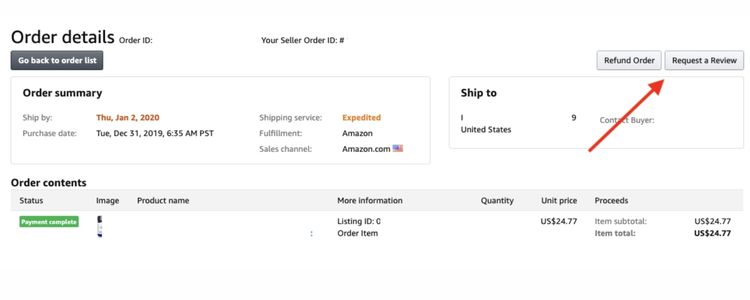
- Request a review via Seller Central: Use the built-in “Request a Review” button in Seller Central to send automated review requests to recent buyers. It is a straightforward, policy-compliant way to collect feedback without any manual outreach.
- Product inserts and packaging: Include a card or note inside your packaging that encourages satisfied customers to leave a review. Keep the language neutral and avoid offering incentives, as this can violate Amazon’s guidelines.
- Product sampling programs: Offer free or discounted products to targeted customers or influencers in exchange for honest reviews. This approach can generate early buzz and attract organic feedback from a broader audience.
- Social media campaigns: Leverage your social media channels to engage with existing customers and encourage them to share their experience on Amazon. Featuring testimonials and product highlights can also drive traffic directly to your listings.
- Customer support and follow-up: Delivering a strong post-purchase experience naturally leads to more positive reviews. Responding quickly to inquiries and resolving issues efficiently gives satisfied customers a reason to leave feedback on their own.
Smart Strategies To Run A Successful Amazon Vine Campaign
Getting approved for Amazon Vine is only half the battle. How you prepare before enrollment and what you do with the results afterward are what ultimately determine whether the program pays off for your business.
Choose the Right Products to Enroll
Selecting the right product to enroll is what determines whether Vine delivers real value or simply costs you free inventory. To get the best return, prioritize new or recently launched listings with fewer than 30 ratings, since these benefit the most from an early review push.
In terms of pricing, products in the $30 to $80 range tend to attract more Vine Voices while keeping your unit cost manageable. Beyond price, a high-demand product in a competitive category with clear search volume is always a stronger candidate than a slow-moving SKU with uncertain demand signals.
Optimize Your Listing Before Enrollment
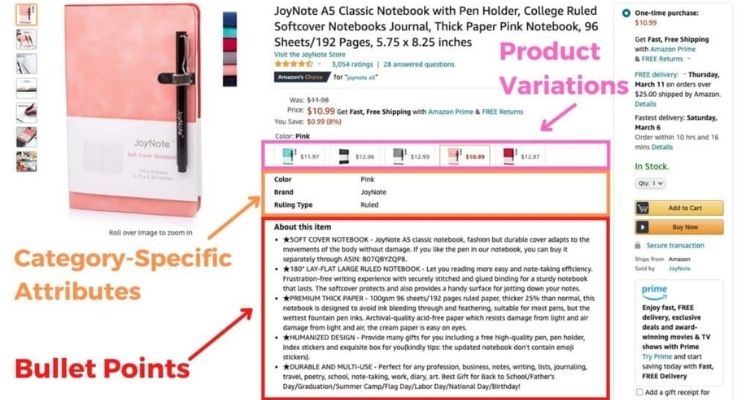
Since Vine reviews reflect exactly what reviewers receive, your listing needs to be fully built out before a single unit is enrolled. Before enrolling, sellers should make sure their listing includes:
- At least 6 high-resolution images, including lifestyle shots and infographics
- Bullet points that cover key use cases, specs, and common buyer questions
- A title with your primary keyword placed within the first 80 characters
Track Performance Metrics After Reviews Go Live
Once Vine reviews start publishing, you should monitor how they affect your core numbers: conversion rate, click-through rate on Sponsored Ads, and organic ranking for target keywords.
For context, enrolling 10 units and seeing your conversion rate climb from 8% to 14% within 30 days is a strong indicator that the reviews are working as intended. Based on this data, you can then decide whether to re-enroll other SKUs or scale ad spend on the reviewed listing.

Use Feedback To Improve The Product And Listing
Rather than treating Vine reviews purely as social proof, experienced sellers use them as structured product research. Specifically, if three or more reviewers flag the same issue, such as unclear assembly instructions or loose packaging, that pattern is worth acting on immediately.
In response, you can update the listing copy to address the concern directly or flag it for your supplier for the next production run. Taking these steps early helps prevent the same complaint from appearing in organic reviews and dragging down your overall rating over time.

FAQs About the Amazon Vine Review Program
No. Vine Voices are selected for their honesty, so their reviews reflect their genuine experience with the product, whether positive or negative. Sellers have no influence over the content or rating of any Vine review.
Negative Vine reviews cannot be removed, but sellers can respond constructively by updating the listing, improving the product, or addressing the concern in the Q&A section.
The enrollment fee is charged per parent ASIN and depends on the number of units enrolled: 1 to 2 units is free, 3 to 10 units cost $75, and 11 to 30 units cost $200. This fee is charged 7 days after the first Vine review is published.
After enrollment, Vine Voices browse the catalog and claim your product at their own pace. Reviews typically begin appearing within a few weeks, though the exact timeline depends on how quickly reviewers receive and evaluate the product.
Get Professional Help from Megaficus
The Amazon Vine Review Program is one of the most reliable ways to give a new listing the early social proof it needs to compete on Amazon. With the right product selection, a fully optimized listing, and a clear understanding of the fee structure, Vine can deliver a measurable return that justifies the upfront cost.
The key is enrolling strategically rather than treating it as a shortcut for every SKU in your catalog. If you are ready to build a smarter review strategy but want expert guidance on when and how to use Vine effectively, the team at Megaficus is here to help you get it right from the start.