Is your Amazon ad spend actually driving growth, or is it just leaking profit? With average CPCs hitting $1.25 in 2026, every wasted click hurts your bottom line more than ever. Relying on “good” keywords isn’t enough to stay competitive. By filtering out irrelevant traffic, you regain control over your margins and reinvest that capital into high-performing winners.
Read on to find out how to find negative keywords for Amazon FBA.
Quick Summary
- Negative keywords are specific terms you exclude from your campaigns so your ads do not trigger when those words appear in a shopper’s query.
- Negative keywords are crucial for profit, especially as average CPCs reach $1.25 in 2026, and use Negative Exact or Negative Phrase match types.
- The Search Term Report is key; negate terms exceeding a “Kill Threshold” of 20–30 non-converting clicks or costing over $50 without sales.
- Employ advanced tactics like branded/non-branded separation and Search Query Isolation to prevent cannibalization and bid against yourself.
What Are Negative Keywords on Amazon?
In practice, Amazon does not fully understand your product positioning. It tries to match your ads with anything that looks somewhat relevant. That is why a premium product can still show up for low-intent searches. For example, if you sell a high-end leather office chair, your ad might appear for queries like “cheap office chair under $50” or “DIY chair ideas.” These clicks rarely convert, but you still pay for each one.
This is where negative keywords come in. They act as a filter that stops your ads from being triggered by searches that do not match your product, your pricing, or your target customer. Instead of letting Amazon test broadly and waste your budget, you gain more control over where your ads appear.
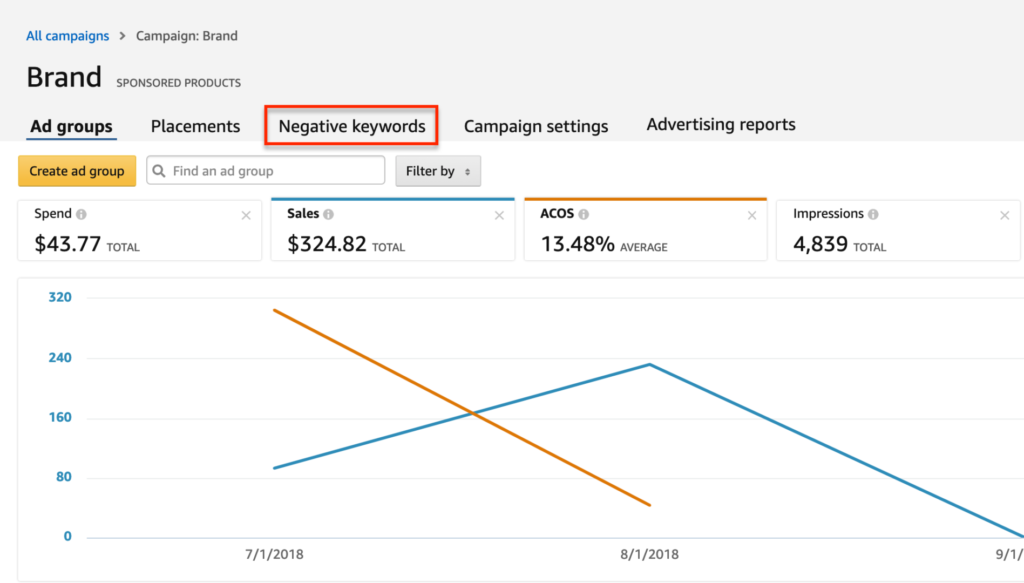
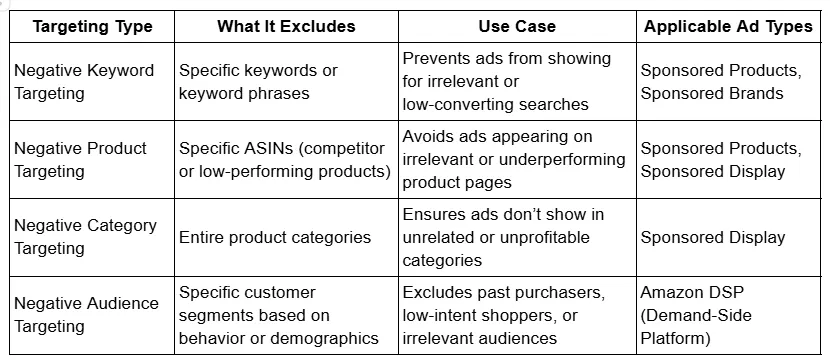
There is a fundamental difference between your standard “positive” keywords and negative keywords. While positive keywords use broad, phrase, and exact matches, Amazon only provides two match types for negative targeting:
| Negative Exact | Negative Phrase |
|---|---|
| Blocks ads for exact keyword matches or close variants (plurals). Ideal for surgically removing specific non-converting terms. | Blocks ads if the query contains the phrase in order. Use as a shield to exclude entire categories like “free” or “used”. |
These can be applied to Sponsored Products and Sponsored Brands campaigns at either the campaign level (affecting all ad groups) or the ad group level (allowing for granular, product-specific filtering).
How Negative Keywords Save Your FBA Profit?
Most sellers don’t lose money because their product is bad. They lose money because their ads are shown to the wrong people.
Every time someone clicks your ad, you pay. That cost is fixed, whether the person buys or not. So when your ad shows up for irrelevant searches, you are paying for traffic that has no chance of converting. Over time, this slowly eats into your margins.
Now consider how this plays out under FBA. Your revenue from each sale already needs to cover fulfillment fees, storage costs, product cost, and advertising spend. That means your margin is already tight. When you add wasted clicks on top of that, profitability drops quickly.
Imagine you sell a premium ergonomic pillow priced at $40. Your product is positioned for comfort and long-term use. But your ads keep showing up for searches like “travel pillow” or “cheap neck pillow.”
People click because your product looks interesting, but once they see the price or realize it does not match their use case, they leave. You pay for the click, but nothing comes back.
Now multiply that by dozens or hundreds of clicks per week. This is exactly what negative keywords help you eliminate.
In many cases, the impact shows up quickly. Sellers often notice that once they clean up their negative keywords, their ACoS drops and conversion rate improves without increasing budget. It is not because they are getting more traffic, but because the traffic they keep is more qualified.
Another important effect is what happens to your budget allocation. When you remove waste, Amazon naturally shifts your spend toward better-performing search terms. This allows your winning keywords to get more impressions and clicks, which further improves performance over time.
In short, negative keywords do not just reduce cost. They help you protect your margins, improve conversion rate, and give more budget to what actually works.
How To Find Negative Keywords For Amazon FBA?
Most beginners identify negative keywords reactively: they see a bad keyword, remove it, then repeat the process again and again. That works, but it is slow and easy to miss bigger opportunities.
A more effective approach is to follow a structured process.
Step 1: Review Amazon Search Term Reports (Core Method)
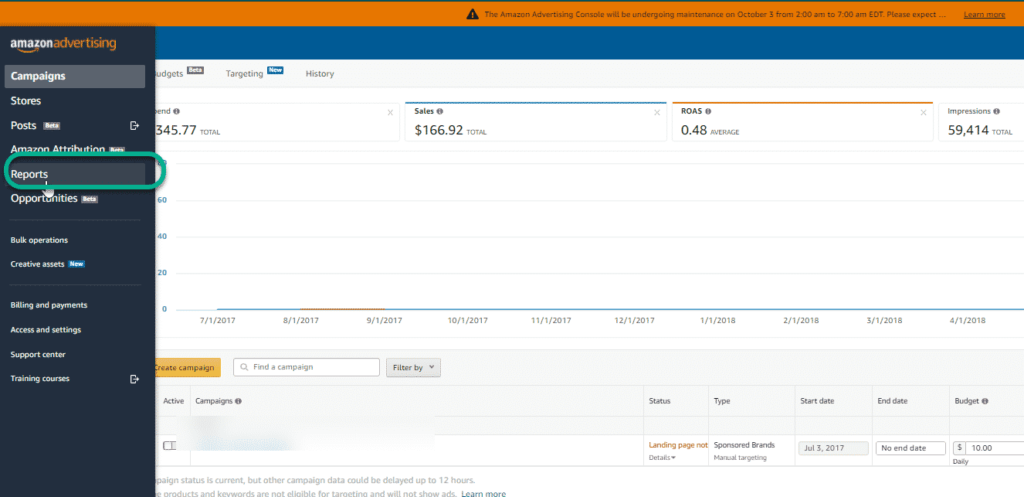
The Search Term Report (STR) is your most valuable diagnostic tool. To find it, navigate to the Campaign Manager in Seller Central or the Advertising Console, go to the Reports section, and generate a Search Term Report. For active campaigns, you should export this data weekly; for mature products, bi-weekly is generally sufficient.
When reviewing the export, focus on these critical columns:
| Metric Group | Purpose/Diagnostic Value |
|---|---|
| Impressions & Clicks | To gauge visibility and statistical weight. |
| Spend | To see where the money is going. |
| Orders & Sales | To identify performance. |
| ACoS & CVR | To judge the efficiency of each query. |
Identify obvious “money burners”:
Sort your report by “Spend” in descending order and look for terms with zero or very low orders.
Most experts recommend setting a “Kill Threshold” of 20–30 clicks with zero orders. Alternatively, you should flag any term that has cost you more than $50 without a single sale.
It is also crucial to distinguish between “early data” and “proven losers.” Avoid negating terms that only have 5 clicks, as Amazon’s algorithm typically needs a learning phase of roughly 14–21 days to find the right customer persona.
Step 2: Spot Patterns and Build Negative Keyword Themes
Don’t just play “whack-a-mole” with individual terms. The most efficient way to scale is through N-gram analysis, which identifies repeated words across multiple failing queries. If you see the word “cheap” appearing in 15 different search terms that all failed to convert, “cheap” is the common thread.
Imagine you sell a high-end ergonomic pillow. Your STR shows spending on “travel pillow,” “pillow for plane,” and “travel neck support,” all with zero sales.
Instead of negating each individually, add “travel” as a negative phrase at the campaign level. This single action blocks all future queries containing “travel,” instantly shielding your budget from an entire category of irrelevant intent.
Step 3: Use Buyer Intent to Decide What to Block
In 2026, Amazon’s algorithm has shifted from simple keyword matching to understanding customer personas, requiring sellers to judge whether a search term matches their specific audience.
For instance, if you sell glass bottles and shoppers search for “plastic,” there is a direct mismatch of intent that necessitates a negative keyword. Similarly, informational queries like “how to,” “tutorial,” or “reviews” indicate a researcher rather than a buyer; if your margins are tight, these should also be negated to protect your budget.
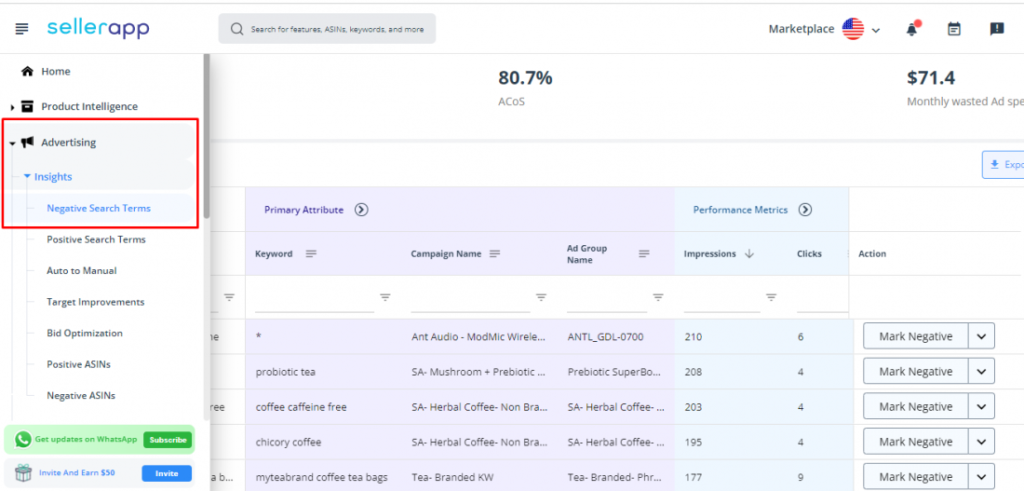
Beyond obvious mismatches, strategic choices must be made regarding competitor targeting and price sensitivity. For competitor brands you do not wish to target, utilizing a negative exact match ensures surgical precision in your exclusions.
Meanwhile, for price-sensitive terms such as “free,” “discount,” or “under $10,” applying negative phrase matches effectively filters out low-intent traffic and preserves your ad spend for high-converting shoppers.
Step 4: Expand with Tools and Keyword Research
Relying only on the Search Term Report (STR) is a reactive strategy; a proactive approach combines manual analysis with third-party PPC tools. Suites like Helium 10, Ad Badger, or SellerApp can perform N-gram analysis at scale and suggest known “junk” terms based on category data.
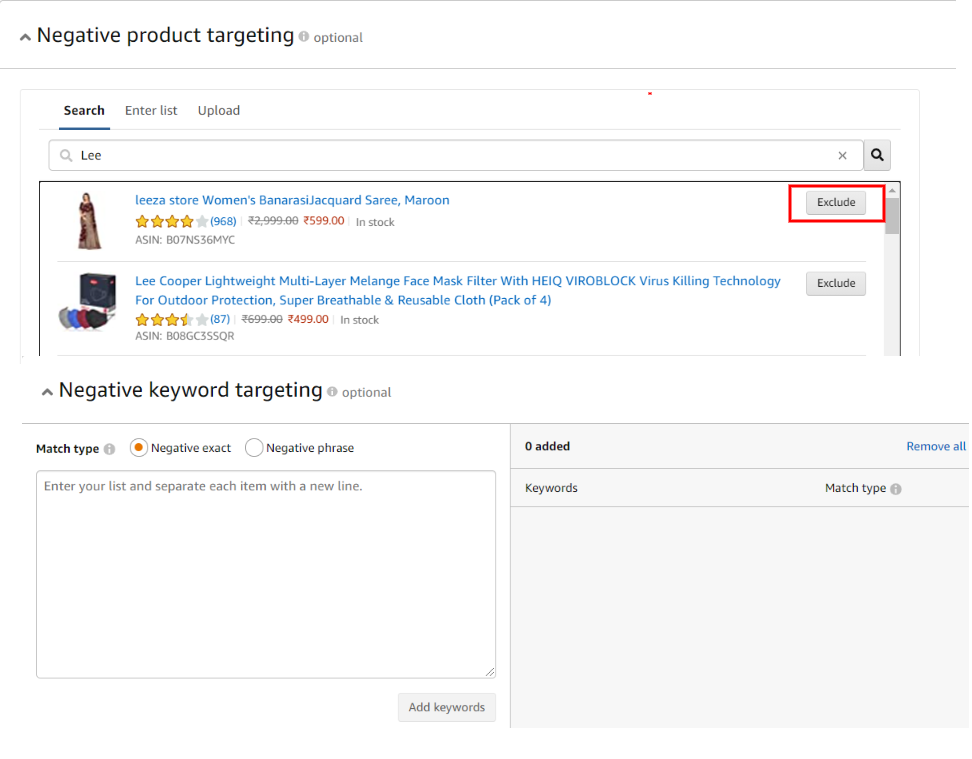
Furthermore, dedicated Keyword Research tools should be utilized to identify tangential niches you do not want. For example, if you sell running shoes, research might show that shoppers also search for “track spikes” or “cleats”; if your product is not a cleat, these terms should be preemptively negated before launching.
Finally, simple Autocomplete suggestions, found by typing your main keyword into the Amazon search bar, can highlight incompatible products (like “earbuds for swimming” if yours are not waterproof), which should be added as negatives immediately.
Step 5: Apply Negatives Correctly in Campaign Manager
To implement your exclusions in the 2026 UI, follow this step-by-step process:
- Navigate to Campaign Manager.
- Select your Campaign and specific Ad Group.
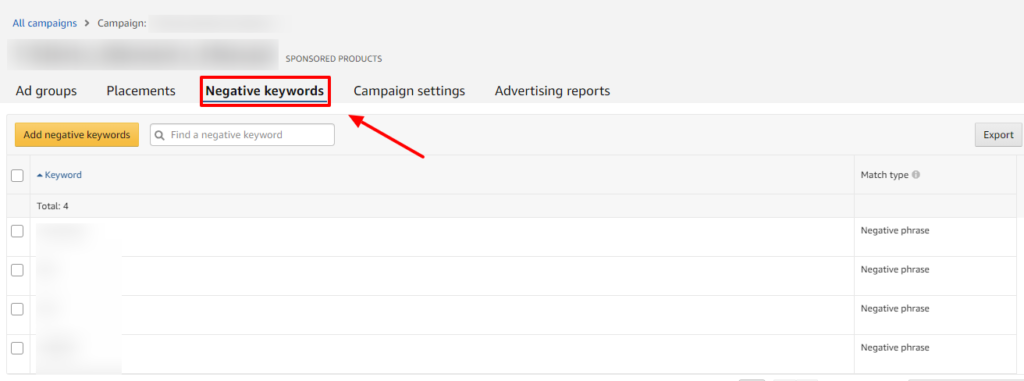
- Click the “Negative targeting” tab.
- Enter your keywords and select the match type:
- Exact: For specific, high-cost terms.
- Phrase: To block broader themes.
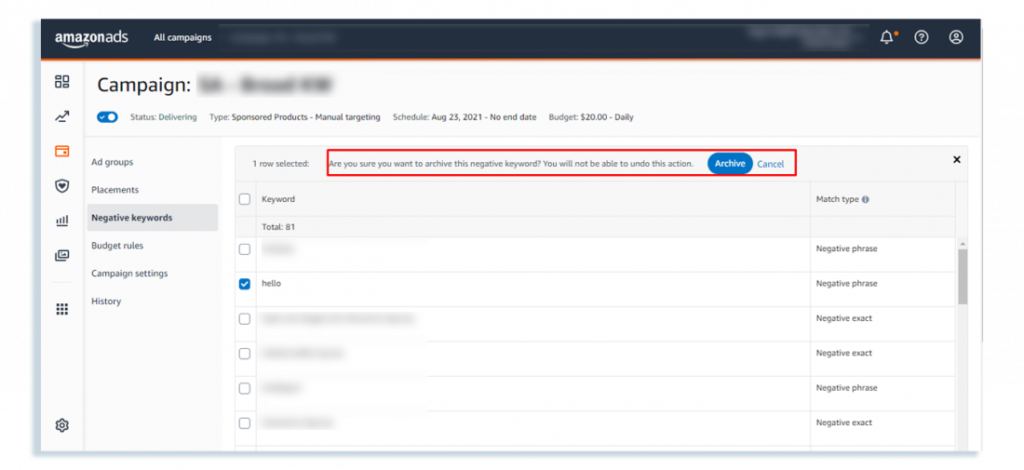
- Save your changes to apply the exclusions.
What Are Advanced Amazon Negative Keyword Tactics for FBA Sellers?
Once you move past basic filtering, negative keywords become more than just a way to cut waste. They turn into a tool for structuring your campaigns and controlling how traffic flows across them.
At this level, the goal is no longer just to stop bad clicks. It is to make sure every search query lands in the right place, with the right bid, and the right strategy behind it.
Separate Branded and Non-Branded Traffic
One of the most overlooked tactics is separating branded and generic searches.
When someone searches for your brand name, they already know you. That traffic is high intent and usually converts well. But if you let your generic campaigns target those queries, you often end up overpaying for clicks you could have captured more efficiently.
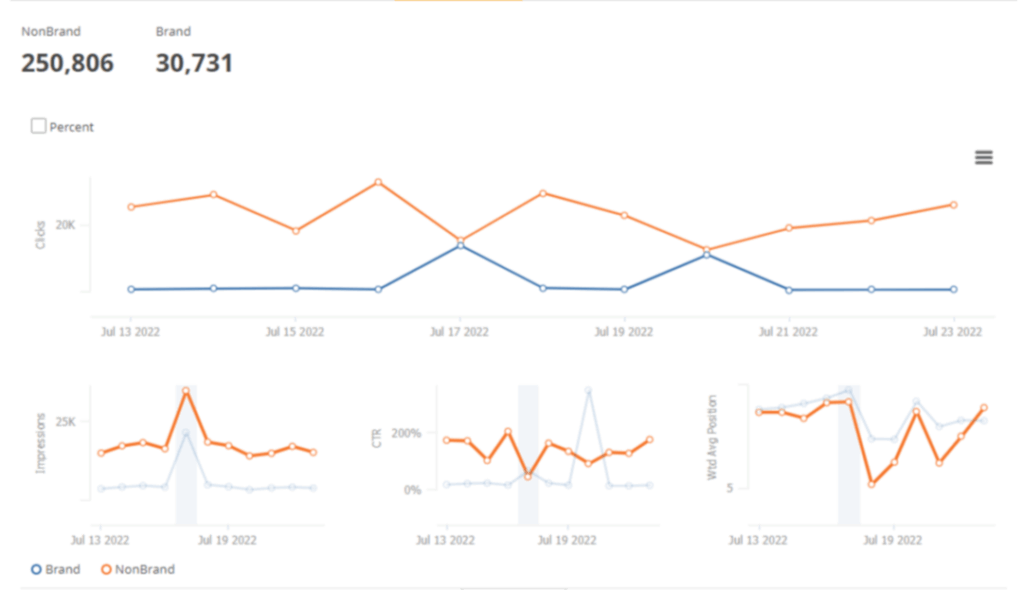
A better approach is to create a dedicated campaign just for branded keywords. Then, add your brand name as a negative keyword in your non-branded campaigns.
This forces Amazon to route branded traffic into the right campaign, where you can control bids more precisely and avoid unnecessary competition within your own account.
Use Search Query Isolation to Avoid Competing with Yourself
As your campaigns grow, you will start identifying keywords that perform consistently well. Many sellers simply increase bids on those keywords, but a more advanced approach is to isolate them.
When a keyword proves profitable in an automatic or broad campaign, you move it into a separate exact match campaign. Then, you add that same keyword as a negative exact in the original campaign.
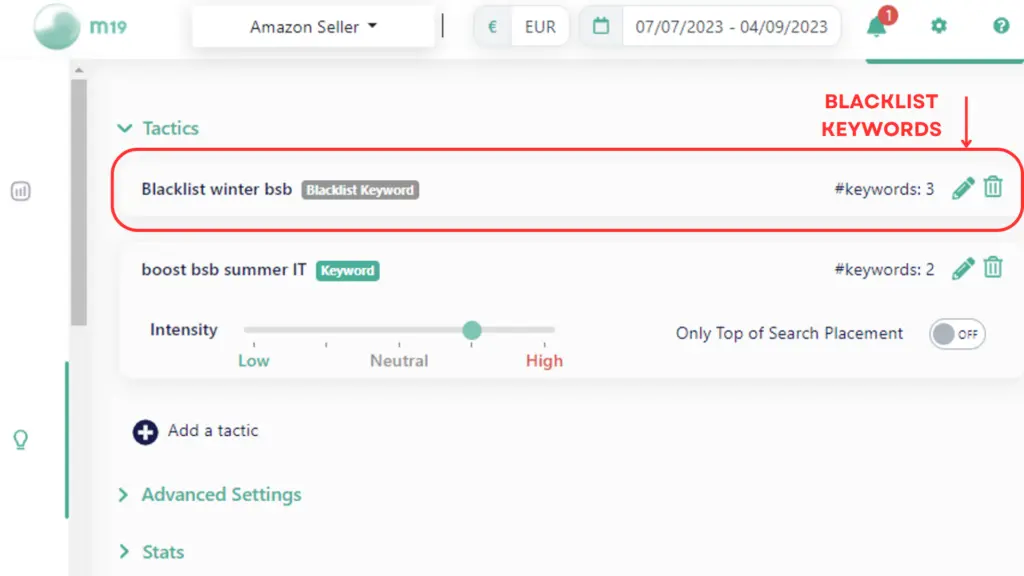
This ensures that the original campaign stops bidding on that keyword and the new campaign takes full control of it.
This process is often called a “waterfall” structure. It prevents you from bidding against yourself and gives you tighter control over performance.
Prevent Cannibalization Between Product Variations
If you sell multiple variations of a product, Amazon does not always match the right search with the right listing.
For example, you sell a red water bottle and a blue water bottle. A customer searches for “red water bottle,” but your blue product still shows up. The customer clicks, realizes it is not what they want, and leaves. You pay for that click, and your conversion rate drops. This happens more often than most sellers realize.
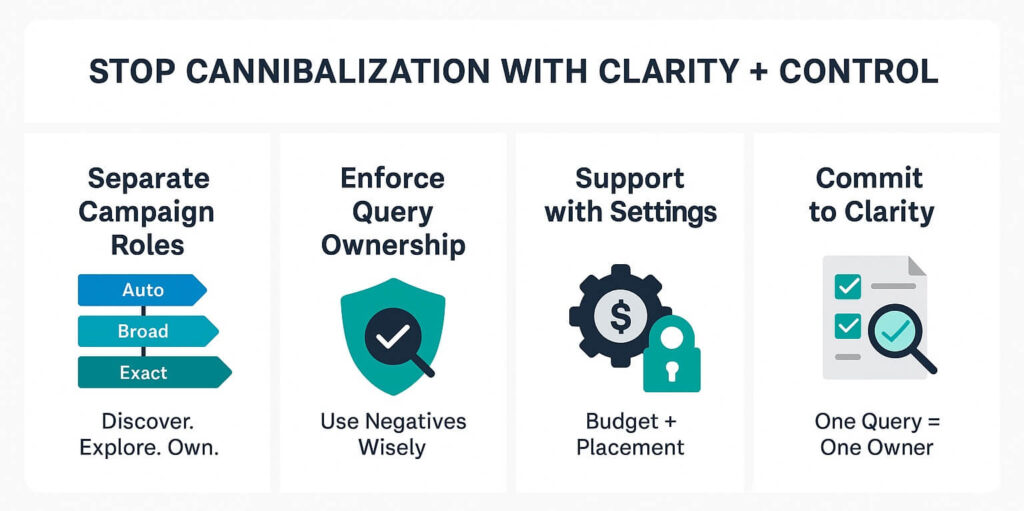
The fix is straightforward. In the blue product campaign, you block the keyword “red.” In the red product campaign, you block “blue.”
Now Amazon has no choice but to send traffic to the correct variation.
This small adjustment can improve conversion rate significantly, especially in categories where color, size, or style matters.
Block Traffic Segments, Not Just Keywords
At scale, you cannot manage negative keywords one by one. You need to think in terms of patterns. After reviewing enough search term data, you will start noticing that certain types of queries almost never convert.
For example, many sellers see poor performance from searches that include:
- “DIY” or “how to”
- “cheap” or “budget”
- “free”
These are not random keywords. They represent specific types of users.
Someone searching “DIY” is looking for instructions, not a product. Someone searching for “cheap” is often price-sensitive and unlikely to buy a premium item. Instead of blocking each keyword individually, you group them into themes and block them using negative phrase match.
Use Negatives to Control Campaign Roles
As your account becomes more complex, each campaign should have a clear role. Some campaigns are for discovery. Others are for scaling proven keywords. Others focus on branded traffic.
Without structure, these campaigns overlap. They compete for the same searches, and your data becomes harder to interpret. Negative keywords help you enforce boundaries.
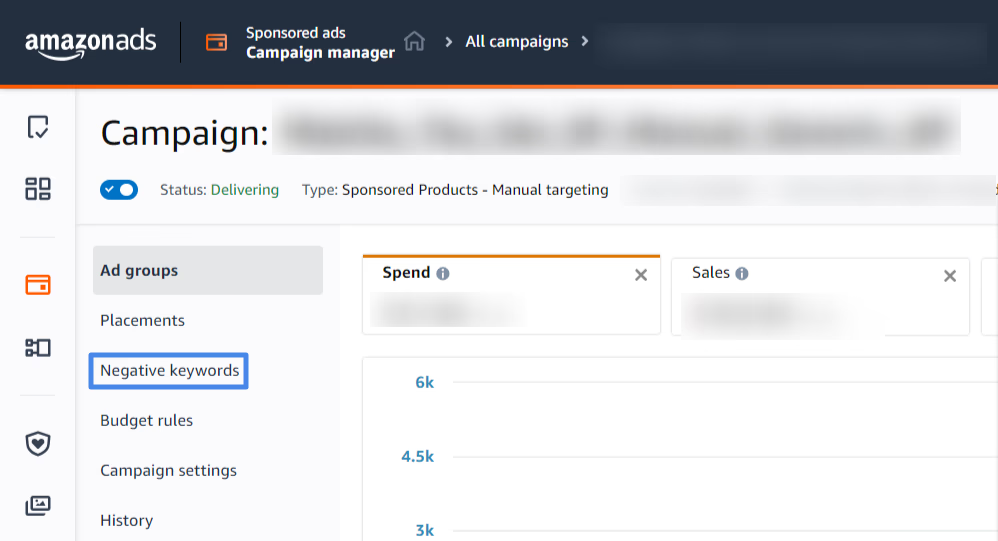
For example, once a keyword is promoted into an exact campaign, you block it in your discovery campaigns. This ensures that discovery campaigns keep finding new keywords and exact campaigns focus on scaling proven ones.
Adjust Based on Timing, Not Just Keywords
Not all clicks behave the same throughout the day. Some sellers notice that certain keywords perform well during peak hours but waste budget late at night. The intent is still relevant, but the timing is not.
Instead of removing those keywords completely, experienced sellers adjust when their ads are active or reduce bids during low-performing hours.
What Are the Common Amazon Negative Keyword Mistakes to Avoid?
Three common pitfalls can undermine an otherwise effective negative keyword strategy.
Over-blocking and Killing Good Traffic
One of the most common mistakes is blocking too broadly. It usually starts with good intentions. You see a few bad search terms, notice a common word, and decide to block that word entirely. But sometimes that word also exists in high-converting searches.
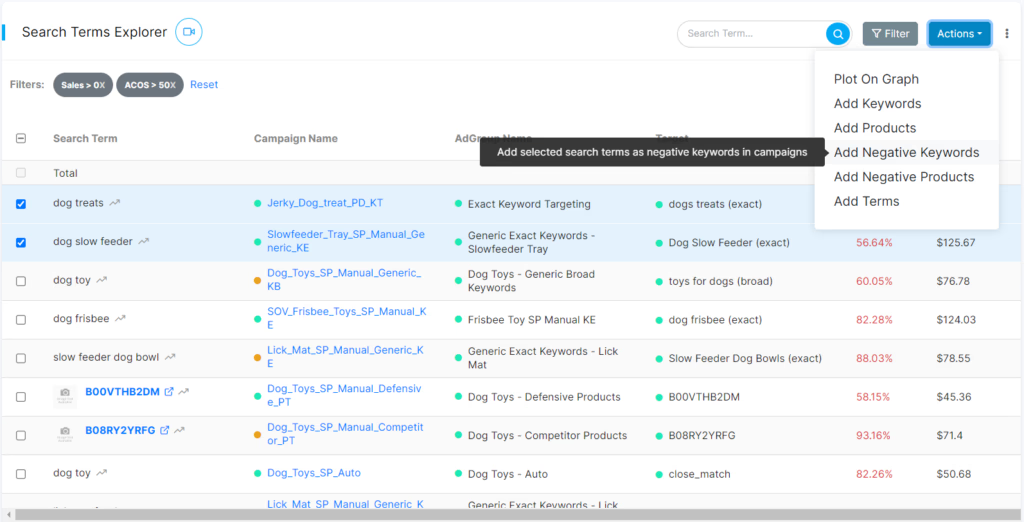
For example, imagine you sell coffee machines. You notice poor performance from queries like “cheap coffee” or “coffee powder.” If you react by adding “coffee” as a negative phrase, you have just blocked almost all relevant traffic, including “coffee maker” and “coffee machine.”
This kind of mistake can quietly kill your sales without you realizing it immediately. Traffic drops, impressions decrease, and performance becomes unstable.
The safer approach is to stay specific. Block the actual problem, not the entire category, unless you are completely sure it does not apply to your product.
Ignoring Campaign Structure When Adding Negatives
Another mistake is adding negative keywords without considering where they should be applied.
For example, a seller might add a negative keyword at the campaign level because it performed poorly for one product. But that same keyword could still be relevant for another product in a different ad group.
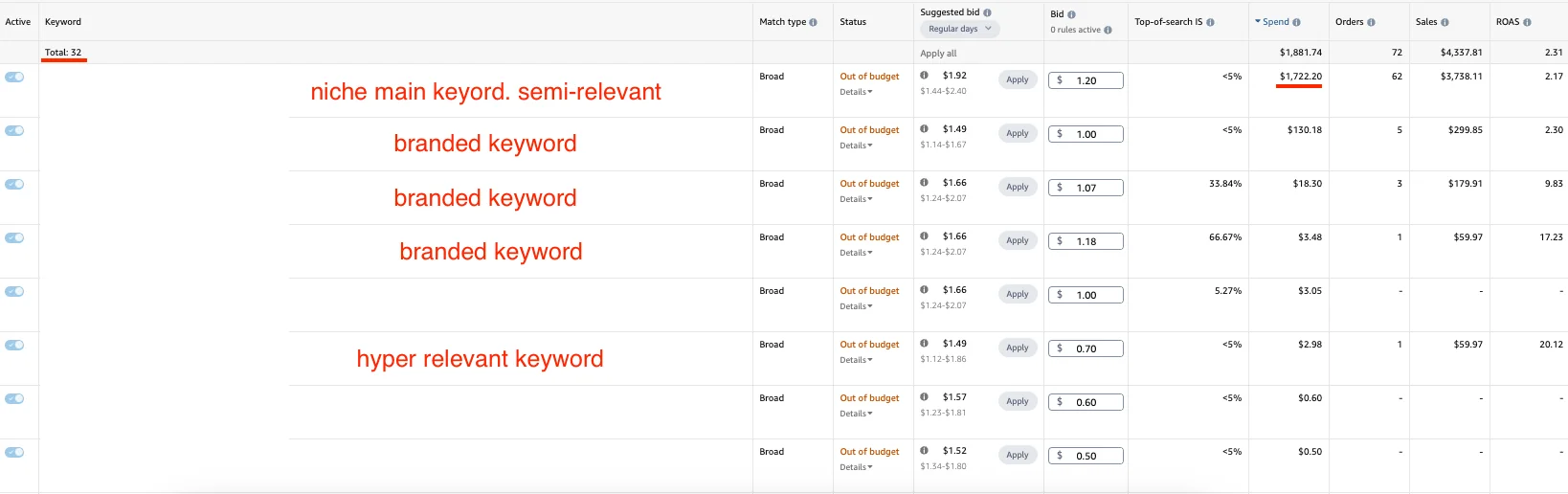
This leads to unintended consequences. You end up blocking useful traffic across your entire campaign when the issue was only local.
A better approach is to think about scope.
If the keyword is irrelevant for all products, apply it at the campaign level. If it only affects a specific product or variation, apply it at the ad group level.
This keeps your structure flexible and avoids unnecessary restrictions.
Focusing Only on Data Without Understanding Intent
Data tells you what is happening, but it does not always explain why. A keyword may show poor performance not because it is irrelevant, but because something else is wrong. It could be pricing, listing quality, or even weak images.
For example, if you see clicks from “premium office chair” but no sales, the issue might not be the keyword. It could be that your product page does not justify the price or does not match expectations.
If you block that keyword too quickly, you may remove a potentially valuable traffic source.
That is why it is important to combine data with judgment. Look at the search term, then ask whether the intent actually matches your product before deciding to block it.
How Often to Audit Your Amazon Negative Keywords?
Negative keyword optimization is not a one-time task. As your campaigns run, new search terms keep coming in, and some of them will waste your budget if you don’t review them regularly.
For most sellers, a simple rhythm works best.
You should review your Search Term Report once a week to catch obvious waste. Look for keywords that are spending money but not generating sales. These are the ones that should be removed early, before they scale.
At the same time, you should do a deeper review once a month. Some keywords don’t spend much in a short period, but over 30 to 60 days, they can still add up without converting. This is where you catch hidden inefficiencies and recurring patterns.
The key is balance. If you review too rarely, wasted spending builds up. If you act too quickly, you risk cutting keywords before Amazon has enough data to optimize.
Frequently Asked Questions (FAQs)
Negative keywords are specific terms you exclude from your campaigns so your ads do not trigger when those words appear in a shopper’s query. They are crucial for profit because they filter out irrelevant traffic, especially since average CPCs reached $1.25 in 2026, helping sellers regain control over their margins.
Amazon provides two match types for negative targeting: Negative Exact (blocks ads for exact keyword matches or close variants) and Negative Phrase (blocks ads if the query contains the phrase in order, useful for excluding entire categories like “free” or “used”).
Most experts recommend setting a “Kill Threshold” of 20–30 non-converting clicks with zero orders. Alternatively, you should flag any term that has cost more than $50 without a single sale.
Sellers should review the last seven days of Search Term Report data for active campaigns on a weekly basis to quickly catch “money burners”. Additionally, a monthly “deep dive” is essential for evaluating terms that have accumulated 30 or more non-converting clicks over a 60-day period.
Over-Blocking occurs when sellers use too many negative phrase keywords, risking the accidental “killing” of profitable long-tail traffic. This happens when a broad negative word (e.g., “coffee”) accidentally blocks relevant product queries (e.g., “coffee makers”).
Get Professional Help from Megaficus
Mastering negative keywords is the fastest way to improve your ROI without spending an extra dollar. By being proactive and data-driven, you can ensure your budget is reserved for the shoppers most likely to buy your products.
Start small, focus on your highest-spend campaigns first, and watch your margins expand as the waste disappears.