Are you ready to unlock massive revenue growth? Knowing how to win Buy Box on Amazon is the secret to capturing over 80% of all customer sales. The Megaficus’s guide below will provide a clear, actionable path to dominating the Featured Offer by mastering your pricing, fulfillment speed, and account health to stay ahead today.
Quick Summary
- Meet Minimum Eligibility: Upgrade to a Professional account and ensure all items are listed in “New” condition to qualify for the algorithm.
- Prioritize Fulfillment Speed: Use Fulfillment by Amazon (FBA) or Seller Fulfilled Prime (SFP) to gain a competitive edge through reliable, rapid delivery.
- Optimize Landed Price: Maintain a competitive “Total Landed Price” and use automated repricing tools to stay ahead of market shifts in real-time.
- Protect Account Health: Prevent “Stockout Penalties” through restock alerts and maintain an Order Defect Rate (ODR) below 1% to ensure long-term visibility.
Meet the Minimum Eligibility Requirements
Before you can even compete for the spot, you must meet baseline entry standards set by the platform. These requirements ensure that only professional and reliable merchants are featured to the public. Failing to meet even one of these criteria will result in immediate disqualification from the competition on how to win Buy Box on Amazon.
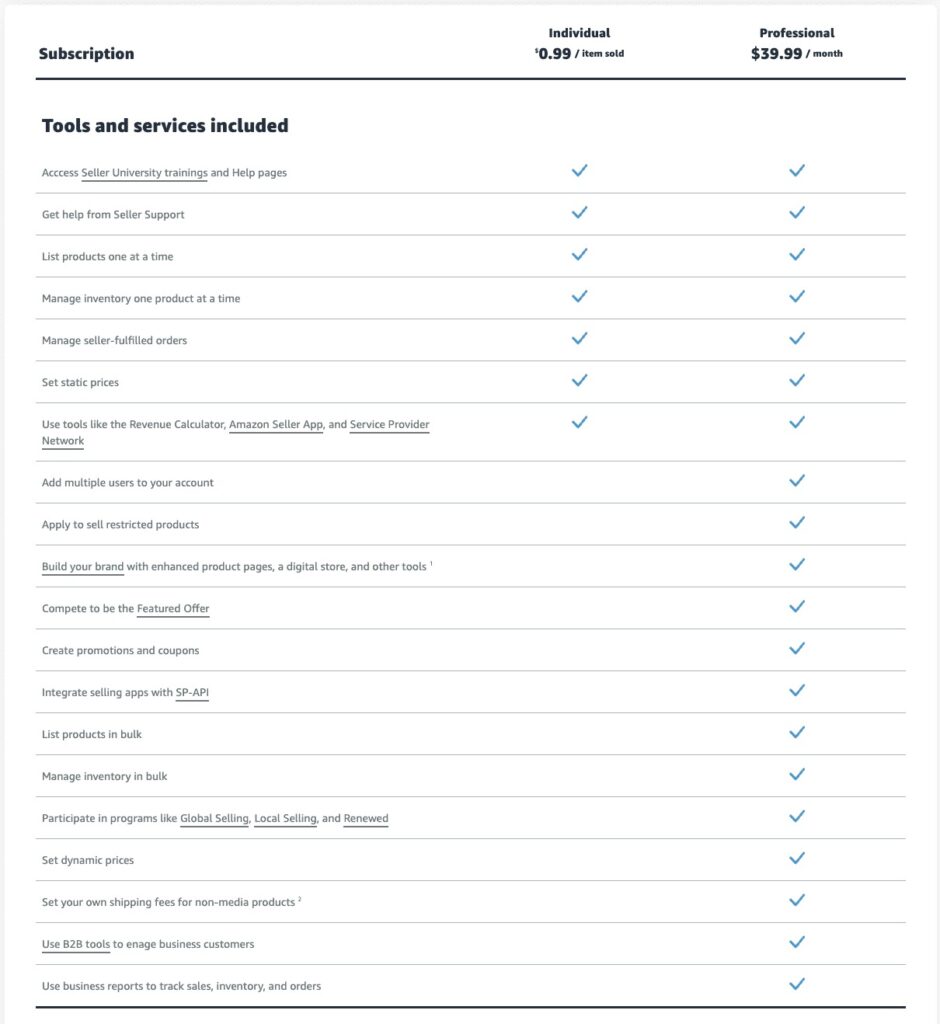
Switch to a Professional Account
To qualify for the Buy Box, you must first move away from an “Individual” account because the algorithm requires the deep performance data only available to Professional accounts. This upgrade grants you access to specialized reporting and advertising tools essential for competing at scale.
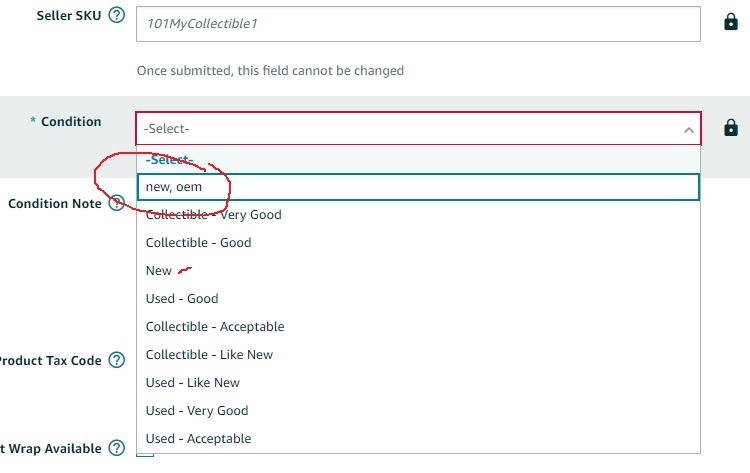
List Items in “New” Condition
Next, you must ensure your listings are set to “New” because Amazon reserves the primary buying spot for unused items. Some niche categories still feature a separate section for used goods, but the main purchase button remains strictly tied to new inventory. Choosing any other condition status will automatically disqualify your offer from the highest-converting area.
Verify Eligibility in Seller Central
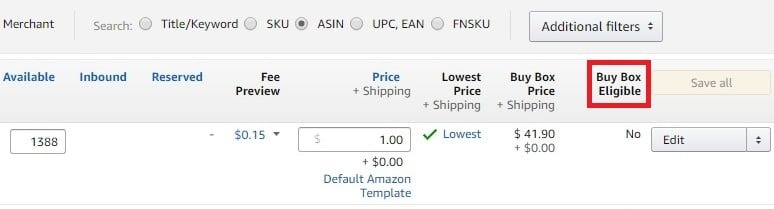
After refining your listings, you can head over to your “Manage Inventory” tab and customize your preferences to add the “Buy Box Eligible” column to your main view. This tool provides a real-time status update for every ASIN in your catalog, allowing you to spot and resolve eligibility issues immediately before they ever affect your daily sales revenue.
Choose the Right Fulfillment Method (FBA vs. FBM)
Once you have established your professional eligibility, the next logical hurdle is proving that your physical delivery network can keep up with Amazon’s rapid fulfillment expectations. Your choice of shipping method acts as the bridge between your warehouse and the customer’s doorstep, directly influencing your win rate.
Prioritize FBA (Fulfillment by Amazon)
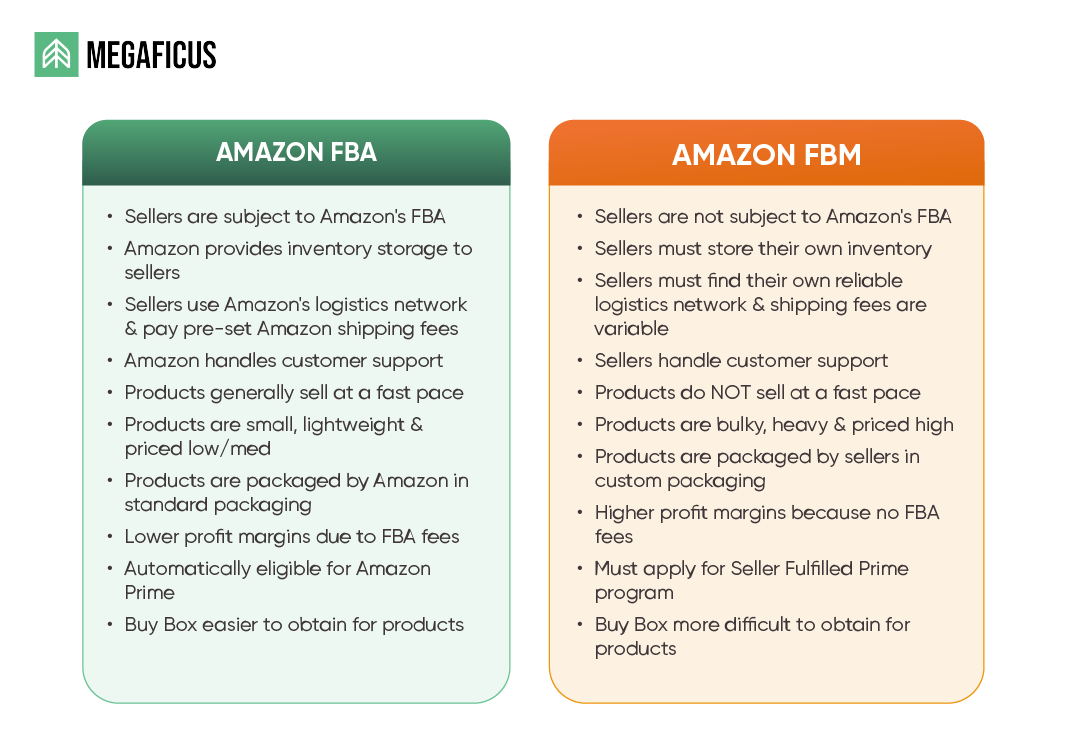
Why do we suggest FBA instead of FBM? Because using FBA gives you an instant and significant advantage in the Buy Box algorithm. Since Amazon handles the storage, picking, and shipping, they trust the speed and reliability of the delivery. When you use the FBA, you will often win the spot even if your prices may be slightly higher than those of your competitors.
Master SFP (Seller Fulfilled Prime)
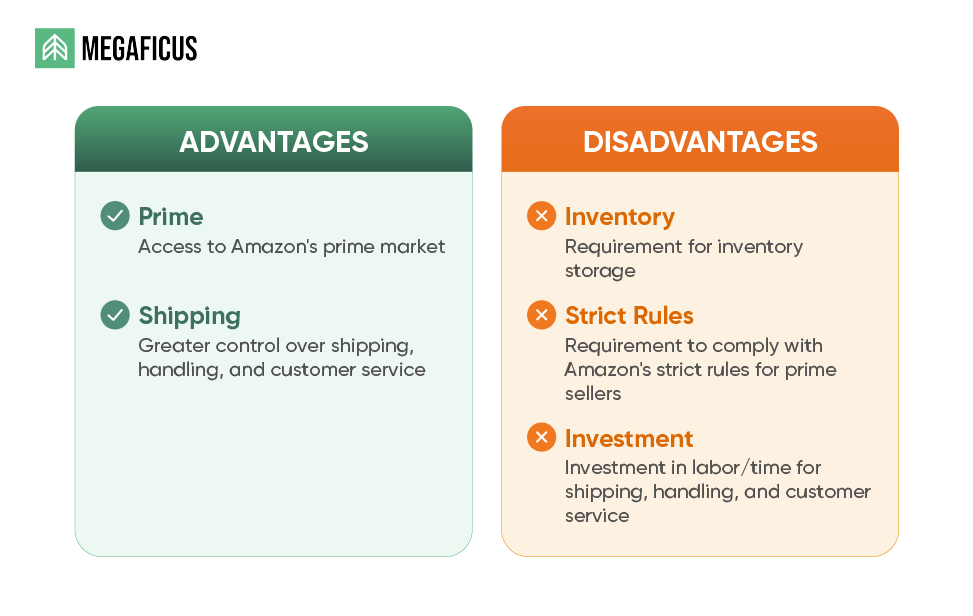
If you find that FBA does not quite fit your business model, you should consider qualifying for SFP. This unique program allows you to ship directly from your own warehouse while still displaying the Prime badge to attract high-intent shoppers. You must meet extremely high performance benchmarks to stay in this elite group and keep your visibility high on the platform.
Manage FBM Shipping Times
In case you can only use FBM, then you must manage your shipping times really carefully. Long shipping windows are the fastest way to lose the Buy Box to a competitor who can get the product to the customer much sooner. You must ensure your warehouse operations are lean and every order is processed with maximum urgency to protect your revenue.
Optimize Your Landed Price for Dominance
With your fulfillment strategy in place to handle speed, you must now turn your attention to the numbers that the algorithm evaluates alongside delivery time. Balancing your costs with real-time market shifts requires a proactive approach below that ensures your “Total Landed Price” remains attractive to the shopper.
Calculate Total Landed Price
Total Landed Cost is the final price a shopper pays, combining the item cost with all shipping and handling fees. Amazon’s algorithm prioritizes this total figure because it reflects the actual value perceived by the customer at checkout today. By focusing on this metric, you ensure your strategy is grounded in the same data the platform uses to rank the most competitive offers.
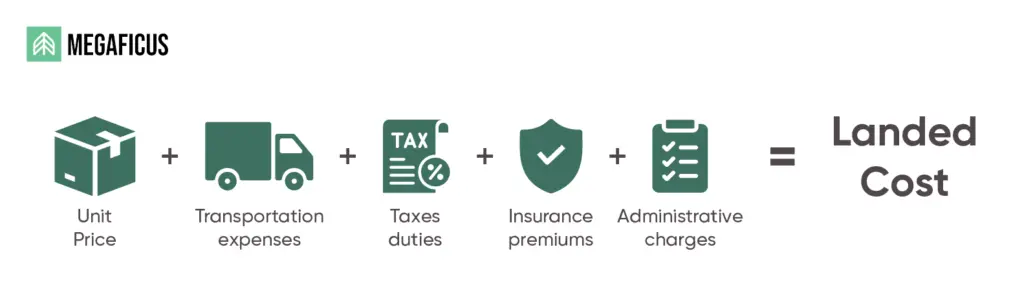
For instance, a $19.99 item with free shipping usually beats a $15.00 offer that adds $7.00 in hidden delivery fees. This transparency prevents price jumps at the final step, reducing cart abandonment and building long-term buyer trust. Aligning with this psychological preference ensures your listing remains the top choice while securing your daily revenue growth.
Implement Automated Repricing
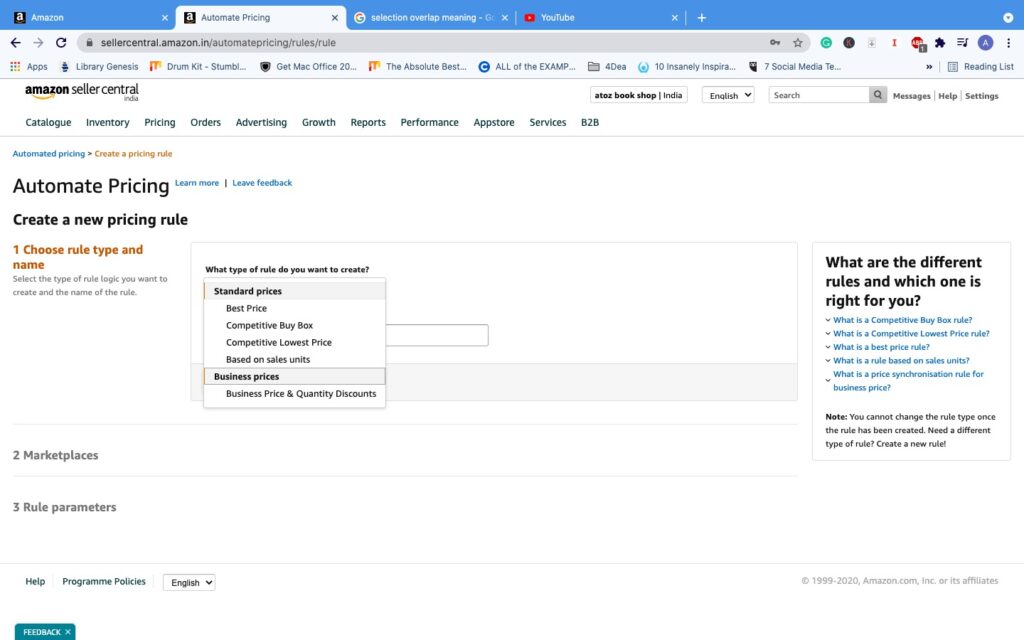
To maintain that landed price edge, you can set smart rules in Seller Central to automatically adjust your price even when you are not online. These tools help you stay $0.01 below the lowest eligible competitor in real-time without manual effort. Automation can prevent you from losing hours of sales during the night when your competitors might drop their prices suddenly.
Use Coupons to Trigger Clicks
Coupled with competitive pricing, a small coupon can sometimes be more effective than a flat price drop for winning the Buy Box because coupons are easier to draw more shoppers’ attention to your offer immediately. Megaficus really recommends this strategy because our customers can see their click-through rate improve by even 10% to 20%.
Maintain Perfect Inventory Levels
If you run out of stock, your “Add to Cart” button disappears instantly, handing your hard-earned revenue directly to your competitors. A stockout not only stops your current sales but also damages your ranking when you eventually return to the market. So you should strictly follow our guide below to keep your inventory rate always healthy.
Set Up Restock Alerts
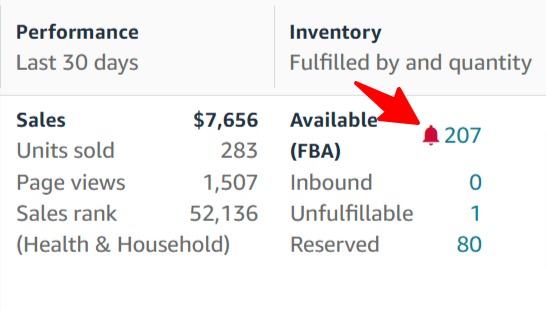
Amazon has helpful internal alerts that notify you before your inventory levels hit a dangerous zero. You can set specific thresholds that trigger an email when your stock reaches a certain level in the warehouse. This gives you a clear window to reorder from your supplier before a stockout crisis impacts your store’s performance on how to win the Buy Box on Amazon.
Factor in Lead Times
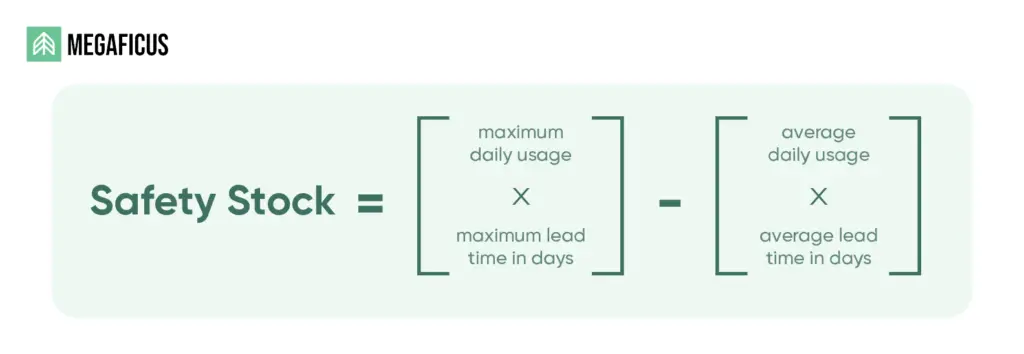
When planning your stock, you must also remember to account for manufacturing time, shipping duration, and the time Amazon takes to check in goods. Calculating a “Safety Stock” buffer helps you avoid running out while waiting for a new shipment to arrive. A mistake in this calculation can lead to weeks of missed sales and a significant loss in organic search ranking.
Avoid the “Stockout Penalty”
It often takes several days or even weeks to regain your Buy Box win rate after you are back in stock. Amazon’s algorithm favors sellers with a long history of consistent availability and reliable fulfillment across all their items. Frequent stockouts signal to the platform that you are a risky choice for their loyal customer base today.
Sharpen Your Seller Performance Metrics
High-quality service is a critical ranking factor that determines who wins the Buy Box every single day. That’s why you must treat your account health as your most valuable asset to protect your brand from losing visibility to rivals, following our steps below.
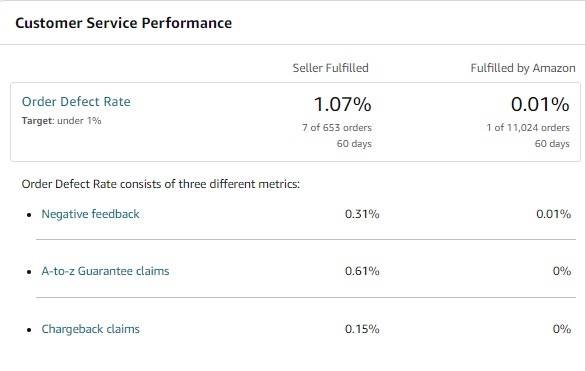
Lower Your Order Defect Rate (ODR)
To keep your ODR under the 1% threshold, you should proactively resolve any customer concerns before they become claims. Responding to messages within 24 hours and handling returns professionally shows Amazon that you truly care about the shopper. A single negative experience can damage your Buy Box win rate for a significant amount of time.
Reduce Late Shipment Rate (LSR)
If you ship orders yourself, you must ensure every package is scanned by the carrier within your promised window. Amazon expects your LSR to stay under 4% to prove you are actually fulfilling your promises to the customer. Failing to meet this window will trigger a warning and can eventually lead to a total loss of revenue.
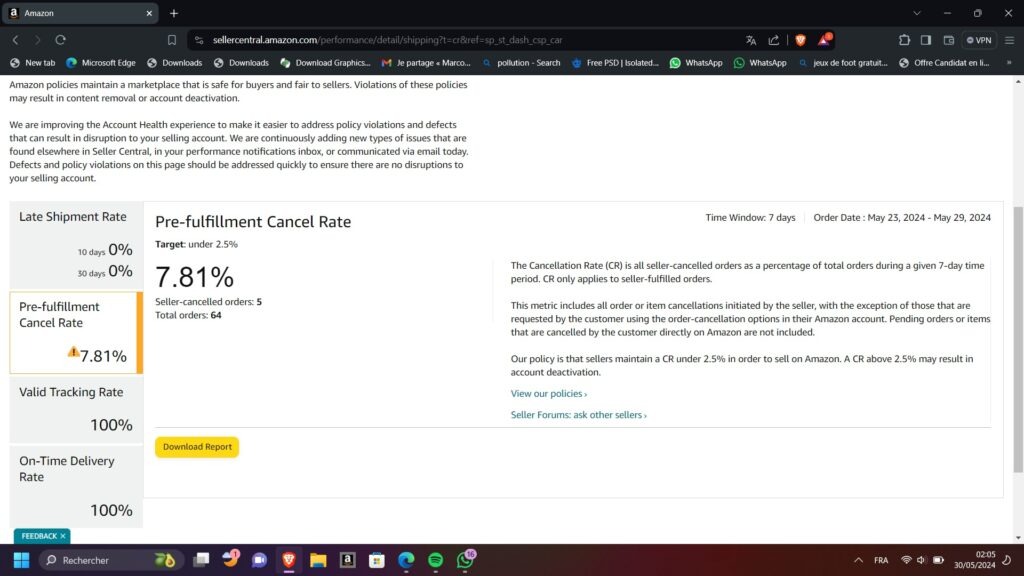
Monitor Pre-Fulfillment Cancellations
To protect your shipping record, you should never cancel an order due to being out of stock because it signals a failure in your inventory data. Each cancellation counts against your metrics and tells Amazon that you are not a reliable partner for their platform. It is almost always better to fulfill a low-margin order than to take a hit on your account health.
Frequently Asked Questions (FAQ) about How to Win Buy Box on Amazon
No, a seller with better metrics and faster shipping can win even with a higher price. Amazon looks for the best overall experience, which is why FBA sellers often win with premium prices.
It can change every few minutes, depending on competitor price changes or inventory shifts today. This rotation allows multiple eligible sellers to share the sales volume throughout a single 24-hour period.
Yes, if they use FBA and have a Professional account, though it takes a few weeks. Amazon needs a small amount of data to prove the seller can handle orders reliably before granting eligibility.
This happens if the price is deemed “unfair” compared to other websites or if no sellers qualify. If every seller has poor metrics, Amazon may remove the button to protect the customer experience.
Yes, Amazon shows the “Featured Offer” from the warehouse closest to the specific customer today. This ensures that the buyer receives their order in the shortest time possible, which is Amazon’s priority.
Get Professional Help from Megaficus
Winning the Buy Box requires a strategic balance of competitive pricing, logistical precision, and stellar account health to satisfy Amazon’s algorithm. Prioritizing these operational steps from Megaficus daily can create a defensive shield against rivals while ensuring long-term revenue growth, transforming your brand into the consistent top choice for every shopper.