What is Amazon Seller Central, and how does it support sellers throughout the selling process? Amazon Seller Central is the platform where sellers manage listings, orders, performance, and daily operations on Amazon, and this guide by Megaficus explains how it works and why it matters for anyone planning to sell on Amazon.
Quick Summary
- Amazon Seller Central is the core platform sellers use to list products, manage orders, track performance, and operate their Amazon business from one central dashboard.
- Key features: Includes sales analytics, customer review management, advertising tools, A/B testing, and performance metrics. These tools help optimize listings, increase visibility, and maintain account health.
- Costs: Individual plan charges per item sold; Professional plan charges a monthly fee with advanced tools. Choosing the right plan depends on sales volume and business needs.
- Account setup: Requires personal, business, and payment info. Registration includes identity verification, plan selection, and initial store configuration to access Seller Central.
- How it works: Seller Central organizes listings, order fulfillment, analytics, and account health in one dashboard. Daily workflow covers listing products, receiving orders, shipping, and tracking performance.
- Common seller mistakes: Weak listings, poor inventory planning, ignoring fees, and slow customer responses. These mistakes can lower sales, harm account metrics, and reduce growth potential.
What Is Amazon Seller Central?
Amazon Seller Central is the main platform where sellers manage their entire business operations on Amazon. Before you can start selling, you need to register and set up this account, which serves as your central dashboard for all selling activities.
This platform provides you with essential tools to run your business, from managing inventory and processing orders to handling payments and customer service. Through Seller Central, you can list your products on Amazon’s marketplace and reach millions of customers worldwide.
Top Features That Make Amazon Seller Central Essential
Amazon Seller Central offers a range of tools and features that help sellers optimize listings, monitor performance, and grow their business effectively.
Sales Analytics Insights
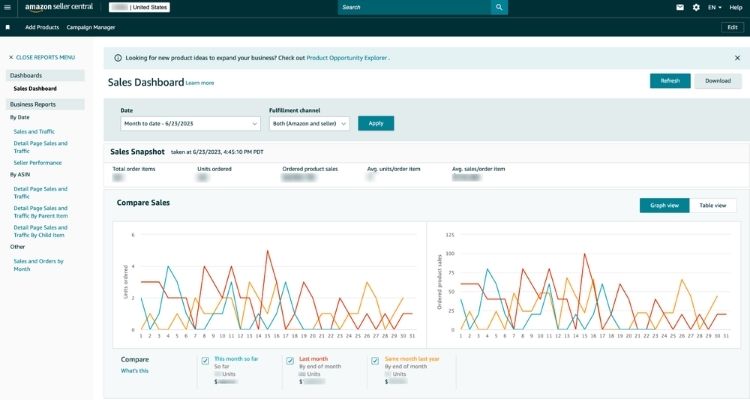
Seller Central gives you access to detailed sales reports that show how your business is performing. You can view sales trends, understand your customer demographics, and analyze individual product performance.
These insights help you make informed pricing decisions, identify which products are selling well, and discover new growth opportunities to increase your revenue.
Managing Customer Reviews And Feedback
Seller Central allows you to respond quickly to customer questions and resolve their concerns directly. You can also monitor all product reviews in one place. By analyzing this feedback, you can identify areas for improvement and enhance both your product quality and overall customer experience.
Advertising Tools
Seller Central provides built-in advertising features like Sponsored Products and Pay-Per-Click (PPC) campaigns to help you reach more customers. You can set your own advertising budget, choose specific keywords to target, and track how well your ads are performing.
These tools help increase your product visibility, drive more shoppers to your listings, and ultimately boost your sales.
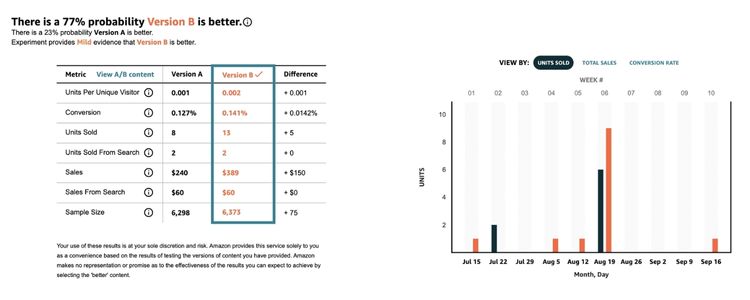
A/B Testing
Seller Central’s A/B testing feature lets you experiment with different versions of your product listings. You can test variations in titles, descriptions, and images to see which ones perform better. By comparing the results, you can identify what appeals most to your target customers. This helps you optimize your listings and increase your conversion rates.
Performance Metrics
Seller Central tracks important performance indicators that show how well your business is operating. You can monitor key metrics like order defect rates, shipping performance, and customer feedback scores. By keeping an eye on these numbers, you can maintain high service standards and ensure you’re meeting Amazon’s seller requirements.
Who Is Eligible To Sell On Amazon Seller Central?
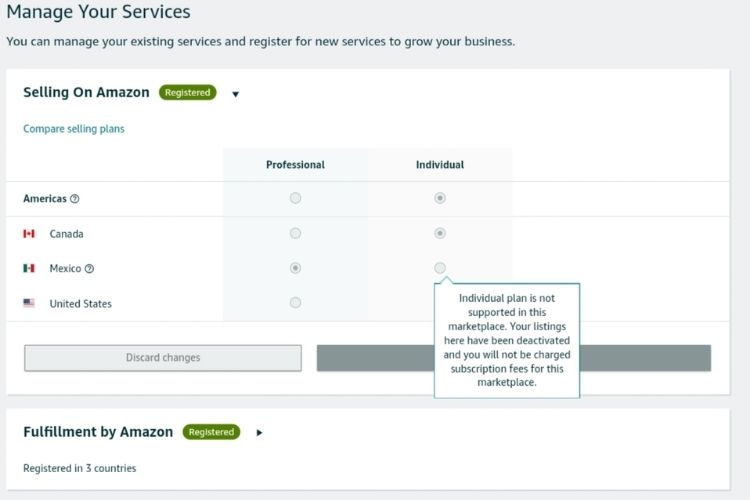
Amazon Seller Central is open to individuals, professional sellers, and private label brands, each with tools and account types tailored to their selling needs.
Individual Sellers
Individual sellers are people who want to sell occasionally or test the Amazon marketplace without major commitments. You can sign up with just basic requirements like a valid ID, email address, credit card, and an active bank account. This plan suits those with limited budgets who want to try wholesale, dropshipping, or even sell personal items from home.
Professional Sellers
Professional sellers are established businesses or serious entrepreneurs planning to sell regularly on Amazon. This account type offers advanced features and tools for scaling your business. It’s ideal for retailers and brands looking to boost their sales and manage higher order volumes efficiently.
Private Label Brands
Private label brand owners and manufacturers increasingly choose Amazon to expand their reach. The platform provides specialized programs like Brand Registry and A+ Content that help you protect your brand, customize product pages, and create a personalized shopping experience for your customers.
How Much Does Amazon Seller Central Cost?
Sellers can choose between different plans in Amazon Seller Central, each designed to match their sales volume and business goals.
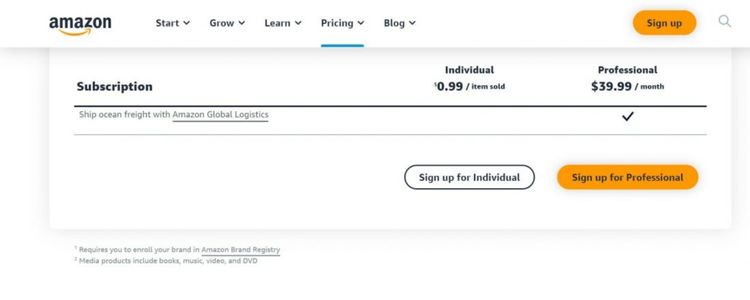
Individual Plan
The Individual plan charges $0.99 for each item you sell, with no monthly subscription fee. This makes it ideal if you’re just starting out or selling fewer than 40 items per month.
You pay only when you make a sale, which helps minimize upfront costs. However, you’ll still need to pay referral fees (typically 8-15% depending on product category) and other applicable charges like closing fees for media items.
Professional Plan
The Professional plan costs $39.99 per month, regardless of how many items you sell. This flat monthly fee replaces the per-item charge, making it more cost-effective if you sell more than 40 products monthly.
Beyond the subscription fee, you’ll also pay referral fees on each sale, which vary by product category. The Professional plan includes advanced features like bulk listing tools, advertising options, and detailed analytics that aren’t available with the Individual plan.
How To Create An Amazon Seller Account
Before you can start selling on Amazon, you need to register for an account and complete a few essential setup steps.
Before You Start
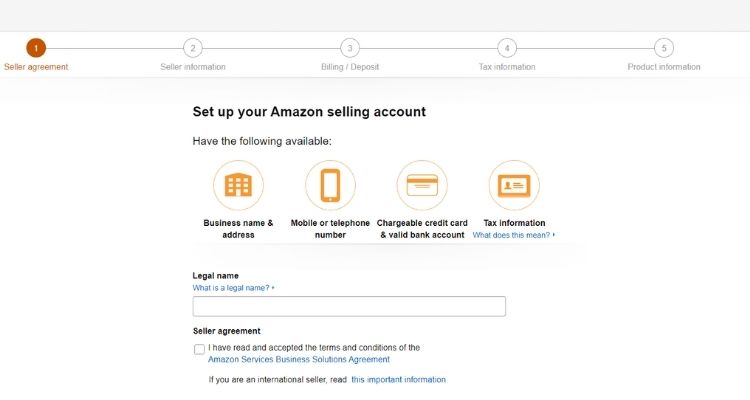
Make sure you have the following items ready before beginning the registration process:
- Business Email: Use a dedicated business email address, or you can sign up with your existing Amazon customer account email.
- Payment Information: Prepare a valid credit card for charges and have your bank account details available, including routing and account numbers.
- Identification Documents: Keep your government-issued ID handy (either a passport or driver’s license) along with your tax information, such as SSN or EIN.
- Phone Number: You’ll need an active phone number for account verification purposes.
Step-by-Step Registration
You need to follow these steps to set up your Amazon Seller account:
- Visit Sell.Amazon.com: Navigate to the Amazon Seller Central homepage and click the “Sign up” button.
- Create Your Account: Provide your name, email address, and create a password for your new Amazon account. Alternatively, you can log in using your existing Amazon credentials.
- Select Your Plan: Choose between the Individual or Professional selling plan based on your business needs.
- Add Business Details: Fill in your business information, including your business structure and geographic location.
- Submit Personal Information: Enter your personal details such as citizenship status and date of birth.
- Set Up Payment Methods: Input your credit card information and bank account details for receiving payments.
- Complete Identity Verification: Go through Amazon’s video verification process, where you’ll show your ID to an Amazon representative.
- Configure Your Store: Choose your store name and start adding your first product listings.
Once you’ve completed these steps, you’ll have full access to your Seller Central dashboard, where you can manage all aspects of your Amazon business.
How Does Amazon Seller Central Work?
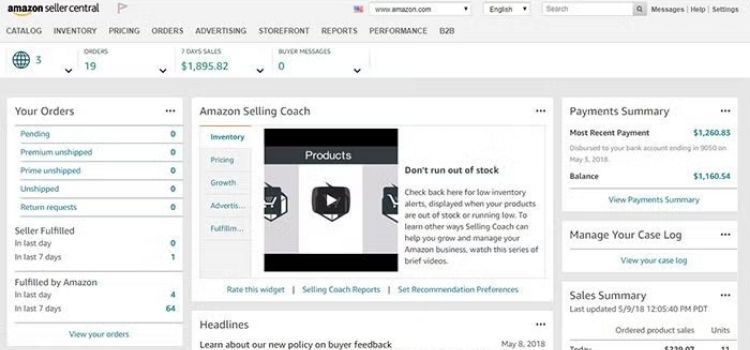
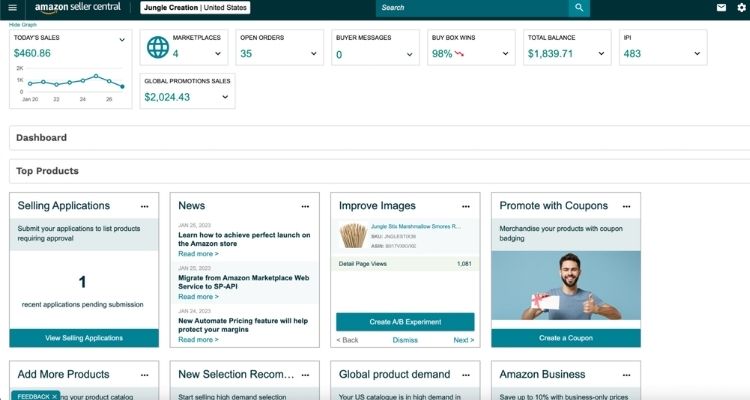
Amazon Seller Central operates as your command center for managing every aspect of your Amazon business. Once you log in, you’ll see a comprehensive dashboard that organizes all essential functions into easy-to-access tabs.
Understanding the Dashboard Layout
The platform organizes its main navigation menu into key sections that help you manage different parts of your business:
- Catalog: Add and manage your product listings
- Inventory: Track stock levels and inventory performance
- Orders: View and process customer orders
- Advertising: Run promotional campaigns for your products
- Reports: Access detailed sales and performance data
- Performance: Monitor your account health and metrics
- Settings: Configure your account preferences and business information
On the right side of the dashboard, you’ll find quick-access buttons for Messages (customer inquiries), Help (support resources), and Settings (account management).
The Basic Workflow
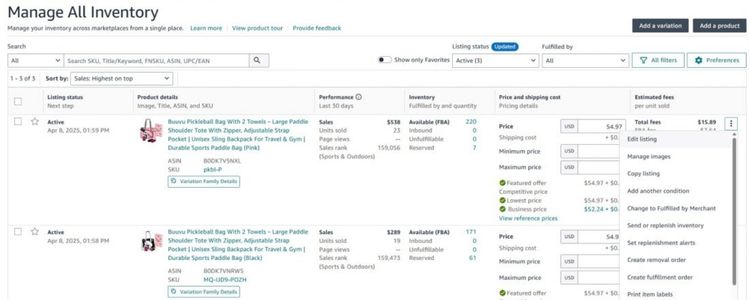
Your daily operations follow a straightforward process that includes these key steps:
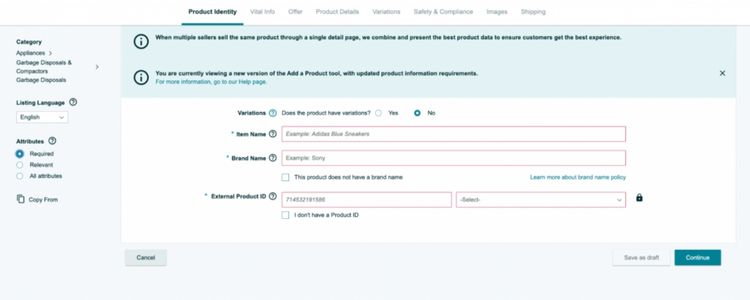
- List Your Products: Add items to your catalog by providing product details, images, pricing, and inventory quantities
- Receive Orders: Customers find and purchase your products through Amazon’s marketplace
- Fulfill Orders: Ship products yourself or use Amazon’s FBA service to handle fulfillment
- Get Paid: Amazon processes payments and transfers funds to your bank account after deducting fees
Monitoring Your Performance
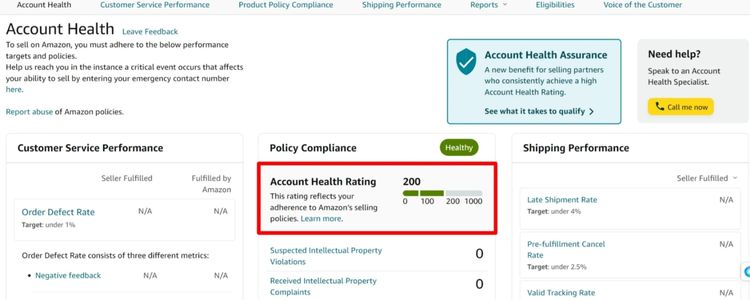
The platform provides you with powerful analytics tools to track your business growth:
- Sales Reports: View revenue trends, top-selling products, and order statistics
- Traffic Data: See how many customers view your listings and conversion rates
- Account Health: Check your performance metrics, like order defect rate and customer feedback
- Inventory Reports: Monitor stock levels and identify products that need restocking
Amazon Seller Central Compared To Vendor Central: Key Differences
Amazon offers two platforms for selling, each with a fundamentally different business model:
- Amazon Seller Central makes you a third-party seller who sells directly to customers. You control your pricing and inventory, and can either ship orders yourself or use FBA to let Amazon handle fulfillment from their warehouses.
- Amazon Vendor Central operates on a wholesale model where you supply products in bulk to Amazon. Amazon then becomes the retailer, handling all pricing, listings, and customer interactions. You have no direct contact with end customers.
Key Differences between Amazon Seller Central and Vendor Central
| Aspect | Seller Central | Vendor Central |
|---|---|---|
| Relationship | Third-party seller | First-party supplier |
| Who sells to customers | You sell directly | Amazon sells for you |
| Access | Open to anyone | Invite-only |
| Payment | You receive payment per sale | Amazon purchases in bulk upfront |
| Control over pricing | You set prices | Amazon controls prices |
| Customer interaction | Direct (handle inquiries/returns) | None (Amazon manages all) |
>>> Read more: Amazon Seller Central vs Vendor Central: Which Is Best?
Common Mistakes New Sellers Make in Seller Central
Starting out on Amazon can be challenging, and even small mistakes in Seller Central can affect your sales, visibility, and account health. Below are the 4 most common mistakes new sellers make and how to avoid them.
Poor Quality Product Listings
New Amazon sellers often struggle because their product listings use generic titles, low-quality images, and unclear descriptions. As a result, these listings fail to rank well in search results and do not build enough trust for customers to make a purchase.
Instead of guessing what works, sellers should research the top competitors in their category and reuse proven keyword patterns. Then, titles should clearly include the brand name, product type, and key features, while bullet points must explain who the product is for and what problem it solves.
In addition, sellers should upload at least seven high-resolution images, including lifestyle and close-up shots.
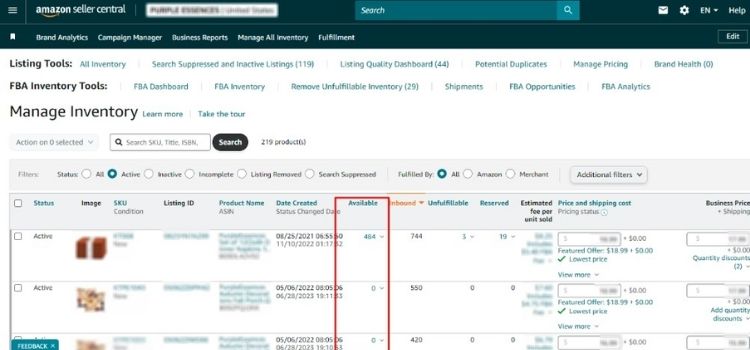
Poor Inventory Management
For many beginners, inventory problems happen because stock levels are planned based on assumptions rather than real sales numbers. Consequently, sellers either run out of inventory and lose ranking or hold too much stock that generates unnecessary storage fees.
To prevent this issue, sellers should calculate daily sales velocity using actual order data and plan inventory for 60-90 days of sales. Furthermore, sellers can reorder when inventory reaches 30 days remaining instead of waiting until stock is nearly gone. At the same time, slow-moving products should be reviewed weekly and removed or discounted early.
Ignoring Amazon Fees and Profit Calculations
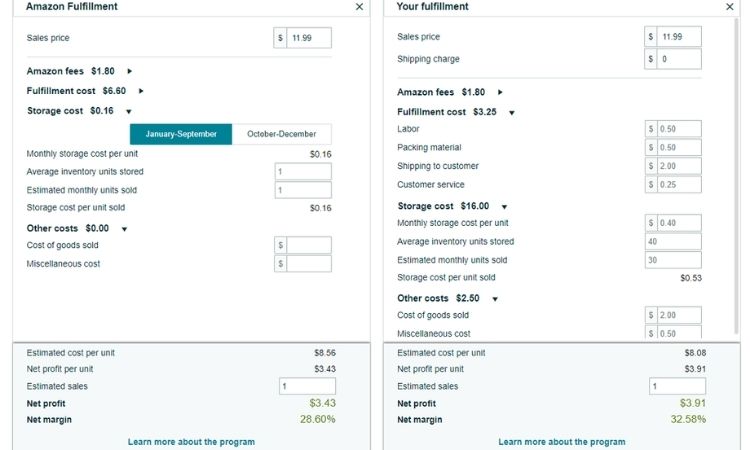
In many cases, profit disappears because sellers focus only on product cost and selling price while ignoring Amazon fees. Therefore, referral fees, FBA fulfillment fees, and storage charges reduce margins more than expected after sales begin.
Before listing a product, sellers should use Amazon’s FBA Revenue Calculator to estimate all platform fees. After that, sourcing costs, inbound shipping, packaging, and advertising expenses must be added to calculate real profit. As a rule, products should be priced to maintain at least a 30% margin after all costs.
Poor Customer Communication and Review Handling
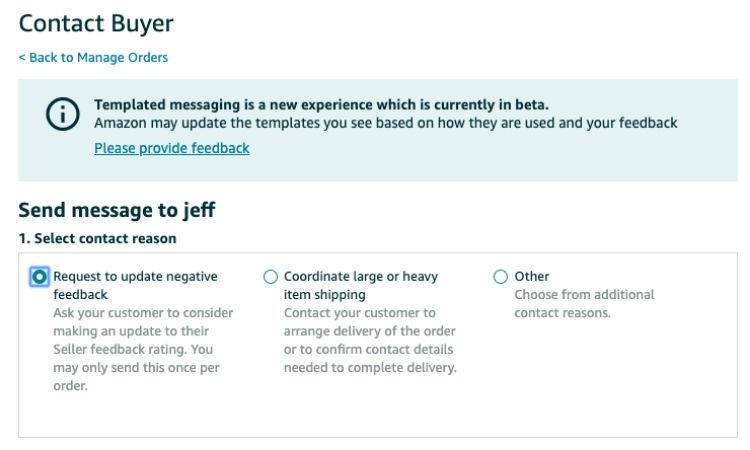
Customer service issues often arise when sellers fail to respond quickly or handle feedback poorly. Because delayed replies and defensive responses frustrate buyers, negative reviews and account health warnings become more common.
To improve performance, sellers should check Seller Central messages daily and respond within 12 hours. When negative reviews appear, sellers should acknowledge the issue publicly and offer a clear solution, such as a replacement or refund. In addition, the “Request a Review” button should be used after delivery to encourage feedback from satisfied customers.
FAQs About Amazon Seller Central
Seller Central allows you to sell directly to customers, while Vendor Central requires Amazon’s invitation and positions Amazon as the buyer who resells your products.
Yes, the Professional plan fee is worth it if you sell more than 40 items per month or need access to advanced tools and advertising features.
Most physical products can be sold, including private-label, branded, and wholesale items, as long as they comply with Amazon’s restricted and gated category policies.
Yes, sellers must follow Amazon’s performance metrics, category restrictions, and listing rules, and some products require approval before selling.
Get Professional Help from Megaficus
Understanding what Amazon Seller Central is and how it functions gives sellers full control over their listings, inventory, performance metrics, and day-to-day operations on Amazon. By using Seller Central correctly, sellers can make better pricing decisions, avoid common account issues, and build a scalable business instead of relying on trial and error.
Success on Amazon depends on more than just launching products; it requires consistent optimization, compliance with platform rules, and a clear operational strategy. When Seller Central is used effectively, it becomes a powerful tool for long-term growth rather than a source of confusion.
If you need expert support to navigate Amazon Seller Central, optimize your listings, or scale your Amazon business with confidence, Megaficus provides proven strategies and hands-on guidance to help sellers grow sustainably.