Most sellers launch their first Amazon ad by picking a product, setting a budget, and hoping the sales follow, only to find that weeks later, the campaign has spent $300 with almost nothing to show for it. The problem is rarely the product itself but rather the setup behind it. This guide breaks down exactly how to advertise on Amazon, from choosing the right ad type to optimizing bids and turning clicks into consistent sales.
Quick Summary: How to advertise on Amazon (Step-By-Step):
- Step 1: Open the Amazon Ads console
- Step 2: Pick the right ad type for your goal
- Step 3: Set your budget and choose a bidding strategy
- Step 4: Decide between automatic and manual targeting
- Step 5: Choose which products to promote
- Step 6: Launch your campaign and track early results
Why Is Advertising On Amazon Worth It?
There several advantages that make Amazon one of the most effective advertising platforms for sellers:
- High buyer intent: Amazon users come with a clear purpose – they are actively searching for products to buy, which makes them far more likely to convert than audiences on social media platforms.
- Prime visibility and sales velocity: Sponsored Products ads secure top placements in search results, increasing visibility and generating sales that subsequently push organic rankings higher.
- Superior conversion rates: Amazon Ads consistently outperform other platforms, with conversion rates often exceeding 3X those of Google Shopping.
- Precise targeting: Sellers can reach the right audience by targeting specific keywords, competitor product pages, or retargeting shoppers who previously viewed their listings without purchasing.
- Brand growth and data: Sponsored Brands and Brand Stores strengthen long-term brand awareness, while ad analytics deliver valuable insights into customer behavior and campaign performance.
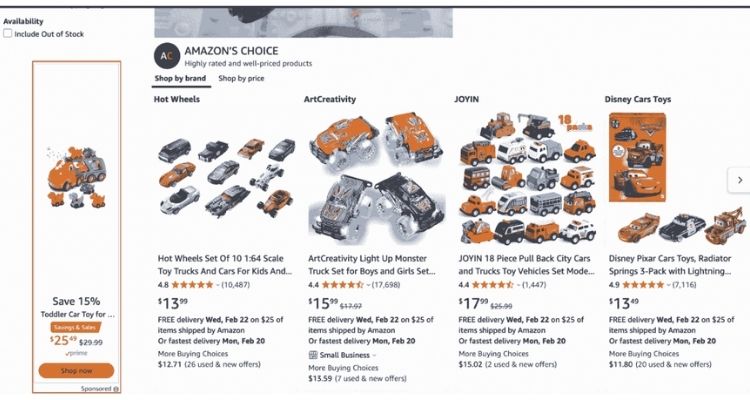
Amazon Ad Types Every Seller Should Know
Amazon offers several ad formats, each serving a different purpose depending on where a seller is in their growth journey. Knowing how each type works makes it easier to choose the right one before spending a single dollar.
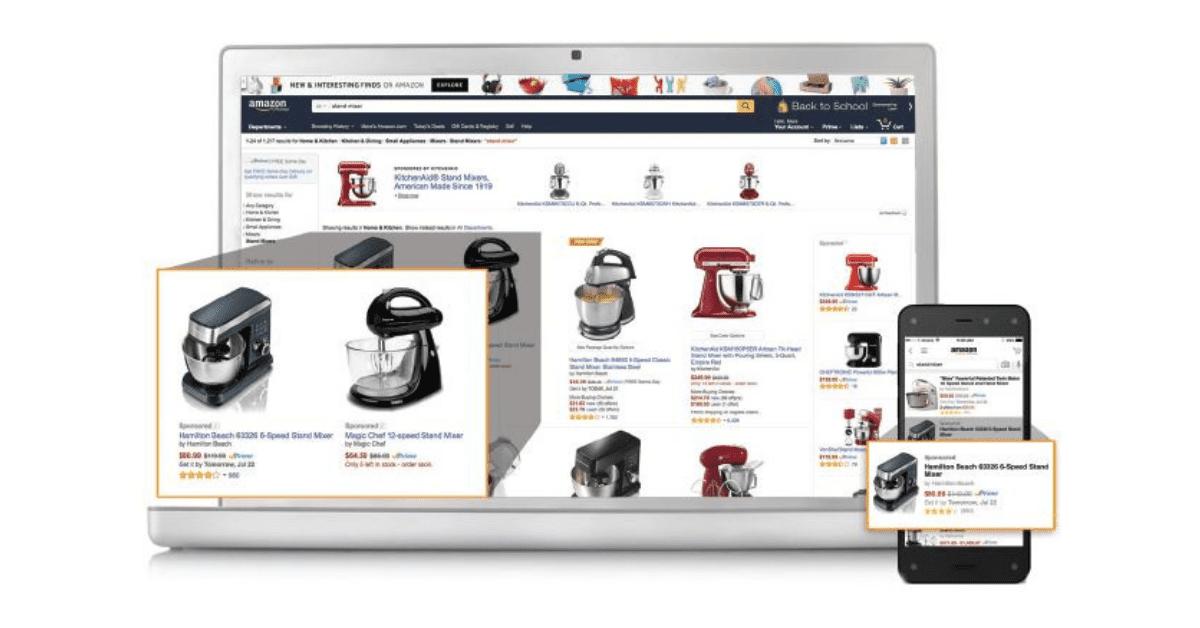
Sponsored Products
Amazon Sponsored Products are CPC-based ads that help sellers, vendors, and authors promote individual product listings directly within search results and on product detail pages.
These ads can target specific keywords or product categories, making them visible to shoppers on both desktop and mobile. Sponsored Products are self-service, require no brand registry enrollment, and only display for items that are currently in stock.
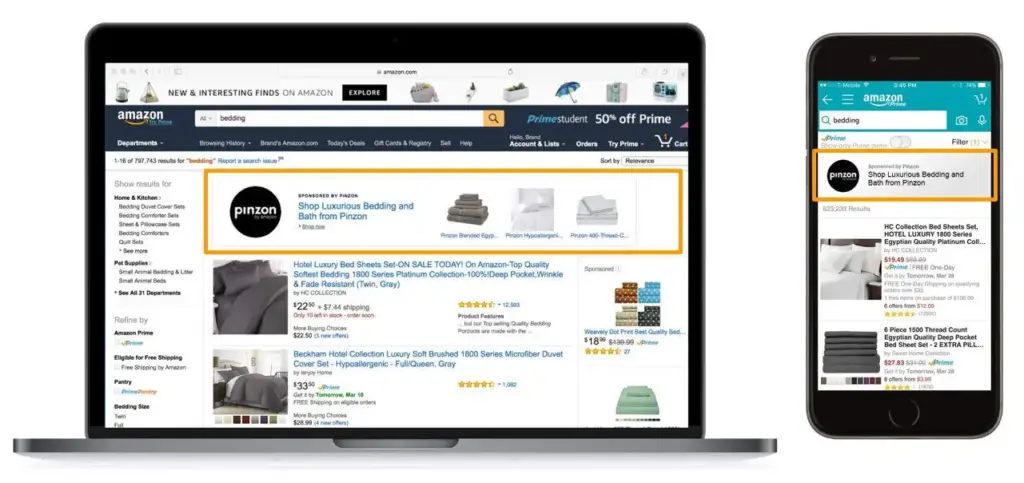
Sponsored Brands
Amazon Sponsored Brands are search-result banner ads that display a custom headline, logo, and multiple products or a video to help sellers build brand recognition. They come in three core formats: Product Collection, Store Spotlight, and Video – each appearing prominently at the top, side, or within search results.
When shoppers click on these ads, they are directed straight to the brand’s Store page, making Sponsored Brands an effective tool for driving targeted traffic.
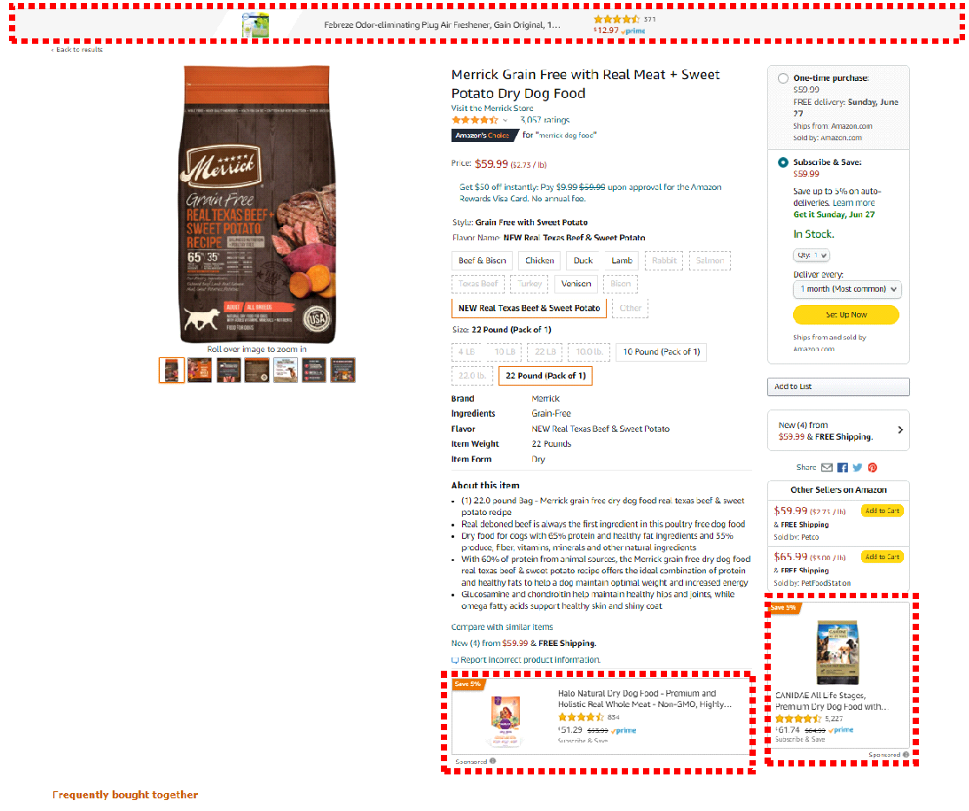
Sponsored Display
Amazon Sponsored Display ads are self-service display campaigns that reach shoppers both on and off Amazon, covering every stage of the marketing funnel through audience targeting or product targeting.
Unlike other ad types, these ads are retail-aware, meaning they only appear when the promoted product is in stock and has an active featured offer. This makes Sponsored Display a well-rounded tool for building brand awareness, attracting new traffic, and retargeting shoppers who have previously shown interest but have not yet made a purchase.
What You Need Before Running Your First Amazon Ad?
Setting up an Amazon ad takes less than an hour, but running one that actually converts requires preparation that most sellers skip. Getting these foundations in place before launching a campaign is what separates profitable ad spend from wasted budget.
Setting Up Your Amazon Seller Account
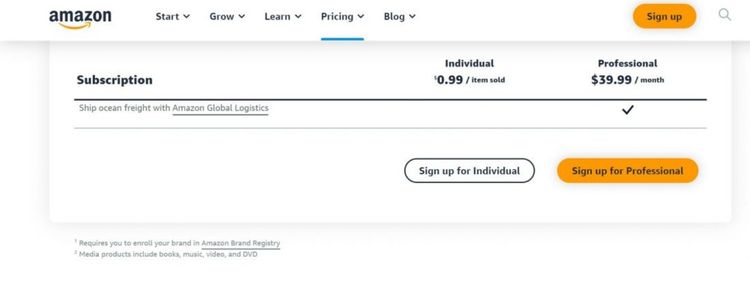
To run Amazon Ads, sellers need an active account that is in good standing. While most ad types are accessible to third-party sellers, certain features require additional access depending on the account type:
- Professional seller account: This plan costs $39.99 per month and is the minimum requirement to run any type of Amazon ad, as Individual accounts do not have access to the advertising console.
- Brand-registered sellers: These sellers gain access to advanced tools, including Sponsored Brands and video ads, which are not available to non-registered sellers.
- Brand Registry: Enrollment requires an active registered trademark and unlocks additional features such as a custom brand logo, a custom headline, and a dedicated Amazon Store for showcasing the full product catalog.
Making Sure Your Listings Are Ad-Ready
Before launching any campaign, sellers should review each listing they plan to promote and ensure the following elements are in place:
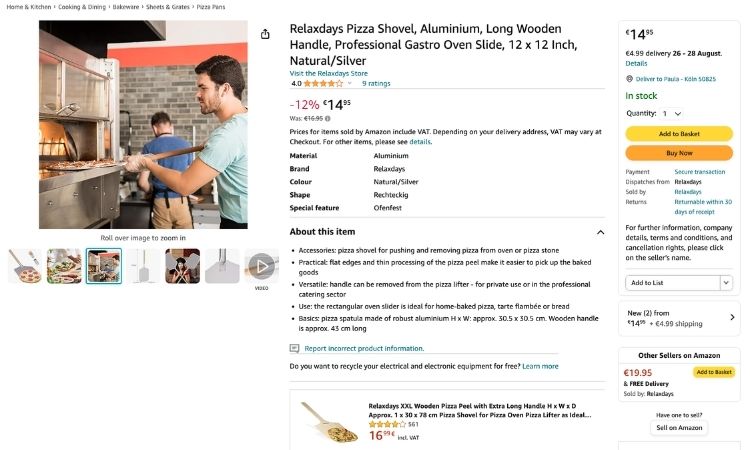
- Clear product titles and bullet points: Titles should be between 80 and 200 characters and include the brand name, key features, and primary keyword. Bullet points should cover at least 5 product highlights, each between 100 and 200 characters.
- High-quality images: Listings should include at least 6 images, with the main image meeting Amazon’s requirement of 1000×1000 pixels or larger on a pure white background to enable the zoom function.
- Accurate pricing and sufficient stock: Listings should reflect the correct price at all times and maintain enough inventory to avoid going out of stock, as stockouts can cause ads to pause automatically.
- Competitive pricing: Sellers should benchmark their price against the top 3 to 5 competing listings in the same category, as Amazon factors price competitiveness into both Buy Box eligibility and ad visibility.
How To Qualify For The Featured Offer?
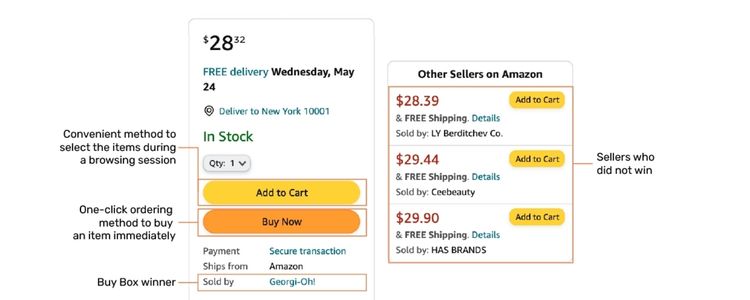
The Featured Offer, commonly known as the Buy Box, has a significant impact on ad performance that many sellers tend to overlook. While ads can still run without winning the Featured Offer, both reach and results are likely to be limited.
Eligibility is determined by several key factors:
- Price competitiveness: If a competitor offers the same product at a lower price, Amazon is less likely to award the Buy Box, which reduces ad visibility regardless of budget.
- Shipping performance: Sellers with consistently fast dispatch times and low late-shipment rates are prioritized, as Amazon favors experiences that keep customers satisfied.
- Seller metrics and account health: Amazon reviews order defect rates, cancellation rates, and customer feedback scores – sellers with poor metrics are at a disadvantage even when bidding competitively on ads.
Checking Product Restrictions
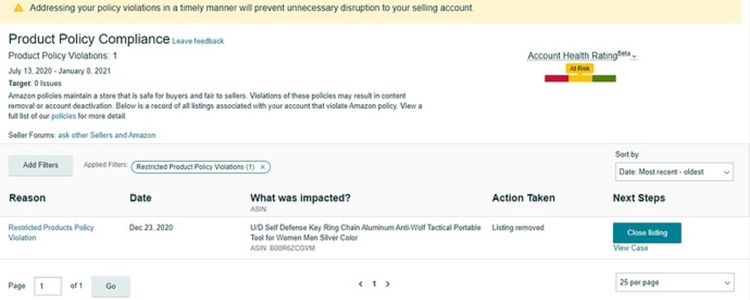
Not every product on Amazon can be advertised right away, as sellers in certain categories must receive approval from Amazon before their ads are allowed to go live:
- Certain health, beauty, and grocery items: Products such as supplements, skincare, and food items often require sellers to meet specific safety and compliance standards before they can be advertised.
- Products with brand restrictions: Items that fall under another brand’s intellectual property or exclusivity agreement require direct authorization from the brand owner before promotion is allowed.
- Categories with stricter compliance rules: Niches such as medical devices, pesticides, and alcohol have additional regulatory requirements that sellers must fulfill before running any ads.
How To Advertise On Amazon (Step-By-Step)
The following steps walk through the entire process from accessing the ads console to launching and monitoring a live campaign.
Step 1: Open The Amazon Ads Console
To get started, sellers need to access the Amazon Ads console by following these steps:
- Sign in to Amazon Seller Central at sellercentral.amazon.com
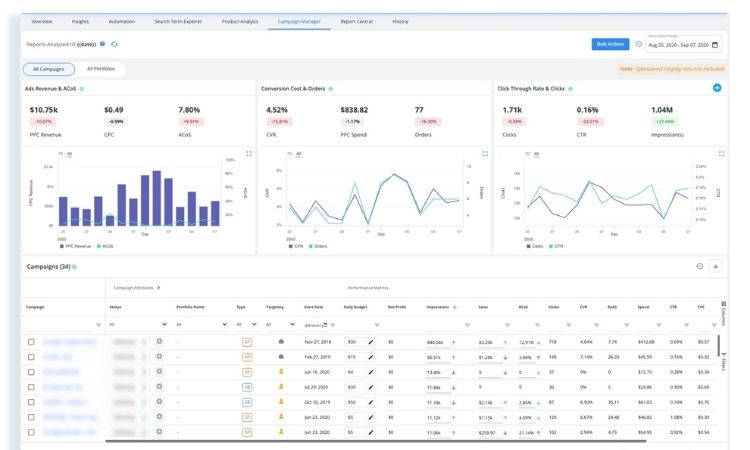
- On the top navigation bar, hover over Advertising and select Campaign Manager from the dropdown menu
- If it is the first time accessing the console, Amazon will prompt sellers to set up an advertising account by selecting their marketplace and confirming billing information
- Once inside Campaign Manager, the main dashboard will display all active campaigns, along with key metrics such as impressions, clicks, spend, and ACOS
Step 2: Pick The Right Ad Type For Your Goal
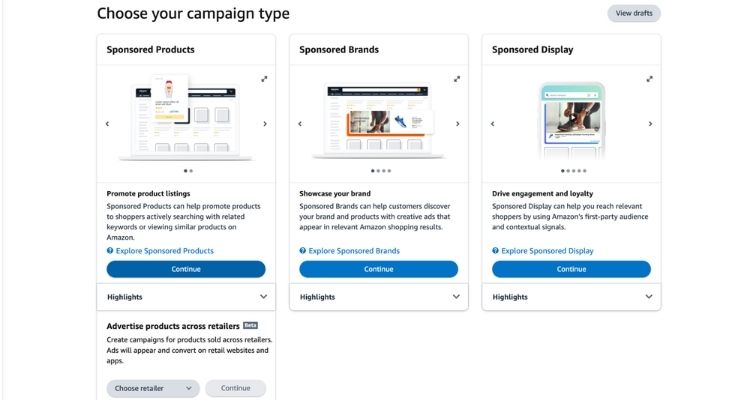
Selecting the right ad type is the foundation of any successful Amazon campaign, as each format serves a different purpose. Sellers should choose based on their current goal:
- Sponsored Products: Best for beginners, these ads promote a single product listing and appear directly in search results and on product detail pages. This format is the most straightforward to set up and delivers results quickly.
- Sponsored Brands: Suitable for sellers enrolled in Brand Registry who want to increase brand visibility, these ads display a custom headline, logo, and multiple products at the top of search results.
- Sponsored Display: Ideal for retargeting, these ads reach shoppers both on and off Amazon, including those who previously viewed a listing but did not complete a purchase.
For sellers just starting out, Sponsored Products is the recommended first step. Once the campaign is running and performance data starts coming in, other formats can be explored to expand reach and attract new customers.
Step 3: Set Your Budget And Choose A Bidding Strategy
Setting a realistic daily budget and choosing the right bidding strategy are two decisions that directly affect how far ad spend goes. Here is what sellers need to configure at this stage:
Daily budget:
- Amazon recommends a minimum daily budget of $10 to ensure ads run consistently throughout the day without exhausting the budget too early.
- Sellers who are just starting out can begin with $20 to $50 per day to gather enough performance data within the first 2 weeks before making any adjustments.
Bidding strategy:
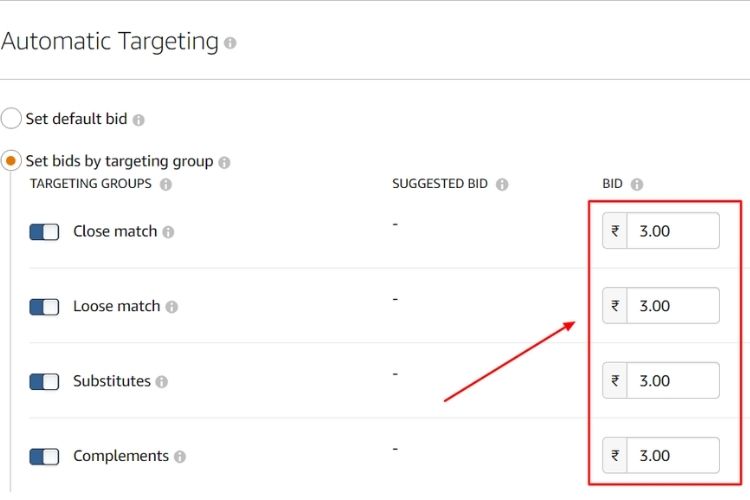
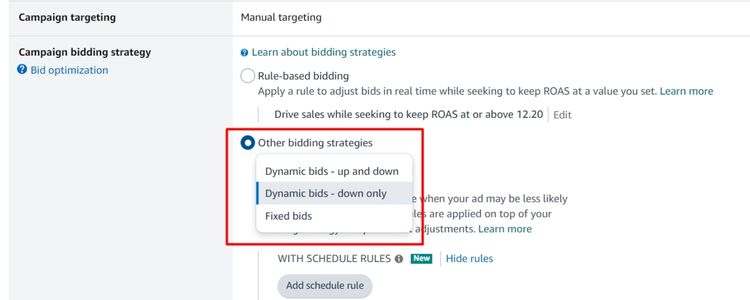
- Dynamic bids – down only: Amazon automatically lowers the bid when a click is less likely to convert. This is the safest option for beginners looking to control costs.
- Dynamic bids – up and down: Amazon raises or lowers bids in real time based on conversion likelihood, with bids increasing by up to 100% for top-of-search placements. This option suits sellers who prioritize visibility over cost control.
- Fixed bids: The bid amount stays constant regardless of conversion likelihood. This gives sellers full control but requires closer monitoring to avoid overspending.
Step 4: Decide Between Automatic And Manual Targeting
Targeting determines how Amazon matches ads to the right shoppers, and choosing the correct approach from the start can significantly impact campaign efficiency. Sellers have two options at this stage:
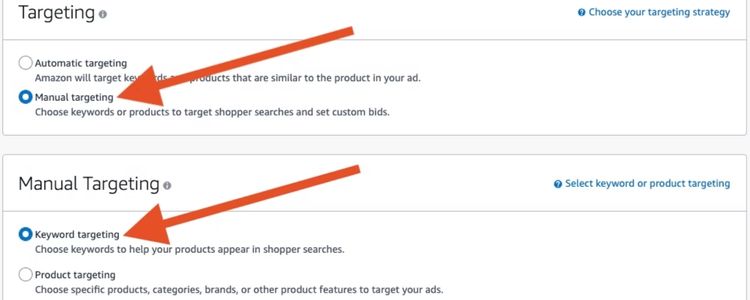
- Automatic targeting: Amazon analyzes the product listing and matches the ad to relevant search terms and competitor products automatically, requiring no prior keyword research. After at least 2 weeks of running, sellers can pull the Search Term Report to identify which terms are driving clicks and conversions.
- Manual targeting: Sellers handpick their own keywords or target specific product ASINs, giving them greater control over ad spend. However, this option requires keyword research beforehand using tools such as Helium 10, Jungle Scout, or Amazon’s built-in keyword suggestions.
For sellers running their first campaign, automatic targeting is the recommended starting point. Once enough data has been collected from the Search Term Report, high-performing search terms can be moved into a manual campaign with refined bids for better cost control and improved ACOS.
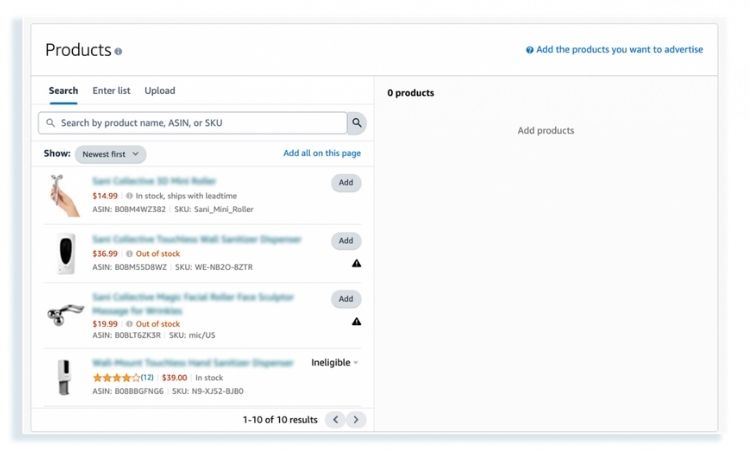
Step 5: Choose Which Products To Promote
Sellers should ideally run a separate campaign for each product they plan to advertise, as this makes it easier to track performance, control budget allocation, and optimize bids at the individual product level.
Running multiple products under one campaign is only advisable when those products share the same category, target the same audience, and fall within a similar price range.
For example, grouping three variations of the same kitchen tool priced between $15 and $20 into one campaign is reasonable, whereas mixing a $12 phone case with a $95 wireless charger would dilute targeting accuracy and make performance data harder to interpret.
Step 6: Launch Your Campaign And Track Early Results
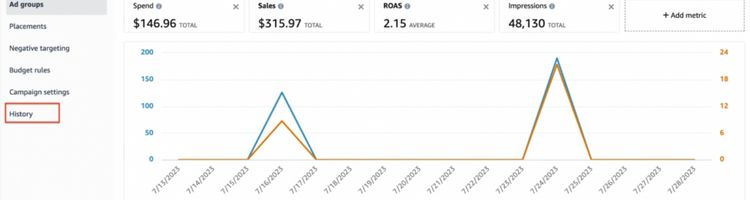
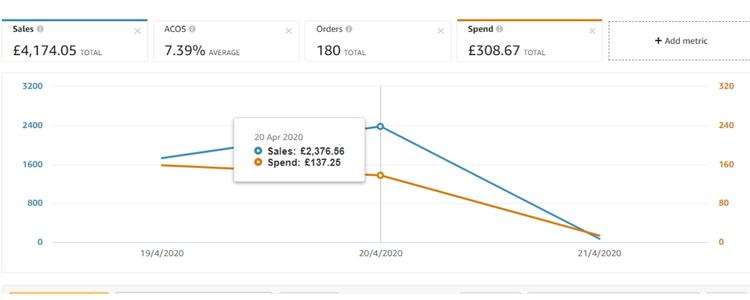
Once the campaign goes live, sellers should allow at least 2 weeks before making any major adjustments, as Amazon’s algorithm needs time to gather sufficient data.
During this period, the Campaign Manager should be checked regularly to track how the campaign is performing:
- Impressions and clicks: A high impression count with low clicks typically signals that the ad is being shown but the product image or title is not compelling enough to attract shoppers.
- ACOS (Advertising Cost of Sale): This is calculated by dividing total ad spend by total ad revenue. A lower ACOS indicates a more efficient campaign, while a high ACOS suggests bids or targeting may need adjustment.
- Conversion rate: This measures the percentage of clicks that result in a purchase. An average Amazon conversion rate sits between 10% and 15%, so anything significantly below this warrants a closer look at the listing quality and pricing.
- Search Term Report: Available after the first 2 weeks, this report reveals which search terms are triggering the ads and which ones are draining budget without converting, allowing sellers to add negative keywords and refine targeting.
How Much Does It Cost To Advertise On Amazon?
The cost of advertising on Amazon varies depending on the ad type, product category, and level of competition. As of 2026, the average CPC across most categories ranges from $0.71 to $1.20, though highly competitive niches such as electronics, supplements, and home appliances can push CPC beyond $2 per click.
Monthly budgets on Amazon Ads vary significantly depending on where a seller is in their growth journey:
- New sellers: $300 to $800 per month, focused primarily on Sponsored Products to test targeting and gather initial performance data.
- Growing sellers: $1,000 to $3,000 per month, typically expanding into Sponsored Brands to build brand visibility alongside product-level campaigns.
- Scaling brands: $3,000 to $20,000 or more per month, running multiple campaign types across a broader product catalog.
CPC rates also differ across ad formats, with more prominent placements generally commanding higher bids:
- Sponsored Products: $0.71 to $1.20 per click
- Sponsored Brands: $0.90 to $1.50 per click
- Sponsored Display: $0.50 to $1.00 per click
How To Get Better Results From Your Amazon Ads?
Getting better results from Amazon Ads is not about spending more but about making smarter adjustments based on what the data is already showing.
Find and Expand Your Best Keywords
After a campaign has been running for at least 2 weeks, sellers should download the Search Term Report from Campaign Manager and filter for terms that have generated at least 1 order with an ACOS below the target threshold. These terms should be moved into a manual campaign with Exact Match targeting to capture high-intent traffic more efficiently.
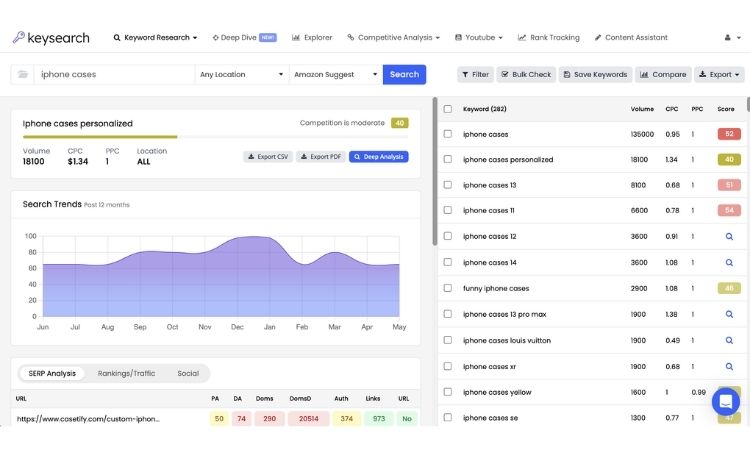
To expand beyond existing keywords, sellers can apply the following approaches:
- Amazon’s suggested keywords: For example, if you advertise a stainless steel water bottle, Amazon may suggest keywords like “insulated water bottle 32oz” or “leak proof water bottle for gym” – both of which signal clear purchase intent.
- Broad match for discovery: Running a separate ad group with Broad Match allows Amazon to match ads to a wider range of queries, surfacing new keyword variations such as “BPA free bottle” or “water bottle with straw” that can later be tested with Exact Match.
- Competitor ASIN targeting: Adding top competitor ASINs as targets exposes the ad to shoppers already browsing similar products, effectively intercepting purchase decisions at the final stage.
Using Negative Keywords to Cut Wasted Spend
Negative keywords prevent ad spend from being wasted on searches that are unlikely to convert. For the stainless steel water bottle example, terms like “plastic water bottle”, “water bottle kids,” or “free water bottle” should be added as negative keywords, as these attract clicks from shoppers whose intent does not match the product.
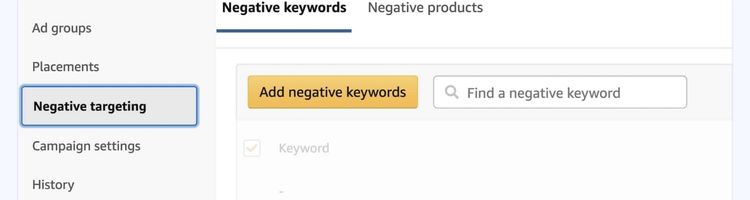
Any search term in the Search Term Report that has accumulated 10 or more clicks with zero conversions is a strong candidate for negation. Adding these consistently keeps the campaign focused on high-intent traffic and lowers overall ACOS over time.
Improving Product Listings
Before increasing any budget, sellers should confirm the following:
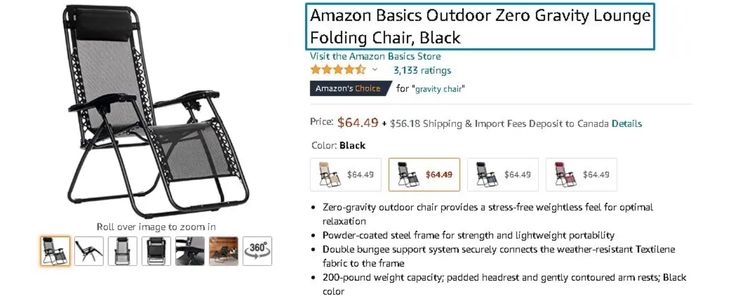
- Clear titles and images: Titles should be between 80 and 200 characters and lead with the primary keyword. Listings should include at least 6 images, with the main image at a minimum of 1000×1000 pixels on a white background to enable the zoom function.
- Competitive pricing: The product price should sit within 5% to 10% of the top 3 competing listings in the same category, as pricing outside this range reduces both Buy Box eligibility and conversion rate.
- Simple, scannable product details: Listings should include 5 bullet points, each between 100 and 200 characters, highlighting the most important features and benefits in plain language that shoppers can read quickly without scrolling extensively.
Adjusting Bids Based On Performance
Bid adjustments should always be driven by data rather than assumptions. The two most important signals to watch are placement performance and the relationship between spend and revenue – specifically, whether an increase in ad costs is producing a proportional increase in sales.
For example, if top-of-search placements are delivering an ACOS of 18% while product page placements are sitting at 40%, bids for product page placements should be reduced by 20% to 30% to reallocate budget toward the more efficient placement. Similarly, if total ad spend has increased by 30% over two weeks but revenue has only grown by 10%, bids across underperforming keywords should be pulled back by 15% to 20% until the numbers realign.
Frequently Asked Questions About How To Advertise On Amazon
Amazon does not impose a minimum budget, with campaigns technically able to run on as little as $1 per day. However, a daily budget of at least $10 to $20 is recommended to collect enough data for meaningful optimization within the first 2 weeks.
Unlike Google or Meta, Amazon captures shoppers at the bottom of the purchase funnel, resulting in conversion rates often 3X higher than Google Shopping. Amazon Ads also operate with no minimum spend, whereas Meta typically requires higher budgets to exit the learning phase and deliver consistent results.
Brand Registry is not required – sellers without it can still run Sponsored Products, which covers the majority of ad placements. However, enrolling unlocks additional formats such as Sponsored Brands and Sponsored Display, along with a custom storefront and brand logo within ads.
Get Professional Help from Megaficus
Running Amazon ads successfully comes down to getting the fundamentals right before scaling spend, from having optimized listings and the right targeting setup to monitoring performance data and refining bids over time. Sellers who treat advertising as an ongoing process rather than a one-time setup are the ones who consistently lower their ACOS and grow revenue without wasting budget.
Whether you are launching your first campaign or looking to improve results from existing ads, applying the strategies in this guide will put your spend to better use. If you need expert guidance to build and manage a profitable Amazon advertising strategy, the team at Megaficus is ready to help.