Have you ever wondered why your Amazon payouts seem smaller than expected despite reaching record-breaking sales numbers this month? Navigating the complex world of Amazon referral fees is the first step toward achieving a sustainable and profitable e-commerce business by accurately pricing your inventory against competitors.
Quick Summary
- Definition: A mandatory percentage-based commission paid to Amazon for every successful sale.
- Cost Variance: Fees range from 8% to 45%, depending on the specific product category.
- Optimization: Strategic categorization and price threshold management are vital for profit.
- Mechanics: Amazon automatically deducts these fees, including a per-item minimum of $0.30.
What are Amazon Referral Fees?
Amazon referral fees represent the essential commission that every seller pays to the platform in exchange for listing products and accessing its global customer base. Every time a transaction occurs, Amazon takes a specific percentage of the total sales price as compensation for providing the marketplace infrastructure and driving traffic.
This fee is the primary cost associated with utilizing Amazon’s massive marketplace, and it applies to both Individual and Professional selling plans. Unlike fixed subscription fees, referral fees are strictly performance-based, meaning you only pay them once you have actually secured a sale and collected payment.
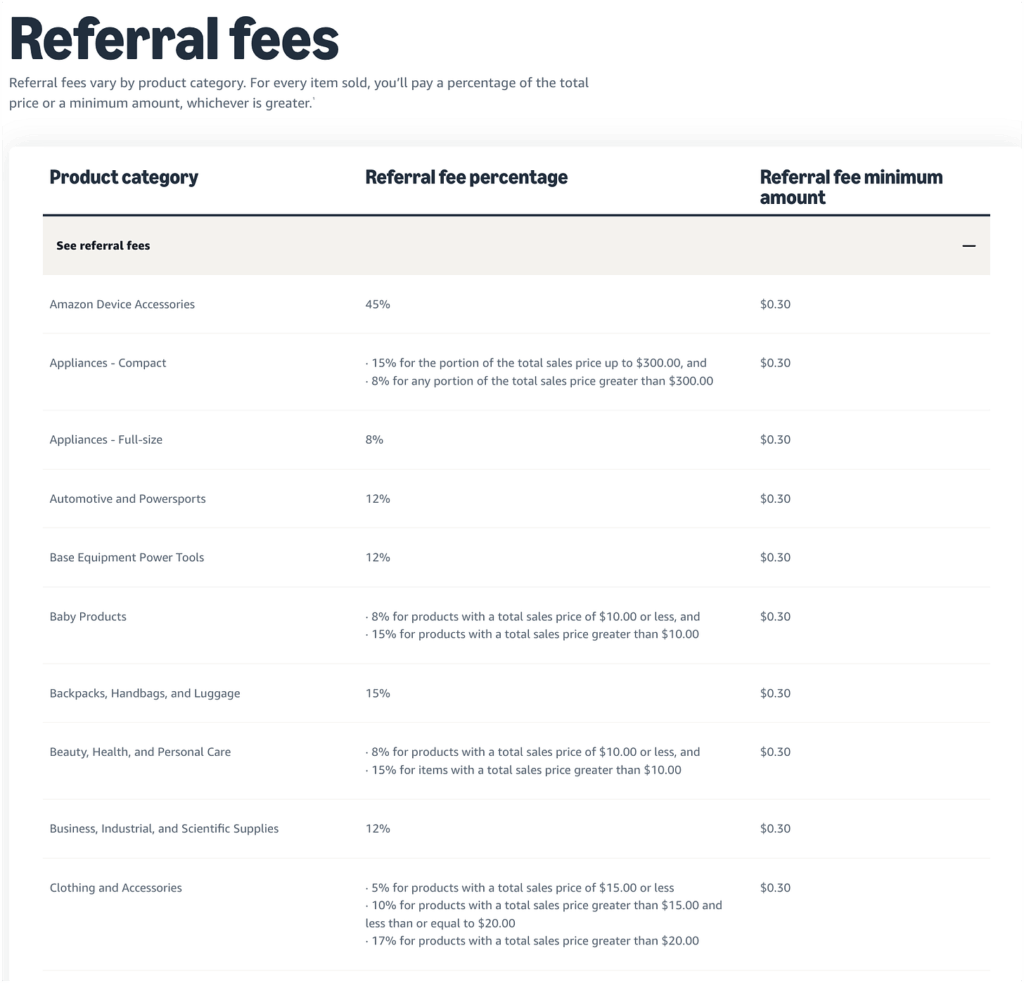
For example, if you sell a high-quality yoga mat for $40, Amazon will take a percentage of that $40 before depositing the remaining funds into your account. Understanding this per-sale cost is critical because it directly dictates how much room you have for marketing expenses and inventory reinvestment.
How Does the Amazon Referral Fee Work?
The mechanics of the Amazon referral fee are designed to be seamless, as the platform automatically deducts the required amount from each transaction before the funds reach you. You do not need to manually send payments to Amazon for these fees, as they are subtracted instantly at the point of sale.
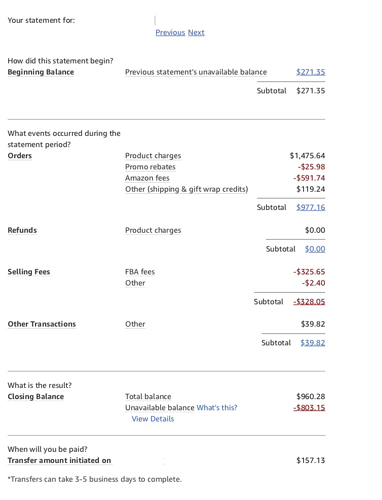
Each product’s fee is calculated based on the specific category assigned to its listing, making accurate categorization a fundamental task for every seller. If a product is listed in Electronics, it will trigger a different fee percentage than if it were listed under Clothing or Home Improvement.
In addition to the percentage-based cost, most categories are subject to a per-item minimum referral fee, which is currently set at $0.30 for most items. This means that for very low-priced products, you will pay either the percentage or the minimum of thirty cents, whichever amount is greater.
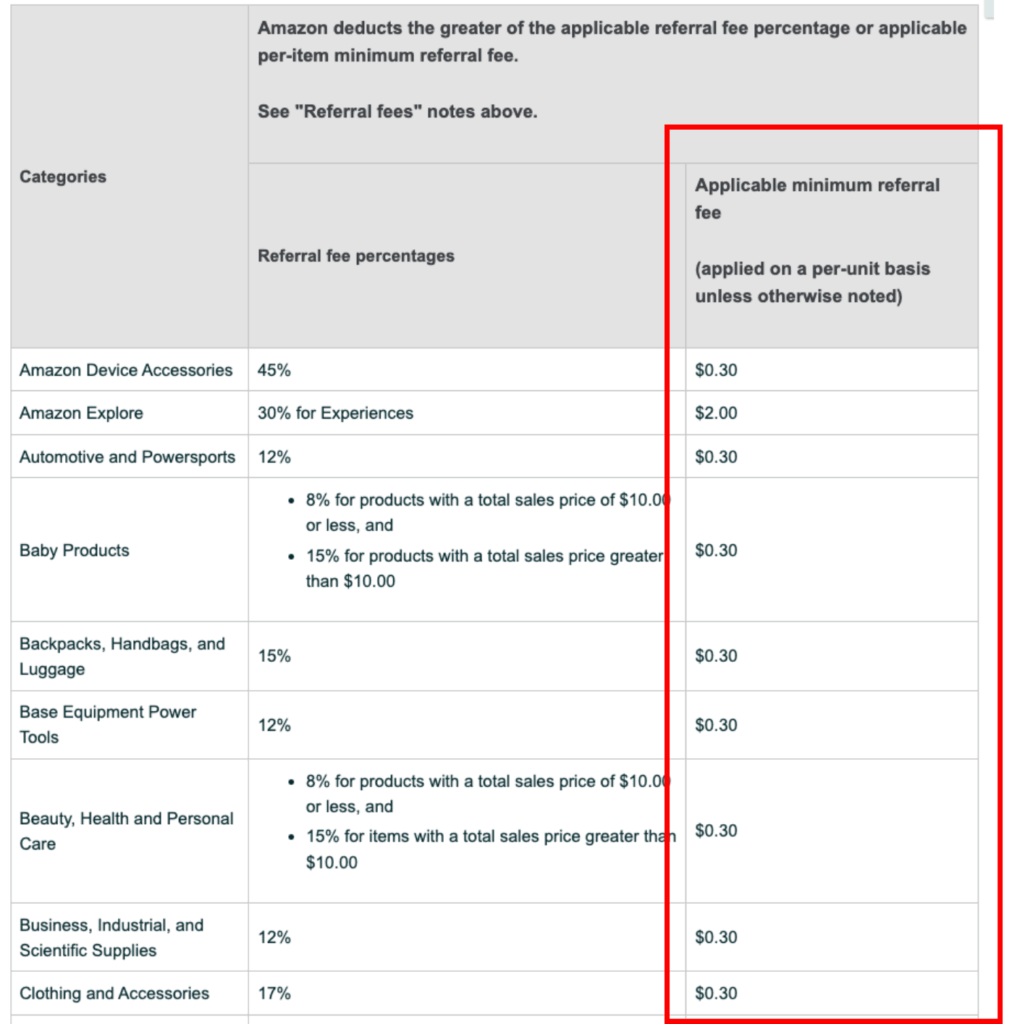
Between your main strategy and execution, you must understand how small margins are affected by minimums to avoid losing money on low-cost goods.
For a practical example, imagine selling a $1 sticker in a category with a 15% referral fee. While 15% of $1 is only $0.15, Amazon will still charge you $0.30 as the minimum fee, effectively taking 30% of your revenue.
How Much Do Amazon Referral Fees Cost?
Referral fee costs vary widely across the platform, but most standard categories fall within the benchmark range of 8% to 15% of the total price. However, some specialized categories can go as low as 6% or as high as 45%, depending on the complexity of the niche.
| Category | Referral Fee Percentage | Per-Item Minimum |
|---|---|---|
| Amazon Device Accessories | 45% | $0.30 |
| Beauty & Personal Care | 8% (for items ≤ $10) / 15% (for items > $10) | $0.30 |
| Camera and Photo | 8% | $0.30 |
| Clothing & Accessories | 5% (for items < $15) / 17% (for items > $20) | $0.30 |
How to Calculate Your Amazon Referral Fees Step-by-Step?
Calculating your fees accurately involves a methodical approach to ensure no hidden costs surprise you during your monthly financial reconciliation or tax preparation. By following a structured process, you can predict your net income for every unit sold before you even purchase your initial inventory.
Step 1: Identify your specific product category
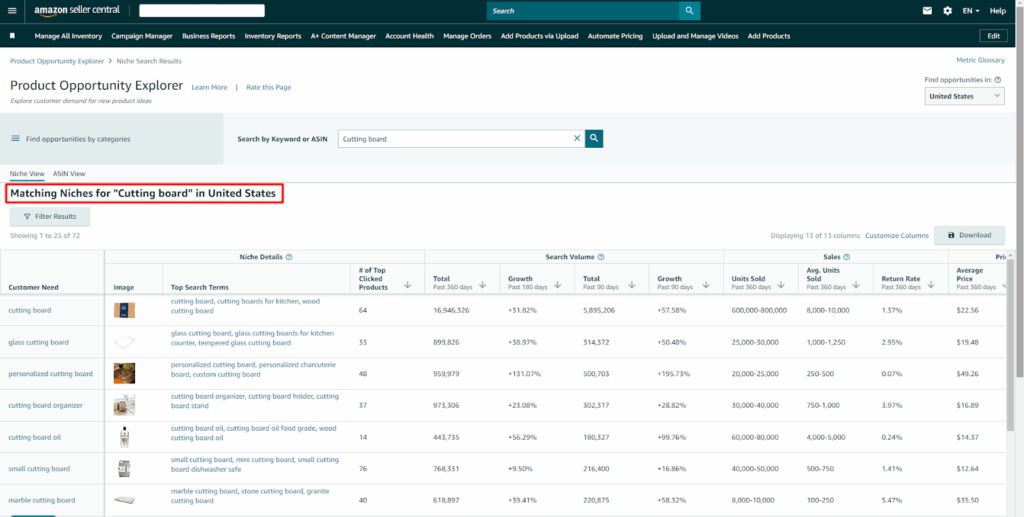
The first move is to find the exact category where your product will live, as this dictates the base percentage rate. You can use the Amazon Seller Central “Product Opportunity Explorer” to find where competitors in your niche are currently categorized for the most accurate data.
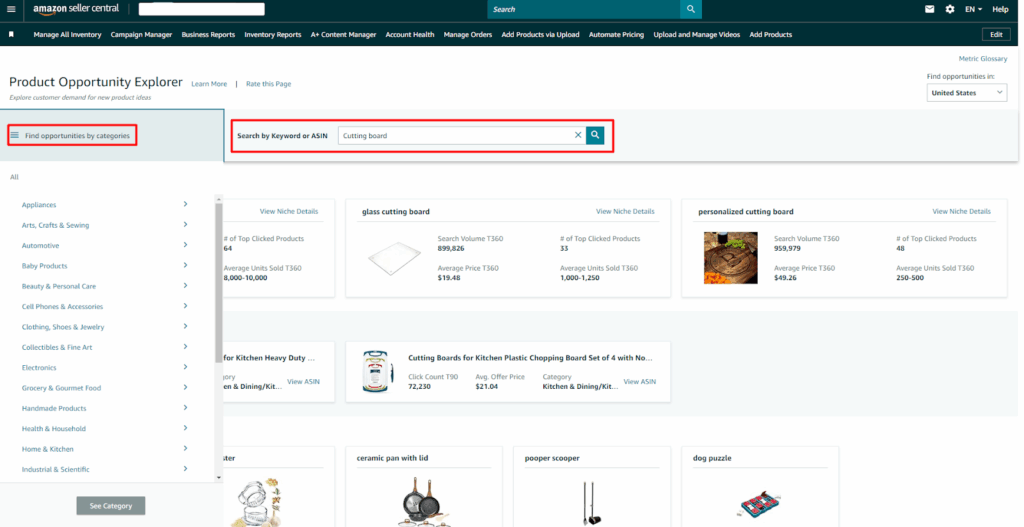
Once you perform a search, the tool highlights several essential metrics that directly influence your profitability and pricing strategy:
- Customer Needs: These represent the specific individual niches available on Amazon where your products will compete for visibility.
- Top Search Term: This identifies the three highest volume search terms for a niche, helping you gauge the demand before calculating Amazon referral fees.
- Search Volume (360/90 days): This metric displays how frequently shoppers use specific terms to find products, providing data for the last quarter and the full year.
- Search Volume Growth: It indicates the percentage change in interest, comparing recent data to previous periods to help you spot trending categories with favorable Amazon referral fees.
- Units Sold (past 90 days): This figure reveals the total number of items sold within a niche over the last quarter, which is vital for forecasting your total commission costs.
- # of Top Clicked Products: It tracks the specific products receiving 90% of all clicks and sales, showing you exactly who your main competitors are in that fee category.
- Average Price (past 90 days): This provides the average selling price in a niche, a key number needed to accurately estimate your expected Amazon referral fees per unit.
- Price Range (past 360 days): It shows the minimum and maximum selling prices over the last year, allowing you to see if your product can stay within a profitable price threshold.
Step 2: Determine the applicable percentage for that category
Once the category is confirmed, consult the current Fee Schedule to find the exact percentage associated with that specific branch of the product tree. Be aware that some categories have tiered pricing, where the percentage changes based on whether the item is above or below price points.
Step 3: Apply the percentage to the total selling price
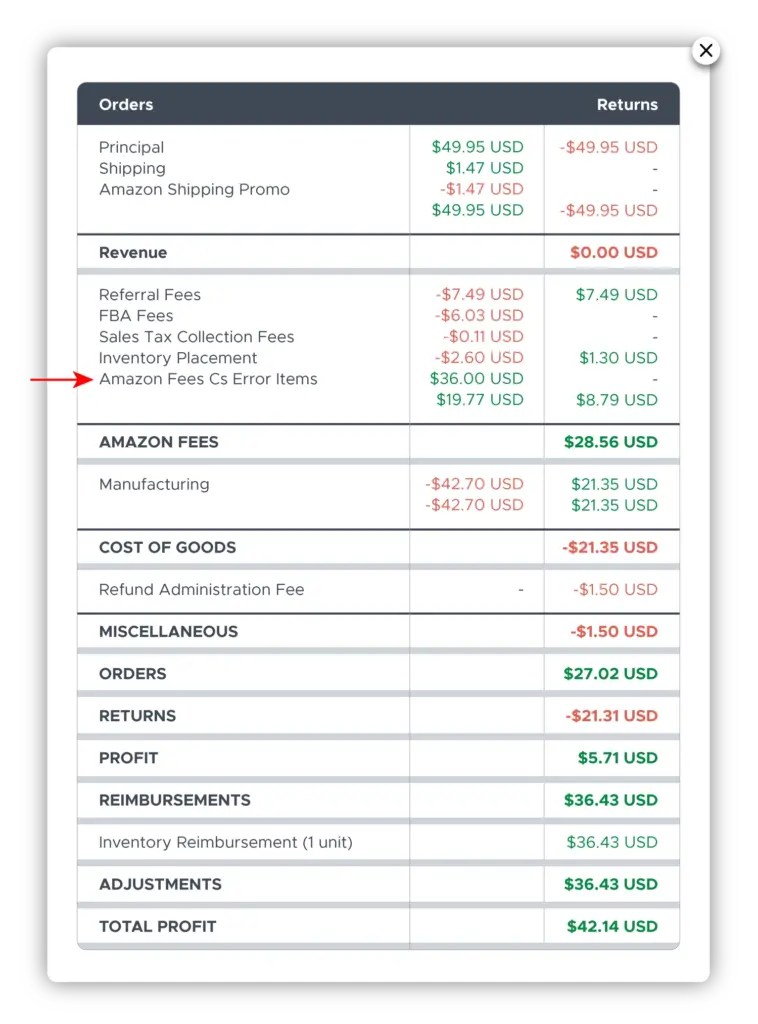
Multiply the total price paid by the customer, including the item cost, shipping charges, and gift wrapping, by the category percentage you identified earlier. There are many clients making a common mistake in calculating the fee only on the item price while forgetting that shipping revenue is also taxed, so you must be careful in this step.
Step 4: Compare the result against the minimum fee
Check if your calculated fee is higher than the $0.30 minimum; if it is lower, you must record $0.30 as your actual referral cost. For a $2 item at 10%, the math shows $0.20, but you will actually pay $0.30, which significantly changes your unit economics.
What are the Best Practices for Optimizing Fee Costs?
Implementing a strategic approach to cost management can significantly reduce your overhead and ensure you keep a larger portion of every sale you make.
Regularly Audit Your Product Categorization
One of the most effective strategies involves auditing your listings regularly to ensure they are placed in the most accurate and lowest cost category available. Sometimes, Amazon’s automated systems move a product to a sub-category with a higher fee, so monitoring your Fee Preview report is essential.
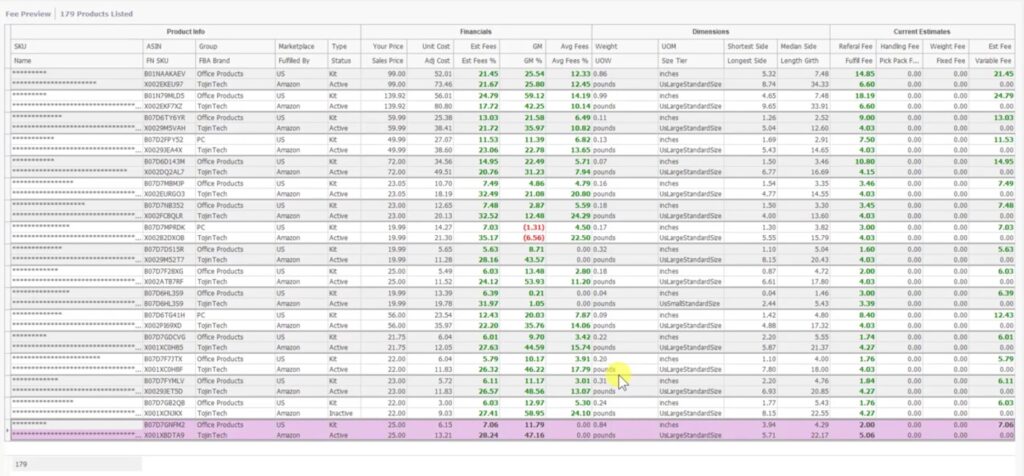
You just need to go to Reports, then choose Fulfillment, and next is Payments. This will bring you to the reports page, and then you just have to click on “Fee Preview” to finally download the report you want.
Monitor Price Thresholds for Fee Tiering
You should stay mindful of specific price-point thresholds, especially in categories like Apparel or Beauty, where the Amazon referral fees drop significantly for lower-priced items. For a practical example, if an item is priced at $15.01, you might pay a 15% fee, but dropping the price to $14.99 could trigger an 8% rate, potentially making the lower price point more profitable.
To maximize your final profit, you should consistently evaluate your net payout across multiple pricing levels to confirm that a minor price increase isn’t triggering a higher fee percentage. You can identify “sweet spots” where your item remains competitive without accidentally crossing into an expensive fee tier that would ultimately decrease your take-home pay.
Leverage the Amazon Revenue Calculator
You should frequently utilize tools like the Amazon Revenue Calculator to estimate net profit while accounting for referral fees and fulfillment costs simultaneously. This tool allows you to plug in different sale prices and fulfillment methods to see exactly how your margins shift as you offer customer discounts or coupons.
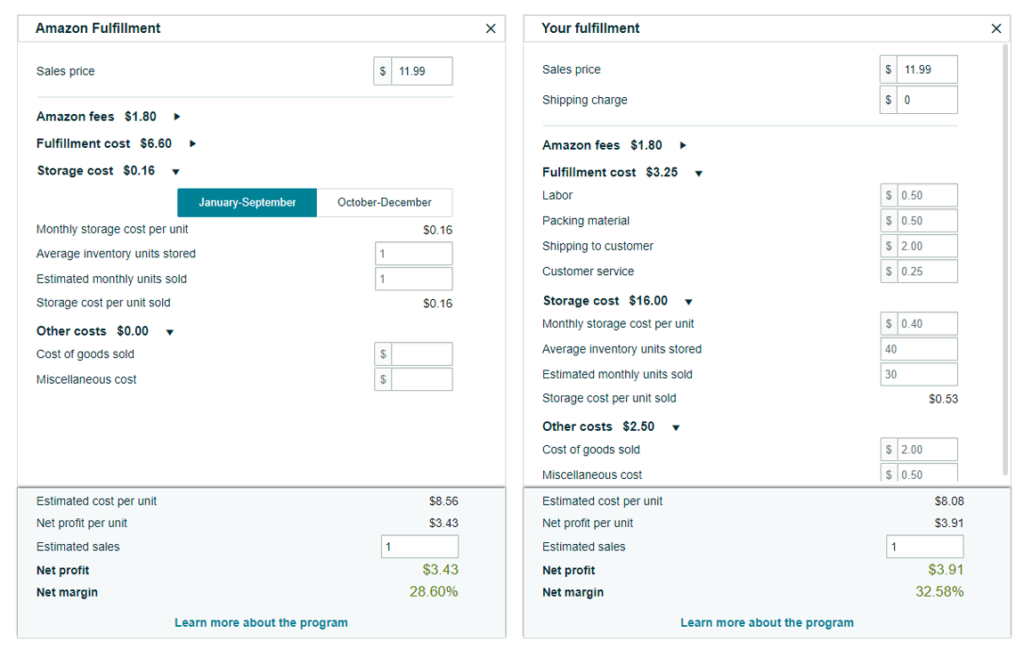
By simulating these costs before launching a product, you can ensure that your chosen niche can actually support the mandatory commission while still delivering a healthy return.
Utilize the Brand Referral Bonus Program
Sellers can effectively lower their net Amazon referral fees by participating in the Brand Referral Bonus program, which offers a credit of roughly 10% on qualifying sales. This bonus is applied to sales generated from non-Amazon traffic, such as your own social media ads, email marketing lists, or external blogs.
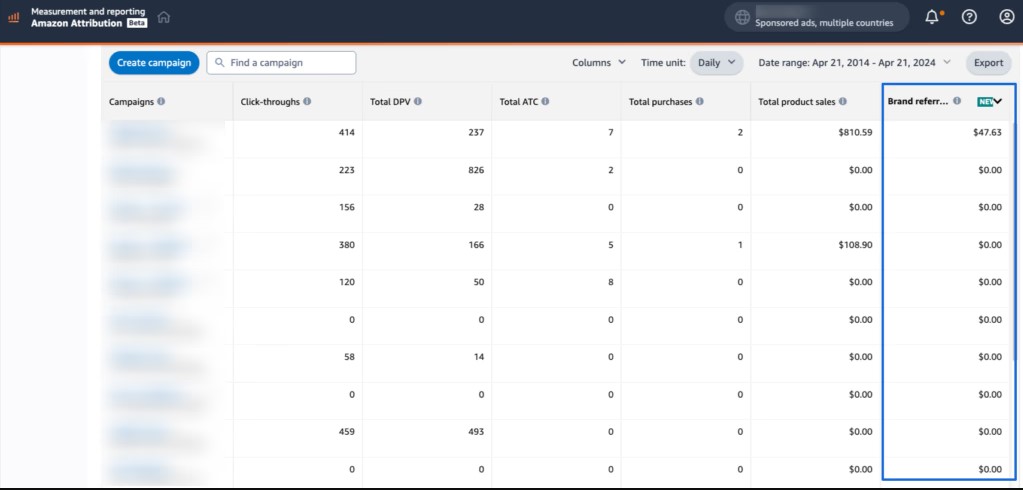
This strategy essentially allows you to recoup a significant portion of your referral costs by bringing new customers to the platform through your own independent marketing efforts.
Which Category is Right for Your Profit Goals?
Selecting the right category requires balancing the level of competition and search volume against the specific referral fee cost associated with that niche. A category with a very low 8% fee might be extremely crowded with competitors, leading to a race to the bottom on pricing.
You must also consider factors like average return rates and shipping costs, as these expenses are layered on top of the base referral fee. In high-return categories like Fine Jewelry, a 20% referral fee combined with a high return rate can quickly evaporate your business’s cash flow.
A practical example would be choosing between Kitchen (15% fee) and Major Appliances (8% for items over $300). If you sell a high-end blender, classifying it correctly as a major appliance rather than a simple kitchen tool could save you 7% on every single sale.
Common Referral Fee Mistakes and Troubleshooting
To protect your profits, you must actively identify and resolve errors that could lead to overpayment of Amazon referral fees throughout your selling journey. Being proactive in your monitoring allows you to catch system glitches or human errors before they significantly drain your business’s cash flow.
Addressing Product Miscategorization Errors
Frequent errors often include miscategorization, where a seller accidentally lists a Home Decor item under Art Crafts, potentially triggering a higher fee rate. If you discover that your product has been incorrectly charged for months, you must prepare a case for Amazon Support.
To resolve this, you can request a fee reimbursement by providing evidence that the item belongs in a different, lower fee category based on its function. Clear photos of the product packaging and links to similar items in the target category will strengthen your case for a successful fee adjustment.
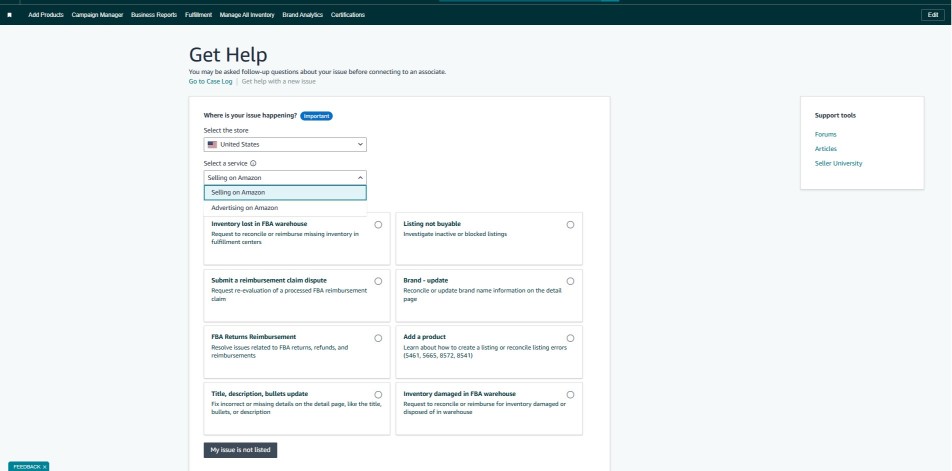
This process ensures you are only paying the mandatory commission required for your specific product niche rather than a generic or incorrect rate.
Calculating Fees on the Total Sales Price
Many sellers also forget that referral fees apply to the total sales price, meaning they are surprised when Amazon takes a cut of their shipping revenue. If you charge a customer $5 for shipping, remember that a portion of that revenue goes directly to Amazon, so you must price your shipping services accordingly to cover your actual costs.
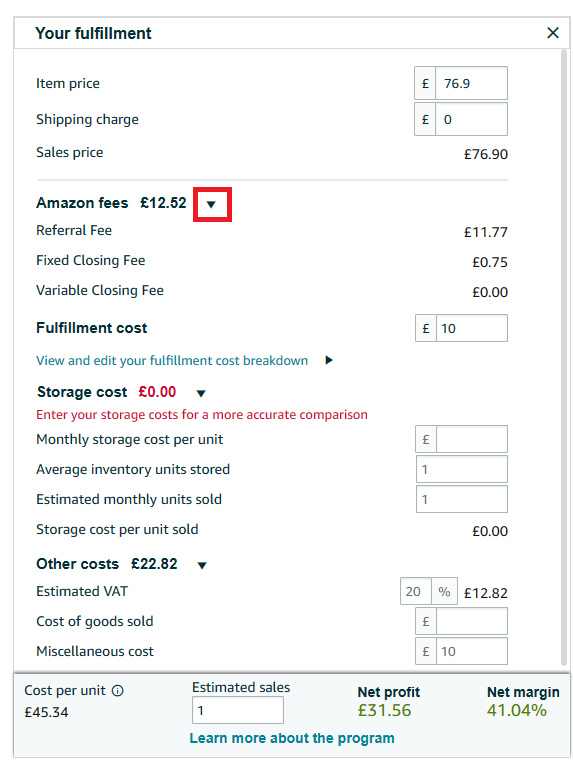
Understanding this comprehensive calculation prevents unexpected losses and helps you maintain a more accurate view of your net payout per transaction.
>> Read more: Amazon FBA Fees: Complete Guide To All Costs & How To Save
Frequently Asked Questions (FAQs)
Yes, every seller must pay the referral fee regardless of whether they ship the items themselves or use Amazon’s fulfillment centers. The referral fee is for the customer’s referral, while FBA fees are separate charges for the storage and shipping of goods.
The referral fee is typically calculated on the total sales price, which includes the item price and any shipping or gift wrap charges. However, in most jurisdictions, Amazon does not calculate the referral fee on the sales tax collected from the customer.
Amazon generally updates its fee structures periodically to reflect changing market conditions and operational costs. It is vital to read the announcements in Seller Central to adjust your pricing strategy before any scheduled updates go live.
When a customer is refunded, Amazon returns the referral fee to the seller, but they keep a small portion called a Refund Administration Fee. This administrative charge is typically the lesser of $5.00 or 20% of the original referral fee that was charged.
Sellers can effectively lower their net referral costs by participating in the Brand Referral Bonus program, which offers a credit of roughly 10%. This bonus is applied to sales generated from non-Amazon traffic, such as your social media ads or email marketing lists.
Get Professional Help from Megaficus
Monitoring your Amazon referral fees is a non-negotiable part of maintaining a healthy and scalable e-commerce business in the modern digital landscape. By treating these fees as a dynamic variable rather than a fixed expense, you can proactively adjust your strategies to protect your margins.
We encourage all Megaficus clients to conduct monthly audits of their fee reports to ensure every ASIN is categorized correctly and performing at peak profitability. Stay informed on periodic fee updates and utilize the tools provided by Amazon to keep your business’s financial engine running smoothly.