Have you ever confirmed a shipment a few hours past the deadline and wondered if it actually matters? The Amazon late shipment rate is calculated the moment you confirm an order in Seller Central, and even a small number of late confirmations can push your rate toward the 4% threshold where account warnings begin. This guide breaks down exactly how LSR works, what triggers it, and how to keep it under control.
Quick Summary
- LSR (Late Shipment Rate) is the percentage of seller-fulfilled orders confirmed late in Seller Central, regardless of the actual delivery time
- Amazon’s LSR policy: Must stay below 4%, exceeding it risks warnings or deactivation of seller-fulfilled offers
- How Amazon calculates LSR: Late-confirmed orders divided by total shipped orders over a rolling 30-day window
- How to check your LSR: Go to Performance, then Account Health, then Shipping Performance in Seller Central
- Common causes of high LSR: Overselling, incorrect handling times, manual workflows, and real-time inventory sync gaps
- How fulfillment method affects LSR: FBA orders are excluded; only MFN/FBM orders count, Seller Flex requires as low as 0.08%
- How to reduce and manage LSR: Set accurate handling times, improve inventory accuracy, tighten order processing, and communicate proactively with buyers
- How to recover from LSR violations: Submit a POA covering root cause, corrections already made, and a concrete prevention plan
What Is Amazon’s Late Shipment Rate (LSR)?
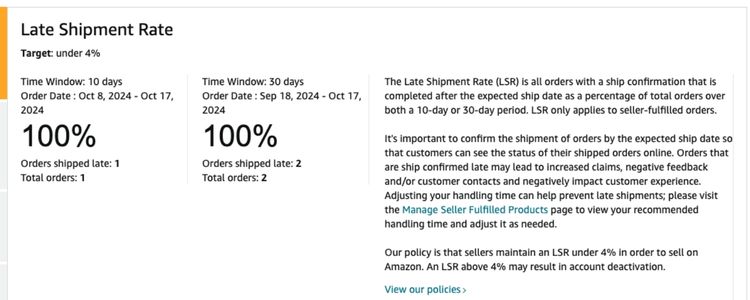
Late Shipment Rate (LSR) tracks the percentage of orders that sellers confirm as shipped after Amazon’s required handling time window. Amazon calculates this metric based solely on when the seller updates the shipment status in Seller Central, not when the carrier picks up the package or when the buyer receives it.
Even a few hours of delay in confirming an order counts as a late shipment. Once LSR reaches 4% or above, the seller’s account becomes vulnerable to warnings or suspension.
Why Does The Late Shipment Rate Matter for Amazon Sellers?
LSR is one of the key performance metrics Amazon uses to evaluate seller quality. Maintaining a low LSR directly affects three critical areas of a seller’s business:
- Customer Satisfaction: On-time shipment confirmations help ensure buyers receive their orders within the expected timeframe, which drives positive reviews, repeat purchases, and a stronger brand reputation over time.
- Account Health: Amazon consistently monitors LSR as part of its seller performance standards. A high LSR signals poor fulfillment reliability, which can trigger account warnings, suspension, or loss of selling privileges.
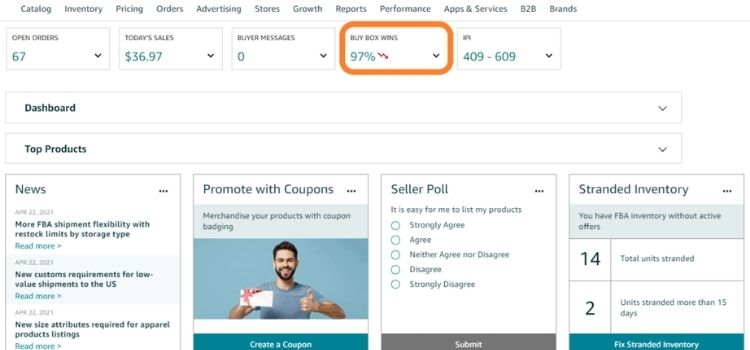
- Buy Box Eligibility: LSR is one of the factors Amazon weighs when determining which seller wins the Buy Box. Sellers with a high LSR are less competitive for this placement, directly reducing their visibility and sales potential.
Amazon Late Shipment Rate Policy Explained
Amazon requires all seller-fulfilled orders to maintain an LSR below 4%. Sellers who exceed this threshold risk having their seller-fulfilled offers deactivated until the issue is resolved.
When a deactivation occurs, Amazon sends a Performance notification directly to the seller’s Seller Central account. This notification outlines the specific steps the seller must take, including submitting a Plan of Action (POA) to request reinstatement of their selling privileges.
How Amazon Calculates The Late Shipment Rate?
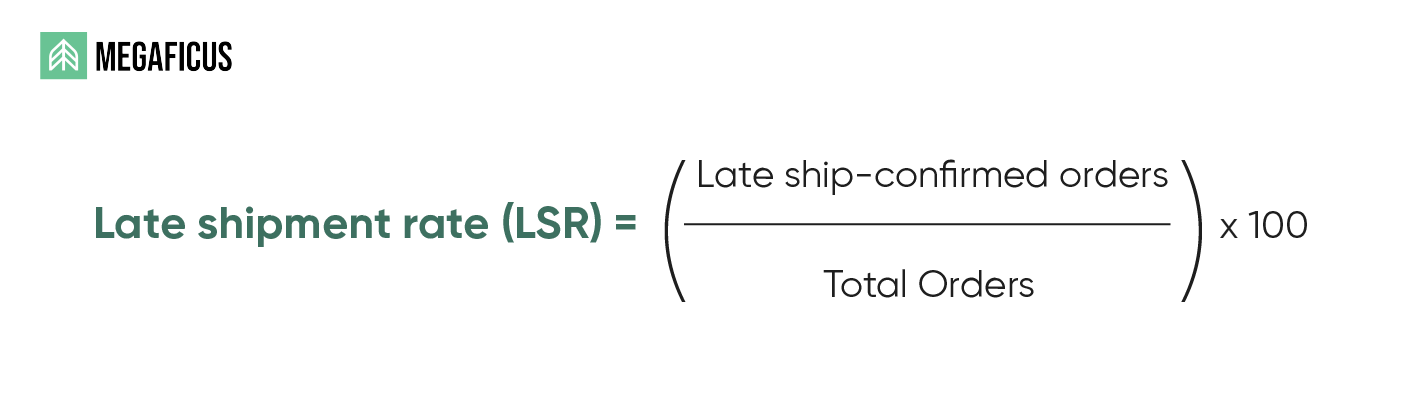
Amazon calculates LSR by dividing the total number of late-confirmed orders by the total number of shipped orders over a rolling 30-day window. The formula breaks down as follows:
- Late-confirmed orders: orders where the seller confirmed shipment after the required handling time
- Total shipped orders: all seller-fulfilled orders within the same 30-day period
- Result: the percentage is updated continuously, reflecting the seller’s fulfillment consistency over time
One common misconception is that LSR measures whether a package arrives late for the buyer. In reality, Amazon only tracks when the seller confirms the shipment inside Seller Central, regardless of when the carrier picks up or delivers the order.
Try to calculate your LSR here:
How To Check Your Amazon Late Shipment Rate?
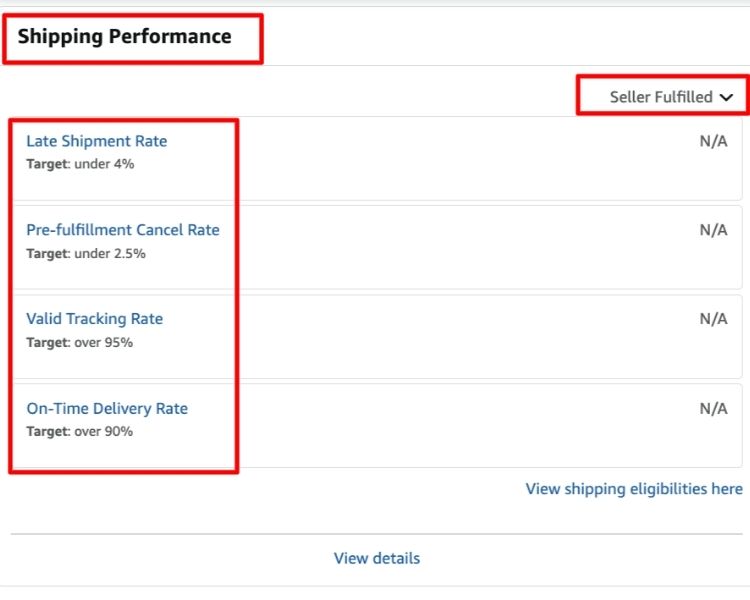
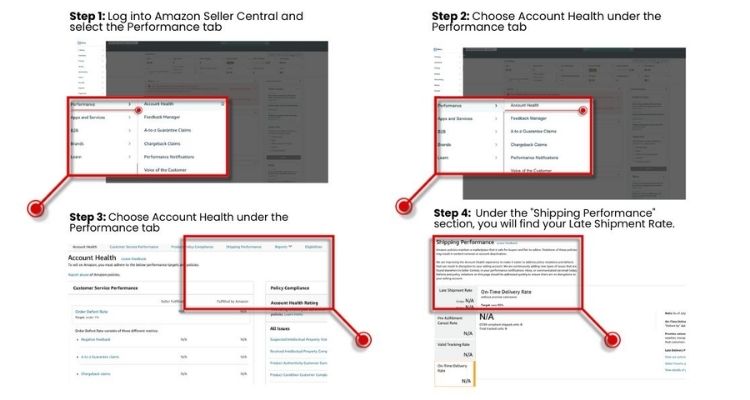
Tracking your LSR regularly helps you catch fulfillment issues before they escalate into account penalties. Sellers can access this metric directly inside Seller Central by following these steps:
- Log in to your Seller Central account and hover over the “Performance” tab in the top navigation bar.
- Select “Account Health” from the dropdown menu.
- Scroll to the “Shipping Performance” section to locate your current LSR.
- Review the 30-day trend and check whether your rate is approaching or exceeding the 4% threshold.
Beyond manual checks, sellers should set up proactive monitoring to avoid surprises:
- Enable alerts: Go to Settings, then select Notification Preferences to configure email or SMS notifications for performance updates, including LSR changes.
- Schedule regular audits: Check your LSR more frequently during peak seasons such as holidays, when fulfillment delays are more likely to occur.
- Analyze patterns: Break down your LSR by product type or region to identify specific bottlenecks and adjust your fulfillment strategy accordingly.
Common Causes Of A High Amazon Late Shipment Rate
A high LSR rarely stems from a single problem. In most cases, it results from internal workflow gaps that compound over time, such as missed confirmation deadlines, misaligned handling time settings, or systems that cannot keep pace with order volume.
External factors can also contribute, particularly during peak seasons when order surges expose weaknesses in fulfillment processes. The most common root causes include:
- Overselling across multiple channels: Selling on multiple platforms without synced inventory leads to orders that cannot be fulfilled on time.
- Incorrect handling time settings: If your listed handling time does not reflect your actual processing speed, late confirmations become inevitable.
- Slow or manual order processing: Teams that rely on manual workflows are more likely to experience confirmation delays, especially during high-volume periods.
- Real-time inventory gaps: Inventory that is not updated instantly can result in orders being accepted when stock is unavailable.
- Carrier delays: While Amazon does not track delivery time in LSR, carrier-related disruptions can still slow down the internal confirmation process.
How Fulfillment Method Affects LSR?
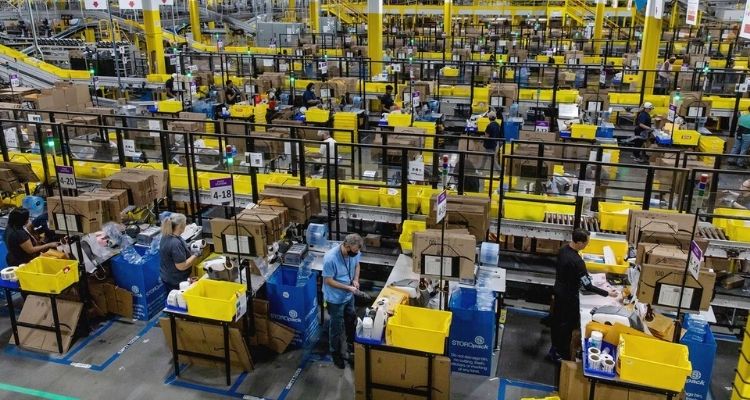
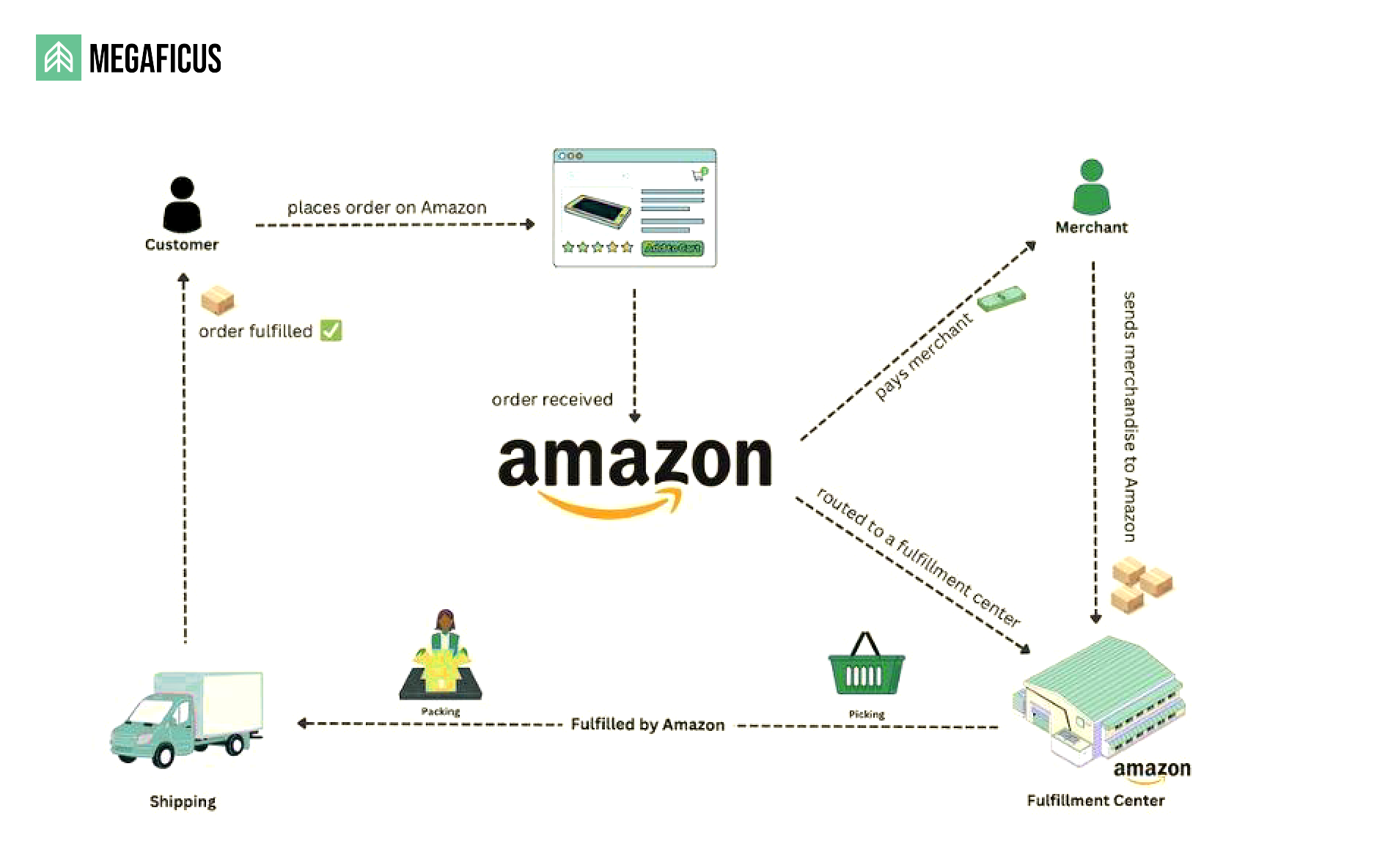
The fulfillment method a seller chooses directly determines whether their orders count toward LSR calculations. Understanding this distinction helps sellers manage their metrics more effectively and avoid unnecessary penalties.
- Seller-Fulfilled (MFN/FBM): All seller-fulfilled orders are included in LSR calculations. Sellers bear full responsibility for picking, packing, and confirming shipments on time, meaning any internal delay directly raises their LSR.
- Fulfillment by Amazon (FBA): FBA orders are excluded from LSR calculations since Amazon manages the entire shipping process, effectively protecting the seller’s score.
- Seller Flex: This program applies stricter LSR targets, with some cases requiring a rate as low as 0.08%, making consistent on-time confirmation even more critical.
- Third-Party Logistics (3PL): Outsourcing fulfillment to a 3PL can improve processing speed and reduce errors, but sellers remain accountable for their 3PL’s performance under Amazon’s policy.
How To Reduce And Manage Amazon’s Late Shipment Rate?
Fixing a high LSR is not about a single change. It requires tightening multiple parts of your fulfillment operation at once. The following steps address the most common root causes and give you a practical framework to bring your rate down and keep it there.
Set Realistic Handling Times For Orders
Handling time should reflect how long your operation actually takes to pick, pack, and hand off an order to the carrier. Setting it too short to appear competitive is a common mistake that leads to late confirmations when real-world delays occur.
Sellers should review and update their handling time under these circumstances:
- Higher than usual order volume: Processing slows down when order counts spike, so extending handling time during peak periods prevents late confirmations.
- Understaffed warehouse: If your team is reduced due to holidays or absences, adjust your handling time to match actual capacity.
- Longer processing workflows: If a product requires extra prep, kitting, or labeling, the handling time must account for that additional step.
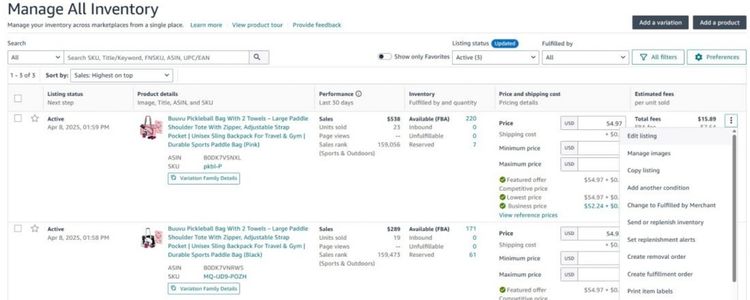
To update your handling time in Seller Central, go to Inventory, then select Manage Inventory, find the listing you want to edit, and update the handling time field accordingly. Sellers managing large catalogs can use bulk editing tools to update multiple listings at once.
As a general guideline, solo sellers or small operations should set a minimum of two business days, while larger warehouses with dedicated fulfillment teams can maintain a one-day handling time if their workflow consistently supports it.
Reviewing your handling time settings every 30 days ensures they stay aligned with your actual fulfillment performance.
Improve Inventory Accuracy To Prevent Delays
Inaccurate inventory is one of the most overlooked causes of late shipments. When stock levels in Seller Central do not match what is physically available, your team spends extra time locating items or pulling from the wrong location, which delays the entire fulfillment process.
To maintain accurate inventory, sellers should take the following steps:
- Update stock levels daily: Manually reconcile your physical inventory against Seller Central at the end of each business day, or use an inventory management tool such as Linnworks, Sellbrite, or RestockPro to sync stock levels automatically across all sales channels.
- Implement a SKU or barcode system: Assigning a unique SKU or barcode to each product reduces picking errors and speeds up the fulfillment process, especially in warehouses with high SKU counts.
- Monitor low-stock listings proactively: Use the Manage Inventory dashboard in Seller Central to track stock levels and set reorder alerts. If a product is running critically low, temporarily deactivate the FBM listing by going to Inventory, then Manage Inventory, selecting the listing, and changing the status to Inactive to prevent overselling.
- Audit multi-channel sync regularly: If you sell on multiple platforms, verify that your inventory management system updates all channels in real time to avoid accepting orders you cannot fulfill.
For example, if you sell the same product on Amazon and Shopify with a total stock of 20 units, and Shopify receives 15 orders before your inventory tool syncs, Amazon may still show 20 units available and accept orders you can no longer fulfill on time. A real-time sync tool eliminates this gap by updating both channels the moment a sale is recorded on either platform.

Strengthen Your Order Processing Workflow
A slow order processing workflow is one of the fastest ways to accumulate late confirmations. When orders sit unreviewed for hours, or your team lacks a clear fulfillment schedule, delays compound quickly, especially during high-volume periods.
Tighten your processing workflow with these practical steps:
- Check orders at fixed intervals throughout the day: Schedule three check-ins at set times, for example, at 8 AM, 12 PM, and 4 PM. This ensures no order sits unprocessed for more than a few hours before confirmation.
- Assign a dedicated fulfillment role: Designate at least one staff member specifically responsible for same-day order processing. Having a clear owner for this task prevents orders from being overlooked during busy periods.
- Pre-stage packaging materials: During peak seasons or high-demand periods, prepare boxes, labels, and packing materials in advance so your team can move from pick to ship without unnecessary stops.
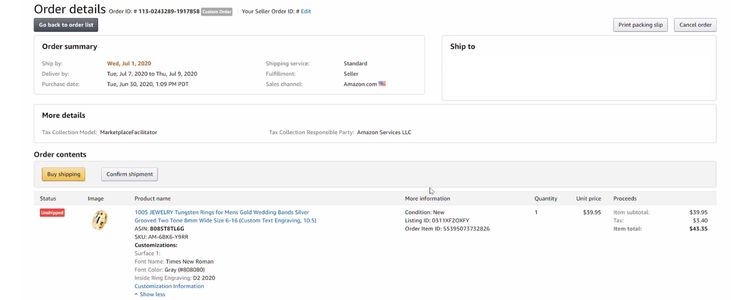
- Automate label printing: Tools like ShipStation, ShipBob, or Amazon’s Buy Shipping service allow you to generate and print shipping labels in bulk, cutting down the time between order confirmation and carrier handoff significantly.
For example, processing 50 orders per day manually can take 2 to 3 hours when labels are printed and confirmed one by one. Switching to a bulk label printing tool like ShipStation can reduce that same task to under 30 minutes, leaving enough buffer time to confirm all orders well within the handling time window.
Maintain Effective Communication With Buyers
While communication does not directly lower your LSR, it plays a critical role in protecting your account health. Keeping buyers informed during delays reduces the likelihood of negative feedback, A-to-Z claims, and order cancellations that could further impact your metrics.
Use these communication practices to manage buyer expectations effectively:
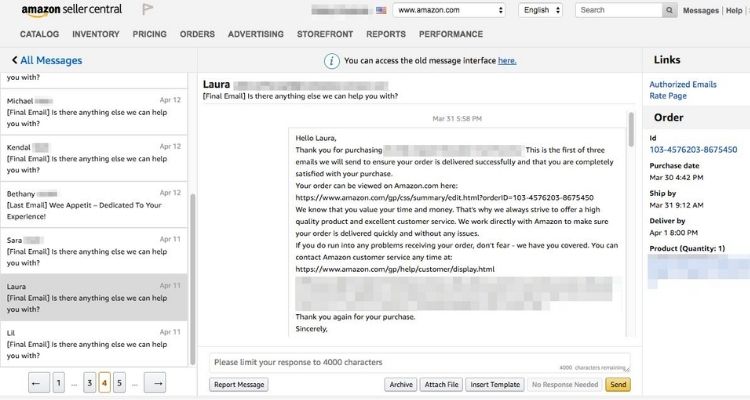
- Notify buyers proactively when a delay is expected: Use the Buyer-Seller Messaging system in Seller Central to send a brief update as soon as you identify a potential delay. A short message such as “Your order is being processed and will ship by [date]. We apologize for the short delay and appreciate your patience” is enough to prevent most complaints.
- Upload tracking information immediately after handoff: As soon as the carrier picks up the package, confirm the shipment and add the tracking number in Seller Central. This gives buyers visibility into their order status and reduces inbound inquiries.
- Respond to all buyer messages within 24 hours: Amazon tracks your response time and factors it into your Account Health metrics. Missing the 24-hour window, including weekends and holidays, can result in a policy violation on top of any existing LSR issues.
For example, when a ship date gets pushed back by one day, sending a proactive message before the buyer reaches out significantly reduces the chance of a negative review. Most buyers respond well to transparency, and a simple update is often enough to turn a frustrating experience into a neutral or even positive one.
What Happens When Your LSR Exceeds 4% and How to Recover?
When LSR crosses the 4% threshold, Amazon responds in two stages. First, a performance warning is issued through Seller Central, giving the seller a window to take corrective action. If the rate remains high or continues to climb, Amazon will deactivate seller-fulfilled offers entirely, cutting off the ability to fulfill orders independently.
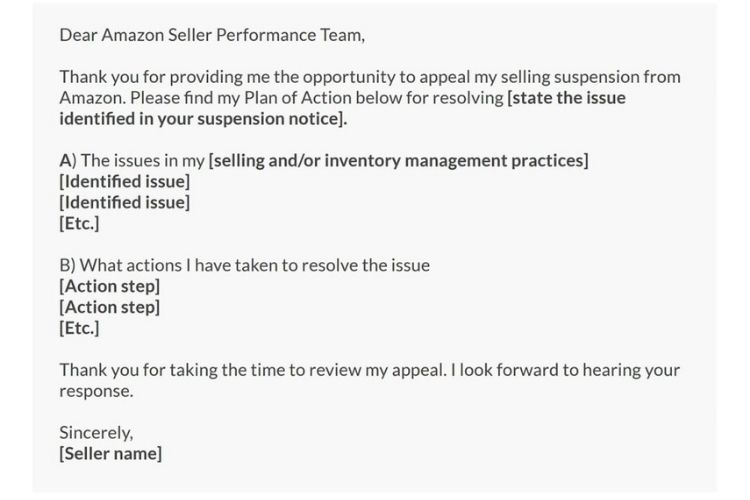
To recover from a deactivation, sellers must submit a Plan of Action (POA) through Seller Central following three key steps:
Review the suspension notice
Amazon sends a detailed notice explaining the specific reason for deactivation. Read it carefully and identify which metrics or incidents triggered the action, as this forms the foundation of your POA.
Draft your Plan of Action
A strong POA must cover three key areas:
- Cause: Explain what went wrong by citing specific incidents or operational gaps that caused the LSR to exceed Amazon’s threshold.
- Corrections: Describe the fixes already implemented, such as revised handling times, a new inventory system, a 3PL switch, or a shift to FBA.
- Prevention: Present a concrete long-term plan showing Amazon that the issue will not repeat, for example, through staff training, new automation tools, or a scheduled performance review process.
Submit and follow up
Send the POA through Seller Central and allow Amazon time to review. If approved, selling privileges are reinstated, and operations must continue as outlined in the plan. If rejected, Amazon will specify the reasons, and the POA should be revised and resubmitted, addressing each point of feedback directly.
>>> Read more: Amazon Valid Tracking Rate: Hidden Triggers That Hurt VTR
FAQs About Amazon’s Late Shipment Rate
Yes. LSR is one of the core metrics Amazon tracks under Shipping Performance in Account Health. A rate at or above 4% can trigger warnings and lead to the deactivation of seller-fulfilled offers.
Amazon requires LSR to stay below 4%, but keeping it under 1% is the recommended target for sellers who want to maintain strong account health and remain competitive for the Buy Box.
No. FBA orders are excluded from LSR calculations because Amazon handles the fulfillment process. Only seller-fulfilled (MFN/FBM) orders count toward this metric.
LSR updates on a rolling 30-day window. Once your rate drops and stays below 4%, the warning is lifted automatically. The timeline varies depending on your order volume.
Get Professional Help from Megaficus
Keeping your Amazon late shipment rate below 4% is not a one-time fix. It requires consistent attention to handling times, inventory accuracy, order processing workflows, and shipment confirmation habits. When these elements work together, LSR stays low, and your account remains in good standing with Amazon’s performance standards.
The sellers who maintain strong metrics long-term are those who treat LSR as an ongoing operational priority, not just a number to check when something goes wrong. Small, consistent improvements across your fulfillment process are what keep your account protected and your offers competitive.
If you need expert guidance to optimize your Amazon fulfillment strategy, improve seller performance metrics, or scale your operations without risking account health, the team at Megaficus is ready to help.